



Nmap stands as an essential tool for contemporary cybersecurity practices. The tool enables users to assess network systems with fast and efficient network assessments. The system displays all accessible ports together with the active applications and connected devices. Beginners prefer to study Nmap through its sequential learning method which allows them to complete their training without delays.
The beginner Nmap tutorial serves students and IT administrators and security learners. The program provides Nmap training through practical exercises which enable students to achieve their learning goals. The guide presents essential information which helps users to achieve their objectives.
The first 30-minutes of the training session will establish your fundamental understanding of Nmap network scanning. The program will teach you how to conduct scans and evaluate their results with complete assurance. You will begin your Nmap network scanning training through proper methods which will benefit your learning process.
1. What Is Nmap? (Quick Overview)
Nmap functions as a free open-source scanning software program which network administrators use to map their networks. The program detects all active devices and their respective ports and network services. The system creates the security processes which organizations use to protect their systems.
Nmap serves as a network discovery tool which professionals use to conduct network audits. The program serves as an Nmap learning tool which beginners can use to start their Nmap training. The software maintains its reputation as a dependable tool because it offers users dependable and adaptable features.
The Nmap tool maintains its usefulness in 2026 because it functions with current systems and protocols. The tool serves as an essential element in Nmap fundamental training program for cybersecurity professionals.
2. Installing Nmap (2 Minutes Setup)
Nmap installation process allows users to complete their tasks within a short time frame. First, Linux users can install it using default package managers. The official installer is available for Windows users. The macOS system allows users to perform installation through its simple methods.
The installation process requires users to verify software functionality through version command testing. The setup process achieves success when it produces correct results. You can start your Nmap practical tutorial after successful completion of these steps.
Nmap provides cross-platform functionality which enables beginners to practice their skills in any environment. The system enables Nmap training for beginners because it removes all training obstacles.
3. Understanding How Nmap Works
Nmap performs scans to discover hosts and their network ports and active services. A host is any device on a network. A port serves as an interface between two devices. Services operate on designated ports of a system.
Nmap utilizes both TCP and UDP scanning techniques. TCP scanning methods provide trustworthy results because they achieve high accuracy. The UDP scanning method allows users to discover hidden systems. Users must learn both concepts because they hold equal significance.
Nmap determines port status through its packet transmission and response analysis process. The knowledge about Nmap operations serves as the foundation for users to efficiently operate the Nmap tool.
4. Essential Nmap Commands You Must Know
Every beginner should start with basic commands. The simplest scan checks common ports. The system delivers instantaneous information through this process.
Nmap enables users to conduct scans across multiple hosts while selecting particular ports. Nmap users can select between two scanning modes which are fast and full scans. The Nmap system offers beginning users two scanning options which they can use to create powerful results.
Results storage enables users to conduct analysis work and create reports. The section establishes the fundamental concepts needed to understand basic Nmap tutorials.
5. Port Scanning with Nmap (Hands-On)
The primary function of Nmap exists to perform port scanning. Services operate through open ports. Closed ports mean nothing is listening. Filtered ports indicate firewalls.
Common ports reveal web servers, remote access, and databases. The Nmap port scanning guide enables users to discover potential security threats at an early stage.
Nmap displays scan results through its clear output system. The output system shows Nmap results according to different port states. The tutorial provides an easy to understand path for beginners who want to learn Nmap scanning.
6. Service and Version Detection
Nmap detects active services through its open port scanning capability. The system detects running services and their respective version numbers. The system helps users discover software which has become outdated and vulnerable to security threats.
Security professionals need to understand the different software versions that exist in their systems. The security team uses the system for their maintenance and auditing processes. The system provides essential service detection capabilities which every Nmap practical tutorial needs to include.
Security teams rely on this feature. The tutorial represents an essential element for learning Nmap fundamental concepts.
7. Operating System Detection (Quick Win)
The testing results for operating system detection showed that Nmap could identify the target operating system through its network behavior analysis. The system uses network traffic data to produce scan results which enhance the overall understanding of the system.
The operating system information enables risk assessment which helps organizations to determine their security priorities. The detection of operating systems through scanning processes directly enhances the accuracy of scan results. The system retains usefulness because it maintains an operational state.
The Nmap program demonstrates its capabilities through this function which enables users to understand practical applications in actual situations.
8. Using Nmap Scripts (NSE Basics)
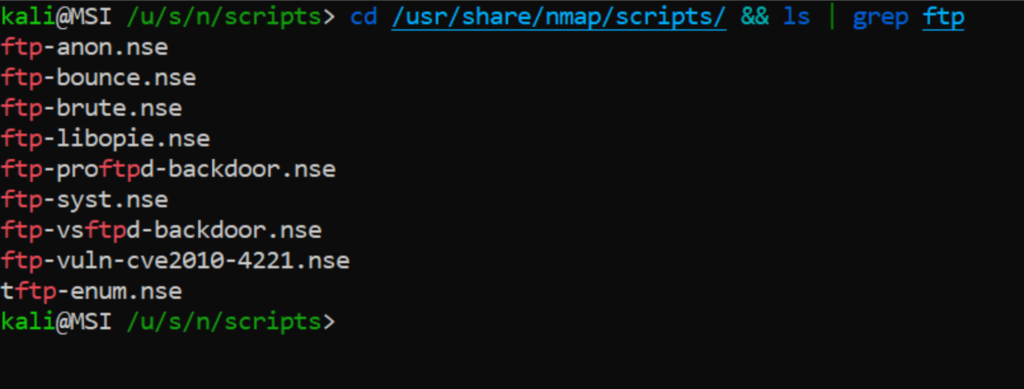
Nmap Scripting Engine provides automatic task execution through its default scan functions which complete predefined checks. The system enables users to complete security assessments with its built-in security scripts and beginner scripts which identify configuration problems. NSE training material for Nmap beginners receives enhancement through its implementation.
The security systems of today require automatic processes to function properly. The introduction of NSE during the initial learning phase provides students with crucial advantages.
The actual scanning procedure begins with the process of locating active hosts on the network. Your first task involves detecting operational machines on the network. Your next task requires you to examine network ports and associated services.
9. Real-World Nmap Scan Example
The Nmap network discovery tutorial reveals hidden network devices which assist users in discovering active network systems. The system enables users to find accessible network services.
The Nmap scan examples demonstrate Nmap capabilities through its deployment in actual network environments. The result provides students with actual experience of acquiring knowledge.
The following list shows common errors which beginners need to avoid.
10. Common Beginner Mistakes to Avoid
Unauthorized scanning of systems creates dangerous situations for users. The scanning process requires permission from system owners to proceed. Unauthorized scanning activities result in potential legal complications.
Beginners make the common mistake of incorrectly interpreting results. The system generates security warnings when users perform aggressive scanning activities. Beginners need to practice scanning through the system because they should approach their learning process with caution.
The foundation of Nmap training for beginners gets strengthened through these mistakes because they provide essential knowledge for system operation. The foundation of Nmap training for beginners gets strengthened through these mistakes because they provide essential knowledge for system operation.
11. Is Nmap Legal and Ethical to Use?
The Nmap tool exists as a legal software, but its users must obtain permission before performing scans. The situation requires analysis of its specific details.
The ethical application of technology supports both defensive actions and educational purposes. You can safely examine your own networks through testing procedures.
Responsible behavior enables users to acquire knowledge and develop professional skills throughout their entire existence.
12. What to Learn Next After This 30-Minute Guide
The 30-Minute Guide leads to advanced scanning techniques which users should learn after they complete basic scanning. The study should include learning about timing methods and performance capabilities.
The next step requires integrating Nmap with security assessment software. The learning process requires users to complete lab exercises.
This path transforms Nmap into an essential ability which users must develop for their professional development.
13. Conclusion: Scan Networks Like a Pro
Nmap offers users three advantages because it operates with speed and strength yet remains simple for newcomers to use. The system produces immediate benefits for users.
The scanning fundamentals become understandable within a 30-minute time frame. The process of continuous practice leads to improved skills.
The final tip requires users to achieve results comprehension. The reason for this relationship exists because people value understanding more than they value speed.
Still Have Questions?
1. Is this a complete Nmap tutorial for beginners?
Yes. This guide covers scanning basics, commands, examples, and safety, making it ideal for beginners.
2. Can I learn Nmap step by step without experience?
Yes. The guide presents information through clear explanations which follow a structured path for users to learn.
3. What is the best way to learn Nmap fast?
The user needs to learn basic commands and perform regular scans while they check their results.
4. Does this guide include Nmap practical examples?
Yes. The document provides real-world scanning examples together with easy-to-understand explanations that beginners can follow.
5. Is Nmap useful for cybersecurity careers?
Absolutely. Nmap serves as a fundamental ability that cybersecurity professionals and network administrators need to master.

