



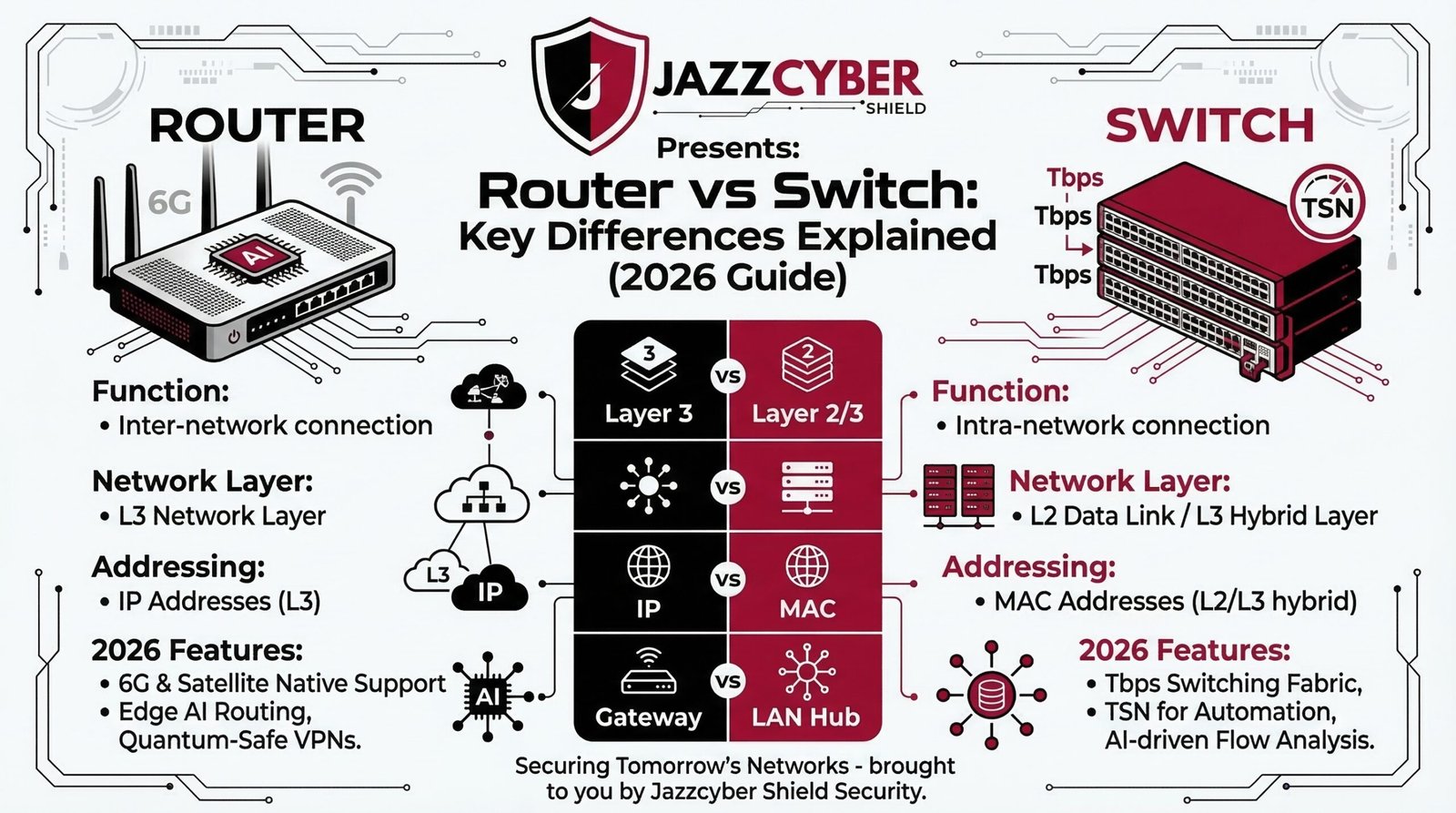
Understanding the difference between a router and a switch is one of the most important networking fundamentals you need to know. Whether you’re setting up a home office, upgrading a small business, or designing an enterprise infrastructure, choosing the wrong device can directly cost you in speed, security, and scalability.
In this 2026 guide, we break down exactly how routers vs switches work, what makes each device unique, and which one your network actually needs — including advanced topics like PoE, VLANs, Layer 3 switching, and real-world setup scenarios.
What Is a Router?
A router is a Layer 3 networking device that connects multiple networks together — most commonly, your Local Area Network (LAN) to the internet (WAN). Think of it as the traffic controller at the entrance to your building: every data packet entering or leaving your network passes through it.
Modern routers assign IP addresses using DHCP, perform Network Address Translation (NAT) to let multiple devices share a single public IP, and include built-in firewall protection. In 2026, routers from brands like TP-Link, ASUS, and Netgear now support Wi-Fi 7 — delivering speeds exceeding 40 Gbps in ideal conditions.
You can shop routers for home and business directly in our store, including the latest Wi-Fi 6E and Wi-Fi 7 models.
If you want a deeper breakdown of all router types and how to pick the right one, read our complete guide on what is a router and how it works.
Many people also confuse routers with modems. If that applies to you, first read our quick explainer on router vs modem vs switch — what each device actually does before continuing.
Key Features of a Router
- Connects your LAN to the internet (WAN gateway function)
- Assigns IP addresses dynamically (built-in DHCP server)
- Performs NAT — multiple devices share one public IP address
- Built-in firewall and optional VPN tunnel support
- Wi-Fi support — Wi-Fi 6, Wi-Fi 6E, and Wi-Fi 7 on 2026 models
- Routes traffic intelligently between multiple different networks
- QoS (Quality of Service) for prioritizing bandwidth by device or application
Important: A router alone cannot expand your wired port count beyond its built-in ports (usually 4). For networks with many wired devices, you need a router + switch combination — and adding network firewalls for added security is strongly recommended for any business environment.
What Is a Network Switch?
A network switch connects multiple devices within the same Local Area Network (LAN). Unlike a router, a switch does not connect to the internet directly — it works behind your router to expand the internal network. It forwards data using MAC addresses, ensuring each packet reaches exactly the right device rather than broadcasting to every device the way older hubs did.
Switches come in port counts ranging from 5 to 48+ ports, and in both unmanaged and managed configurations. Modern switches also support Power over Ethernet (PoE), which delivers electrical power to connected devices — such as IP cameras and wireless access points — over the same cable as data.
Shop managed network switches — including Cisco, HPE Aruba, and TP-Link models available for home, SMB, and enterprise environments.
For a complete beginner-friendly explanation, read our dedicated guide on what is a network switch and how it works.
Key Features of a Network Switch
- Connects all wired devices within one Local Area Network
- Forwards traffic using MAC address tables (no broadcast waste)
- Provides 5 to 48+ Gigabit Ethernet ports
- Available in Unmanaged (plug-and-play) and Managed (full control) versions
- PoE and PoE+ support for powering IP cameras, phones, and access points
- VLAN support for network segmentation on managed models
- Port mirroring and traffic monitoring on advanced enterprise models
Router vs Switch: Key Differences — Full Comparison Table
| Feature | Router | Network Switch |
|---|---|---|
| Primary Function | Connects multiple networks to internet | Connects devices within one LAN |
| OSI Layer | Layer 3 (Network Layer) | Layer 2 or Layer 3 |
| Internet Access | Yes — gateway function | No — requires a router |
| Addressing Method | IP addresses (IPv4/IPv6) | MAC addresses |
| DHCP Server | Yes | No |
| NAT Support | Yes | No |
| VLAN Support | Limited | Yes (Managed Switch) |
| PoE Support | Rare | Yes (PoE/PoE+ models) |
| Wi-Fi Support | Yes | No |
| Firewall Features | Basic built-in | No — requires separate firewall |
| Best For | Internet gateway — home, SMB, enterprise | Expanding LAN, wired device connectivity |
Network Switch vs Router: Understanding OSI Layers
One of the most technically significant aspects of the network switch vs router comparison is where each device operates in the OSI model.
Routers operate at Layer 3 (the Network Layer) — they understand IP addresses and make forwarding decisions based on routing tables. This allows a router to connect your private LAN to the public internet and direct traffic between entirely different networks.
Standard switches operate at Layer 2 (the Data Link Layer) — they use MAC addresses to forward traffic within a single LAN. Every device connected to the same switch can communicate locally without involving the router at all.
Layer 3 switches can perform routing functions similar to a router, making them ideal for large office networks, VLAN routing, and inter-departmental communication. For enterprise deployments, read our dedicated article on Layer 2 vs Layer 3 switch — which one your business network needs.
Ethernet Switch vs Router: Which Handles Wired Traffic Better?
When comparing an ethernet switch vs router for wired performance, the answer depends on what kind of traffic you’re discussing.
A router manages all traffic entering and leaving your network — but it creates a bottleneck when dozens of devices need simultaneous high-speed local communication. A dedicated ethernet switch removes that internal bottleneck by handling device-to-device communication at full wire speed (1Gbps, 2.5Gbps, or 10Gbps), without involving the router at all.
In practice, the best-performing wired networks always use both. The router handles internet gateway duties; the switch handles all internal wired traffic. This combination delivers maximum throughput for both local file transfers and internet access simultaneously.
For most small offices, a 24-port Gigabit managed switch paired with a business-grade router provides the ideal balance of performance, control, and scalability.
Managed Switch vs Router: What Is the Difference?
The managed switch vs router question comes up often in business networking, and the answer is that these devices are complementary — not alternatives.
A managed switch gives you full control over your internal LAN: VLAN segmentation, QoS traffic prioritization, port security, SNMP monitoring, and link aggregation. It does not connect to the internet or assign IP addresses.
A router controls the gateway between your private network and the public internet. It assigns IPs, performs NAT, and manages external traffic routing. It does not give you granular control over internal LAN traffic by port.
In medium to large business environments, you always need both: a managed switch for internal network control, and a router for external connectivity.
Browse Cisco network switches for business and HPE Aruba managed switches — two of the most trusted enterprise networking brands available in our store.
Managed vs Unmanaged Switches Explained
Unmanaged Switches
- Plug-and-play — zero configuration required
- Fixed settings — no remote access or monitoring capability
- Budget-friendly — ideal for home users and simple small offices
- No VLAN, QoS, or port security features
Best for: Home networks, small offices with fewer than 10 devices, non-critical setups where simplicity matters more than control.
Managed Switches
- Full VLAN configuration for isolating network traffic
- QoS for prioritizing VoIP, video, or critical applications
- Port security and Access Control Lists (ACLs)
- SNMP-based monitoring and remote management via web interface
- Spanning Tree Protocol (STP) to prevent network loops
- Link Aggregation (LACP) to bond multiple ports for increased bandwidth
Best for: Small-to-medium businesses, enterprises, schools, hospitals, data centers, and any environment where security, uptime, and control matter.
Still unsure which type fits your setup? Our full breakdown of managed vs unmanaged switch differences covers every use case with real examples.
Learn exactly how to segment your network by reading our beginner guide on what is a VLAN and how to set one up on a managed switch.
Layer 2 vs Layer 3 Switch: The 2026 Reality
Not all switches are equal. Understanding the difference between Layer 2 and Layer 3 switches is essential for designing scalable networks.
Layer 2 Switch — operates at the Data Link layer. Forwards frames using MAC addresses only. Suitable for simple flat LANs with no routing requirements. Most home and small office switches are Layer 2.
Layer 3 Switch — performs both switching AND routing. Handles inter-VLAN routing at wire speed, dramatically reducing latency compared to sending traffic through a dedicated router. Ideal for enterprise campus networks, data centers, and any environment using multiple VLANs.
Enterprise Layer 3 switches from Cisco, HPE Aruba, and Juniper can handle millions of routing decisions per second — making them a cost-effective alternative to deploying separate routers for internal network traffic.
Power over Ethernet (PoE) — Why It Matters in 2026
A PoE switch delivers both data and electrical power over a single Ethernet cable, eliminating the need for separate power adapters at each connected device. In 2026, PoE has become a standard requirement for any network deploying IP cameras, VoIP phones, or wireless access points.
- PoE (802.3af): Up to 15.4W per port — suitable for basic IP cameras and VoIP phones
- PoE+ (802.3at): Up to 30W per port — suitable for PTZ cameras and dual-band access points
- PoE++ (802.3bt): Up to 90W per port — suitable for digital signage, advanced cameras, and thin clients
Before buying a PoE switch, read our full comparison of PoE vs PoE+ vs PoE++ — which standard does your device need before making a purchasing decision.
Note: Standard routers do not provide PoE output. If you need to power devices over Ethernet, always use a dedicated PoE switch.
When Should You Choose a Router?
- Your network needs internet access — a router is the essential gateway
- You want wireless Wi-Fi access for mobile devices
- You need VPN support for remote workers or site-to-site connectivity
- You need to control and route traffic between multiple networks
- You want basic firewall protection at the network perimeter
When Should You Choose a Network Switch?
- You need more wired Ethernet ports than your router provides
- Local devices need to communicate at high speed without bottlenecking the router
- You need VLAN segmentation to isolate departments, IoT devices, or guest users
- You need PoE to power IP cameras, phones, or wireless access points
- You’re expanding an existing network without replacing the router
Real-World Network Setup Scenarios
Home or Small Office (1–10 Devices)
- 1 × Business-grade router with Wi-Fi 6 or Wi-Fi 7
- 1 × Unmanaged or basic managed 8-port Gigabit switch
- Result: Full internet access + all wired devices connected
Growing Business (10–50 Devices)
- 1 × Dedicated router (with optional firewall appliance)
- 1–2 × Managed 24-port Gigabit switches
- Optional: PoE switch for IP cameras and wireless access points
- Optional: VLAN configuration to separate guest, staff, and IoT networks
Not sure how to physically connect these devices together? Follow our step-by-step guide on how to connect a router and switch for your exact setup.
Enterprise Network (50+ Devices)
- Core Layer 3 switch for inter-VLAN routing
- Multiple access-layer switches per floor or zone
- Dedicated enterprise router or SD-WAN appliance
- Separate firewall/UTM appliance (Fortinet, SonicWall, or WatchGuard)
For full guidance on enterprise setups, explore our complete home network setup guide and browse HPE Aruba managed switches for campus-grade deployments.
2026 Buying Checklist: Router or Switch?
Before purchasing, ask yourself these six questions:
- Do I need internet access? → Yes = you need a router
- Do I need more than 4 wired ports? → Yes = you need a switch
- Do devices need to communicate locally at high speed? → Yes = dedicated switch
- Do I need to power devices over cable? → Yes = PoE or PoE+ switch
- Do I need network segmentation or traffic monitoring? → Yes = managed switch
- Do I need wireless access? → Yes = router with Wi-Fi or a separate access point
For a deeper purchasing decision guide, read our full article on how to choose the right network switch for your business.
Frequently Asked Questions
What is the main difference between a router and a switch?
A router connects your local network to the internet and routes traffic between different networks using IP addresses. A switch connects multiple devices within the same local network and forwards traffic using MAC addresses. Routers operate at OSI Layer 3; switches typically operate at Layer 2 (or Layer 3 for advanced enterprise models).
Can a switch work without a router?
Yes — a switch can connect devices within the same local network without a router. However, those devices will have no internet access unless a router is also present. In isolated environments like local file servers or internal setups, a switch alone is sufficient.
Is a router better than a switch for a home network?
They serve entirely different purposes. A router is essential for internet access and Wi-Fi. A switch is essential when you need more wired ports or faster local communication. Most home networks benefit from both — a router as the internet gateway, and a switch to expand wired device capacity.
Can an ethernet switch replace a router?
No. An ethernet switch has no WAN interface, no DHCP server, no NAT capability, and no routing function for connecting to the internet. The only partial exception is a Layer 3 switch, which can route traffic between VLANs internally — but even Layer 3 switches still require a router for internet access.
What is the difference between a router, switch, and hub?
A hub broadcasts all incoming traffic to every connected device — inefficient and insecure, now obsolete. A switch forwards traffic only to the specific destination device using MAC addresses — faster, more secure, and far more efficient. A router routes traffic between different networks using IP addresses, including managing your internet connection. Hubs should not be used in any modern network in 2026.
What is a router vs switch vs firewall?
A router connects your network to the internet. A switch connects devices within your network. A firewall monitors and filters all incoming and outgoing traffic based on security rules — blocking threats before they reach your internal devices. In a properly secured network, all three work together. To understand firewalls in depth, read our comparison of hardware firewall vs software firewall for business networks.
Conclusion: Router vs Switch — The Final Verdict
The difference between a router and a switch comes down to purpose: a router connects your network to the internet, while a switch connects devices within your network. In almost every real-world deployment — from home offices to enterprise campuses — you need both working together.
A router alone gives you internet access but severely limits your wired port count and local network performance. A switch alone gives you excellent internal connectivity but zero internet access. Together, they form the backbone of any reliable, scalable, and secure network infrastructure.
Ready to build or upgrade your network? Explore our full range of managed network switches, routers for home and business, and network firewalls for added security — all available at Jazz Cyber Shield with expert support.


Loving Jazz Cyber Shield’s products! They describe everything about routers and switches so clearly—it made choosing the right one super easy. Great job!
Jazz Cyber Shield routers are the best! Affordable, reliable, and perfect for my needs. Highly recommend!
Just upgraded my home network with a new router and switch, and the difference is amazing Love Jazz Cyber Shield’s routers and switches! They’ve made my network faster and more reliable. Highly recommend!
Excellent read!
Loved this post!
Very informative article!
Great article! 🚀 The difference between a router and a switch is often misunderstood, but this post explains it clearly. A router connects networks and manages internet traffic, while a switch efficiently directs data within a network. Businesses and home users alike can benefit from understanding these distinctions to optimize their network setup. Adding real-world use cases or performance comparisons between modern routers and managed switches could make this even more insightful. Keep up the great work, Jazz Cyber Shield!
Routers are essential devices in modern networking, allowing multiple devices to connect to the internet or a local network. They manage traffic between devices and ensure smooth communication. With advanced features like Wi-Fi, security protocols, and support for high-speed connections, routers play a critical role in maintaining a stable and secure network environment.
Brilliant breakdown of a tricky topic. Your comparison made it so easy to understand which device is needed in different situations.
Your detailed comparison made the decision much easier.
Fantastic explanation! I’ve read many articles on routers and switches, but yours was the clearest by far. The real-world examples made the differences easy to understand.
Before upgrading my home office network, I was completely in the dark about the difference between a router and a network switch. I thought they were interchangeable—but after doing some research and speaking with the helpful support team at Jazz Cyber Shield, I realized how crucial it is to use the right tool for the right job.
Your comparison laid everything out perfectly.
Excellent writing! You broke down the router vs. switch debate in such a simple and practical way. This article is perfect for anyone trying to get started with networking.
I always found networking terms confusing, but your blog made it so easy to understand the roles of routers and switches. Thanks to your guide, I finally set up my home office with the right devices—and everything runs smoothly now!