




You’ve been there before. You walk into a coffee shop, an airport lounge, or a hotel lobby. You pull out your phone, spot the familiar “FREE_WiFi” network, and connect without a second thought. It feels harmless. It feels normal. Millions of people do it every single day.
But here’s the truth nobody is talking about loudly enough: in 2026, that single tap could cost you your banking credentials, your company’s client data, or months of private conversations — and you wouldn’t even know it was happening.
The dangers of public WiFi in 2026 are not the same as they were five years ago. Hackers have gotten smarter, faster, and far more automated. The tools they use are cheaper than ever, and the payoff for them keeps growing as we carry more sensitive information on our devices. If you’re connecting to public networks without protection, you’re essentially leaving your front door wide open and hoping nobody walks in.
This guide breaks down exactly what happens beneath the surface when you join a public network, which attacks are trending right now in 2026, and — most importantly — the practical steps you can take today to stay completely protected, whether you’re an individual or a business owner.
Why Public WiFi Is More Dangerous in 2026 Than Ever Before
Public WiFi has been around for decades. So why are we only now treating it like a genuine emergency? The answer comes down to three major shifts that have happened quietly over the last few years.
First, AI-powered attack tools are now affordable and widely available. A hacker no longer needs years of technical expertise to intercept traffic on an open network. Automated tools — many of them freely downloadable from forums — can capture, decrypt, and analyze network packets in real time. What once required a sophisticated criminal operation now takes a motivated person with a $50 USB adapter and a YouTube tutorial.
Second, we carry more sensitive data than ever before. Your smartphone in 2026 contains your banking apps, work emails, health records, saved passwords, cloud storage access, and in many cases, your employer’s most confidential files. A single successful interception doesn’t just expose one account — it can cascade into a full identity theft scenario within hours.
Third, attackers now use AI to analyze stolen data instantly. Old-school hackers would dump captured data and sort through it manually over days or weeks. Today, automated systems can identify high-value credentials and begin exploiting them before you’ve even finished your drink. Speed is the new weapon, and attackers are using it ruthlessly.
To understand how serious this threat is across the board, take a look at the top 5 cybersecurity threats businesses face in 2026 — many of them trace their origins directly back to unsecured network entry points like public WiFi.
The 6 Real Dangers of Public WiFi You Need to Know
1. Man-in-the-Middle (MitM) Attacks
This is the classic — and still the most common — public WiFi attack, and it’s exactly as sinister as it sounds. Here’s what happens: you connect to a WiFi network and believe you’re talking directly to your bank’s website or your email provider. In reality, a hacker sitting nearby has inserted themselves invisibly between you and the internet. They see everything. Every username, Every password, Every message you send or receive.
In 2026, MitM attacks have evolved well beyond simple packet sniffing. Attackers now use a technique called SSL stripping — which forces your browser to communicate over HTTP instead of HTTPS. This strips away the encryption layer you rely on to feel safe online. Even sites that look secure, with the padlock icon sitting right there in your browser bar, can be compromised if a sophisticated attacker intercepts the connection handshake before encryption is fully established.
2. Evil Twin Networks
Imagine walking into a hotel and connecting to a network called “Marriott_Guest_WiFi.” Everything looks normal. Now imagine a hacker sitting in the lobby has set up their own hotspot with that exact same name. Your device — especially if it’s configured to auto-connect — will simply join whichever signal is stronger. That network is owned entirely by the attacker. Every website you visit, every credential you enter, every file you download flows through their device first.
Evil twin attacks are particularly dangerous because they require zero interaction from the victim. Your phone does the work for the attacker the moment it comes within range. In 2026, these fake networks are increasingly being set up in airports, hospitals, convention centers, and business hotels — precisely where people are carrying the most sensitive data and are most likely to need a quick internet connection.
3. Packet Sniffing
When you connect to an unencrypted network, your data travels as plaintext through the air. Anyone sitting on the same network can run freely available software that captures every data packet flowing around them. This is packet sniffing, and while the name sounds technical, the tools required to do it are completely free and require almost no skill to operate.
The most unsettling part is that packet sniffing is completely invisible to the victim. There’s no warning notification. No slowdown in your connection speed. No sign whatsoever that anything unusual is happening. You’d walk away from that café having no idea that someone just captured a copy of everything you did online.
4. Session Hijacking
When you log into a website, your browser receives a small piece of data called a session cookie. This cookie essentially tells the website “yes, this is the same person who just authenticated — keep them logged in.” If an attacker captures your session cookie while you’re on a public network, they can impersonate you on that site entirely — without ever needing your password. They just load the stolen cookie into their browser and they’re in, looking exactly like you.
This type of attack is particularly common on social media platforms, older web-based business applications, and any site that doesn’t properly enforce HTTPS across all pages.
5. Malware Injection
Some attackers take a more aggressive approach altogether. Instead of watching your traffic, they inject malicious code directly into the web pages you’re loading. You might visit a completely legitimate news site or a well-known retail store, but what your browser actually loads has been quietly modified in transit. A single click on a compromised link or button can download malware, ransomware, or spyware to your device — all while you’re just reading the headlines over a cup of coffee.
6. Rogue Access Points in Business Networks
This final danger targets companies specifically, and it’s one that most small business owners aren’t aware of until it’s too late. A rogue access point is an unauthorized WiFi router that someone has physically connected to a business’s internal network — sometimes planted by an insider threat, sometimes smuggled in by a visiting contractor or customer. Once it’s active, it gives attackers a backdoor into the entire corporate network, bypassing every software firewall and security tool the company has invested in.
This is precisely why businesses in 2026 need more than just a password-protected guest WiFi. They need hardware-level network monitoring that can detect unauthorized devices the moment they appear.
Who Is Most at Risk? (It Might Surprise You)
Most people assume hackers only go after executives, celebrities, or large corporations. That assumption is exactly what attackers count on. In reality, the people most exposed to public WiFi dangers in 2026 include everyday professionals and individuals across every industry.
Remote workers and freelancers who rely on café and co-working space networks daily are among the highest-risk groups — they’re often handling client contracts, invoices, and sensitive communications on networks they have zero control over. Small business owners accessing financial accounts or cloud systems from hotels and airports are equally vulnerable. Travelers are at constant risk, particularly those who move through multiple countries and connect to dozens of different networks in a single trip.
Students using campus and library networks face unpredictable security configurations that vary wildly from one institution to the next. Healthcare workers accessing patient portals through hospital guest WiFi expose themselves — and potentially their patients — to serious data risks. And honestly, anyone who uses online banking or enters payment details on a shared network is at risk, full stop.
If you’ve ever noticed unusual account activity after a trip, it’s worth reviewing the top 10 signs your network has been hacked — because breaches that originate from public WiFi exposure often go undetected for weeks or even months.
How to Stay Safe on Public WiFi in 2026: 9 Proven Steps
Here’s the good news: protecting yourself on public WiFi is genuinely not complicated. It requires the right habits and — for businesses — the right hardware. Let’s walk through both.
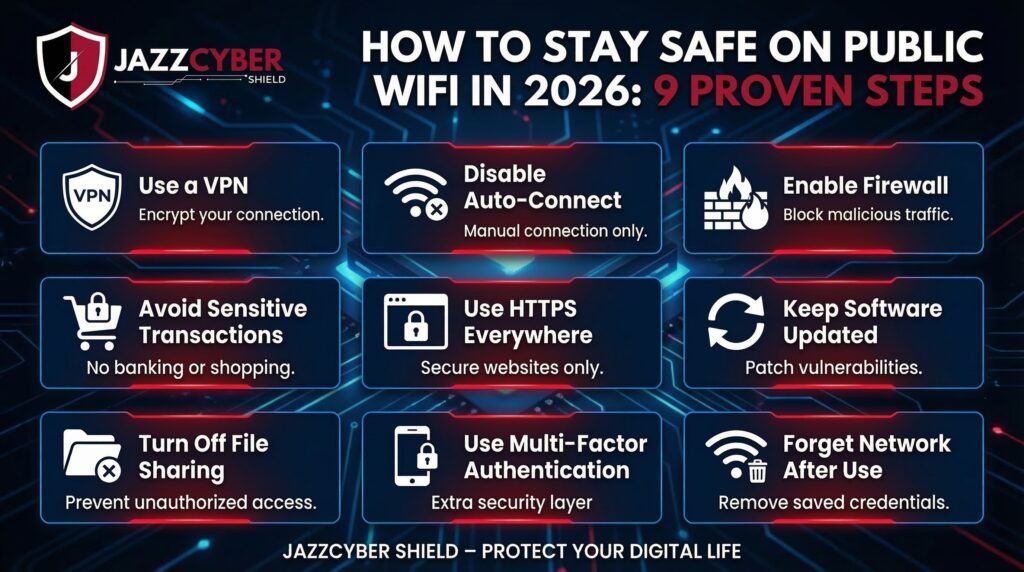
Step 1: Always Use a VPN — Always, Not Sometimes
A Virtual Private Network encrypts all your internet traffic before it leaves your device. Even if an attacker intercepts your data on a public network, they receive nothing but scrambled data they can’t read or use. In 2026, using a VPN on public WiFi is not optional — it is the absolute minimum standard of protection.
But not all VPNs are created equal, and this is where a lot of people make a costly mistake. Before you download the first free option that appears in your app store, read the honest breakdown of free VPN vs paid VPN — the real differences they don’t tell you. Some free VPNs actually sell your browsing data to third-party advertisers, which is arguably worse than using no VPN at all. Look for a paid VPN with a verified no-logs policy, a kill switch, DNS leak protection, and AES-256 encryption as a baseline.
Step 2: Turn Off Auto-Connect Right Now
Your device quietly maintains a list of every network it has ever connected to. By default, many phones and laptops will automatically rejoin any network whose name matches one in that saved list. This is the exact mechanism evil twin attacks exploit. Go into your WiFi settings today and disable the auto-connect or “auto-join” feature for every public network you don’t personally control.
Step 3: Stick to HTTPS — And Verify It Manually
Before you type any credentials on a website, confirm the URL begins with https:// and that the padlock icon is genuinely present in the address bar. Most modern browsers will flag non-HTTPS sites, but don’t rely on that warning as your only checkpoint — some MitM tools can spoof the padlock appearance in certain browser configurations. When in doubt, don’t enter anything sensitive.
Step 4: Enable Two-Factor Authentication on Every Account That Matters
Even if an attacker successfully captures your password through packet sniffing or a MitM attack, 2FA creates a second wall they can’t get through without physical access to your device. Use an authenticator app rather than SMS-based codes wherever possible — SIM swapping attacks can intercept text messages, making app-based 2FA significantly more secure. Google Authenticator, Authy, and Microsoft Authenticator are all reliable choices.
Step 5: Forget Public Networks After Every Use
This takes about five seconds and provides lasting protection. Every time you disconnect from a public network, go to your WiFi settings and select “Forget this network.” It removes the network from your trusted list and prevents your device from ever auto-joining it in the future — permanently eliminating the evil twin attack vector for that location.
Step 6: Avoid Sensitive Transactions on Public WiFi, Period
This sounds obvious until you’re late for a flight and need to quickly transfer money, or you’re in a meeting abroad and someone needs a document from your company system. Set a personal rule: no banking, no entering card details, no accessing company systems on any public network. Save those tasks for trusted, private connections. The few minutes of inconvenience are worth it every single time.
Step 7: Use Your Phone’s Hotspot Instead
If you need secure internet access on the go and a VPN isn’t an option, use your smartphone’s personal hotspot. Mobile data connections — especially over 5G — are significantly more secure than open public WiFi because the traffic is encrypted at the carrier level and you’re the only user on that connection. The trade-off is data usage, but for brief sensitive tasks, it’s the right call without question.
Step 8: Keep Every Device Updated
Many of the vulnerabilities that attackers exploit on public networks target unpatched operating systems, outdated browsers, and apps that haven’t been updated in months. Every security update you receive patches known weaknesses that attackers are actively exploiting. Enable automatic updates on your operating system, browser, and all applications — especially anything that touches financial or health data.
Step 9: Use a Hardware Firewall for Business Protection
For businesses with employees who work remotely, travel frequently, or operate from multiple locations, software protection alone has real limits. A hardware firewall monitors all network traffic at the device level and blocks suspicious activity before it ever reaches your systems. Modern firewalls use deep packet inspection and AI-driven threat intelligence to catch attacks that traditional antivirus software completely misses.
At Jazz Cyber Shield, we carry a full range of enterprise-grade firewall solutions designed for businesses of every size — from the Fortinet FortiGate firewall series for enterprise-level protection, to the SonicWall business firewall lineup that delivers powerful security without the enterprise price tag. If you’re serious about protecting your team’s data whether they’re in the office or working from a hotel room in Chicago, hardware is where that protection starts.
What Businesses Offering Public WiFi Need to Know
If your business provides WiFi to customers, guests, or visitors, you carry a responsibility that goes beyond protecting your own data. A poorly configured guest network can become a launchpad for attacks against other users — and in the worst case, a direct path into your internal business systems.
Here’s what every business offering public WiFi should have in place in 2026.
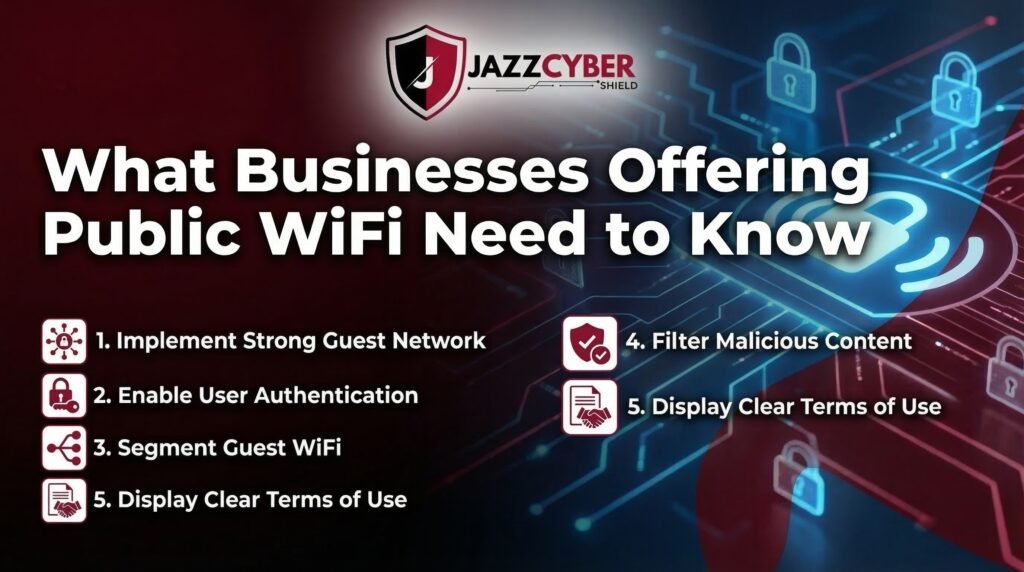
Network segmentation is non-negotiable. Your guest WiFi must be completely isolated from your internal business network. This means separate VLANs, separate subnets, and zero crossover between the two. If a hacker compromises a device on your guest network, they should hit a dead end — not a gateway into your accounting software or your customer database.
Enable client isolation on your access points. This setting prevents devices on the guest network from communicating with each other, which blocks peer-to-peer attacks between users on the same network. It’s a single checkbox in most access point admin panels, and it eliminates an entire category of attack.
Upgrade to commercial-grade access points. Consumer routers and the cheap access points that come bundled with internet service plans were not designed for the security demands of a business environment. Our selection of secure business access points from leading enterprise brands like Ubiquiti, Ruckus, and Cisco Meraki offer client isolation, VLAN support, advanced traffic monitoring, and centralized management — features that simply don’t exist on consumer hardware.
Keep your firmware updated on a schedule. Unpatched access points are among the most commonly exploited vulnerabilities in small business environments. Set a calendar reminder every month to log into your access point admin panel and check for firmware updates. This one habit prevents a remarkable number of known attack vectors.
The Future of Public WiFi Security: What’s Coming Next
Looking beyond 2026, several developments are already reshaping the public WiFi threat landscape in meaningful ways.
WPA3 — the latest WiFi security protocol — is finally reaching mainstream adoption. It offers dramatically stronger encryption than WPA2 and provides real protection against offline dictionary attacks, which have plagued WPA2 networks for years. When you have the choice between networks at a venue, always prefer the one using WPA3 if it’s listed.
AI-powered attack automation is unfortunately going to get worse before it gets better. Fully automated attack chains that handle everything from network reconnaissance to credential extraction to account takeover are becoming more accessible to lower-skill attackers every year. The only reliable counter to automation is proactive, hardware-level defense — not reactive cleanup after the damage is done.
Zero-Trust Network Architecture is quietly becoming the gold standard for businesses of all sizes. Instead of trusting any device simply because it’s connected to the “inside” of a network, Zero Trust assumes every connection is potentially compromised and verifies identity and permission continuously. If your organization hasn’t explored Zero Trust yet, 2026 is the year to start that conversation seriously.
Frequently Asked Questions About Public WiFi Safety in 2026
Is Public WiFi Ever Actually Safe to Use?
No public WiFi network is inherently safe, but you can make it significantly safer with the right habits. Using a paid VPN, disabling auto-connect, enabling 2FA, and avoiding sensitive transactions reduces your risk to an acceptable level for casual browsing. For anything highly sensitive — banking, payroll, health records, company systems — use mobile data instead. The risk simply isn’t worth it.
Can Hackers See What I’m Doing on HTTPS Websites Over Public WiFi?
HTTPS encrypts the actual content of your traffic, so attackers cannot read what you type into a secure site. However, they can still see which domains you’re visiting, the timing of your connections, and your device metadata. Advanced attackers using SSL stripping techniques can sometimes downgrade your HTTPS connection to unencrypted HTTP. A VPN provides blanket protection that covers this scenario entirely.
How Do I Know If I’m Connected to a Fake Evil Twin Network?
In most cases, you genuinely can’t tell — not by looking at the network name, signal strength, or even the login page design. That’s what makes evil twin attacks so effective. The best protection is prevention: disable auto-connect, always use a VPN, and verify network names verbally with hotel or café staff before connecting. If your VPN suddenly disconnects without explanation or you notice unusual browser behavior, disconnect from the network immediately.
Does Incognito Mode Protect Me on Public WiFi?
No, and this is one of the most dangerous cybersecurity myths still circulating in 2026. Incognito mode only prevents your browser from saving your local browsing history on your device. It does absolutely nothing to protect your data at the network level. A hacker on the same public WiFi can capture everything you’re doing in perfect detail — incognito or not. Only a VPN provides actual network-level protection.
What Firewall Do You Recommend for a Small Business?
For small to medium businesses, the SonicWall TZ series and the Fortinet FortiGate 40F or 60F models are both excellent starting points. Both offer deep packet inspection, SSL inspection, and built-in threat intelligence at a price point that works for growing businesses without an enterprise IT budget. Browse our full selection of enterprise-grade firewall solutions and reach out to our team for a personalized recommendation — we’ll match you to the right hardware for your specific setup.
Final Thoughts: Your Data Is Worth Protecting
The dangers of public WiFi in 2026 are real. They’re escalating every year. And they’re increasingly targeting the people who believe “it won’t happen to me.” The attacks described in this article aren’t theoretical — they happen in coffee shops, airports, hotel lobbies, and co-working spaces across the United States every single day.
The good news is that protection doesn’t require a cybersecurity degree or an enterprise IT budget. It requires awareness, consistent habits, and for businesses, the right hardware backing those habits up. Start with a paid VPN. Disable auto-connect. Enable two-factor authentication on every account that matters. Forget networks when you’re done. And if you’re responsible for a business network, take hardware-level security seriously — because software alone has limits when an attacker is physically on the same network as your team.
Continue learning: Top 5 cybersecurity threats businesses face in 2026 | 10 signs your network has been hacked | Free VPN vs paid VPN — the truth

