



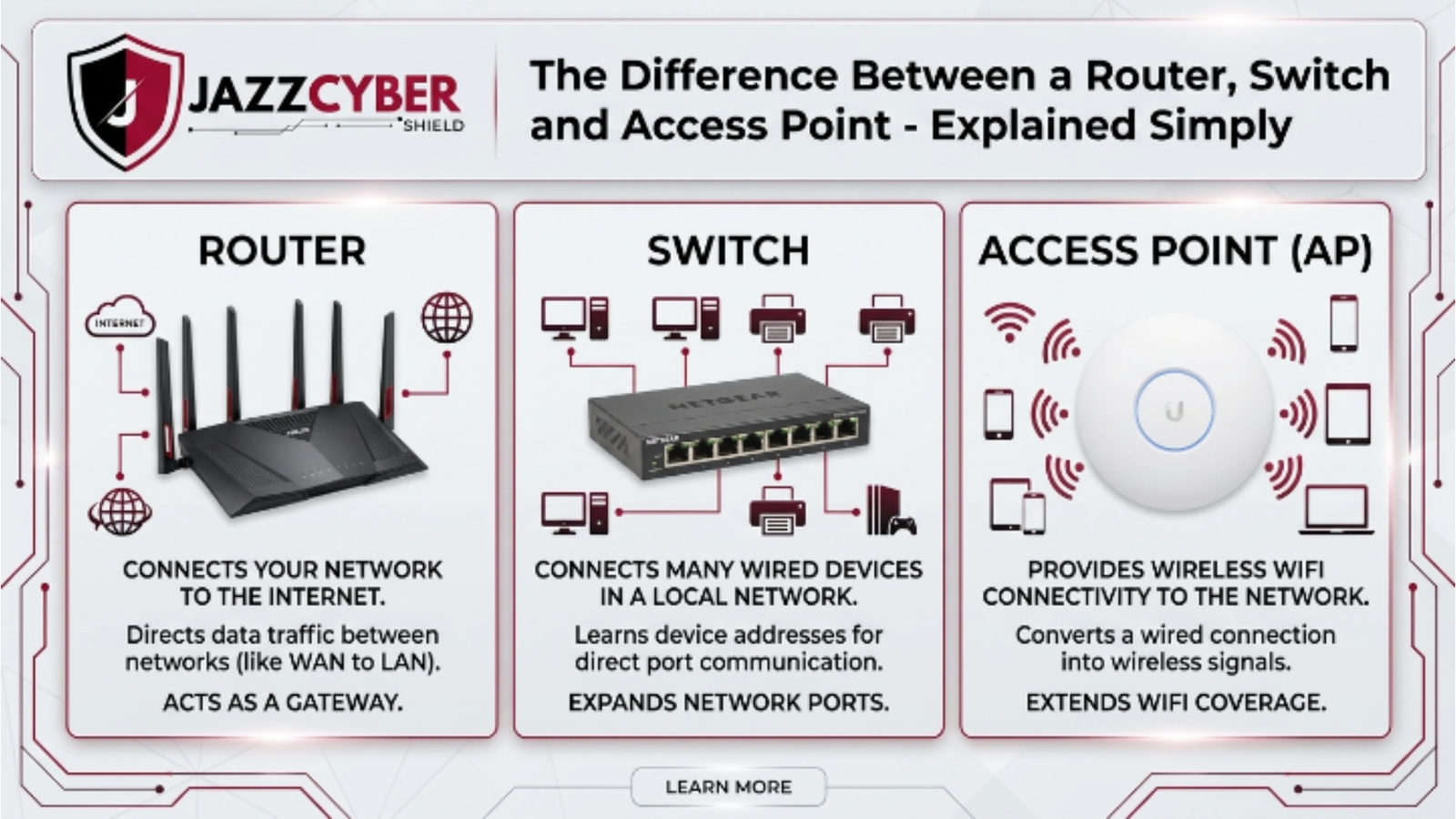
Business owners and IT professionals across the United States rely on the right networking devices to keep operations running smoothly. Router vs switch vs access point forms the foundation of every reliable network. These devices handle data flow differently, and choosing correctly prevents slowdowns, security gaps, and costly downtime in US small businesses and home offices.
Table of Contents
What Is a Router and Its Role in Networking?
Routers direct traffic between different networks. They connect your local area network to the internet and manage data packets intelligently.
Businesses use routers to share a single internet connection among multiple devices. Routers assign IP addresses through DHCP and perform NAT to hide internal IPs from the public web. This process protects your network while enabling seamless browsing.
US companies benefit from routers that support advanced features like VPN tunnels and firewall integration. Modern routers handle gigabit speeds and comply with FCC equipment authorization standards for wireless transmissions.
Professionals often explore router functionality in networking for deeper insights into enterprise options.
Ethernet Switch Explained: Core Functions in LANs
Switches create efficient wired connections within a single network. They forward data only to the intended device instead of broadcasting to every port like older hubs.
An ethernet switch explained simply: it operates at Layer 2 of the OSI model and uses MAC addresses to move frames quickly. This design reduces network congestion dramatically.
Small offices install managed switches for VLAN segmentation and PoE support that powers IP phones and cameras directly. Unmanaged switches suit basic needs where plug-and-play simplicity matters most.
Switches expand port counts without slowing performance. They form the backbone of wired LANs while routers handle external connections.
Check our detailed difference between router and switch for real-world deployment examples.
Wireless Access Point Function: Powering WiFi Connectivity
Access points deliver wireless connectivity to wired networks. They broadcast WiFi signals so laptops, phones, and IoT devices join the LAN without cables.
The wireless access point function focuses on extending coverage and supporting multiple simultaneous users. Enterprise-grade access points manage traffic, enforce security protocols, and roam seamlessly between units.
Businesses place access points strategically to eliminate dead zones. They connect via Ethernet to a switch or router and operate in bridge mode without performing routing duties.
WiFi 6E and WiFi 7 access points now dominate US installations because they deliver faster speeds and better device density.
Upgrade your coverage with enterprise wireless access points.
Router vs Switch vs Access Point: Technical Comparison
Professionals compare these devices side by side to match features with needs. The table below highlights key distinctions including a legacy hub for complete context.
| Feature | Router | Switch | Access Point | Hub (Legacy) |
|---|---|---|---|---|
| Layer | Layer 3 (Network) | Layer 2 (Data Link) | Layer 2 (Wireless extension) | Layer 1 (Physical) |
| Primary Function | Routes between networks | Connects devices in LAN | Provides WiFi access | Broadcasts to all ports |
| Data Handling | IP routing & NAT | MAC address packet switching | Wireless signal conversion | Simple signal repeating |
| IP Assignment | Yes (DHCP server) | No | No (relies on router) | No |
| Security | Built-in firewall & VPN | Basic port security | WPA3 encryption | None |
| Ports | Few Ethernet + WAN | Multiple Ethernet | Ethernet uplink + wireless | Multiple but inefficient |
| Best For | Internet sharing & security | High-speed wired LAN | Wireless coverage | Basic legacy setups |
| US Business Use | Small office internet gateway | Server room connectivity | Office WiFi expansion | Rarely recommended |
This networking devices comparison clarifies roles instantly. Routers manage internet connectivity devices while switches and access points optimize internal traffic.
Business owners review our router vs switch vs firewall vs access point infographic for visual breakdowns.
Packet Switching vs Routing: How Data Moves Differently
Switches perform packet switching at high speed within the LAN. They examine MAC addresses and forward frames directly to the destination port.
Routers execute IP routing across networks. They inspect packet headers, apply routing tables, and forward data to the correct next hop—often the internet.
Packet switching vs routing matters because switches deliver low latency inside the building while routers add intelligence for external destinations.
This distinction helps IT teams design scalable networks that avoid bottlenecks.
DHCP and NAT Functions: Why Routers Stand Out
Routers run DHCP servers that automatically assign IP addresses, subnet masks, and gateway details to every device. They also translate private IPs to a single public IP through NAT.
These DHCP and NAT functions simplify management and enhance security by masking internal devices. Switches and access points depend on the router for these services.
US businesses avoid manual IP configuration headaches thanks to these automated features.
Wireless vs Wired Networking: Choosing the Right Setup
Wired connections through switches deliver maximum speed and reliability. They resist interference and support higher bandwidth for servers and workstations.
Wireless networks via access points offer mobility and easy expansion. Modern WiFi standards now rival wired performance for most daily tasks.
Hybrid setups combine both: switches handle critical wired backbone while access points serve laptops and guests.
Professionals balance wireless vs wired networking based on device count and application demands.
Small Business Network Setup: Practical Guide for US Companies
US small businesses start with a modem from their ISP, followed by a business-grade router. They add managed switches for wired devices and multiple access points for full WiFi coverage.
A typical setup includes VLANs for guest and employee traffic separation. PoE switches power access points and cameras efficiently.
Budget-conscious owners select devices that scale without forklift upgrades.
Follow our how to choose networking equipment before purchasing.
Network Topology Basics and Infrastructure Components
Star topology dominates modern US networks because it centralizes switches and access points around the router. Mesh and hybrid topologies add redundancy for larger offices.
Network infrastructure components include routers for edge connectivity, switches for segmentation, and access points for wireless extension.
Proper network topology basics prevent single points of failure and simplify troubleshooting.
Home Network Setup Devices and Best Practices
Home offices mirror small business designs on a smaller scale. A single router with built-in WiFi often suffices for basic needs, yet power users add a dedicated switch and access point.
Home network setup devices perform better when separated by function rather than relying on all-in-one units.
Experts recommend computer networking guides for optimized residential configurations.
FAQ
What is the main difference between a router and a switch? Routers connect multiple networks and handle IP routing plus NAT while switches connect devices inside one LAN using MAC addresses.
How does a wireless access point differ from a router? An access point extends WiFi coverage but does not route traffic between networks or assign IP addresses like a router does.
Do I need both a switch and an access point? Yes, most US businesses use switches for wired performance and access points for wireless coverage in larger spaces.
Can a switch replace a router? No. Switches lack routing, DHCP, and NAT capabilities needed for internet connectivity.
What networking devices should a small business buy first? Start with a secure router, add managed switches for growth, then deploy access points for WiFi.
Conclusion
Router vs switch vs access point differences determine network speed, security, and scalability for US businesses in 2026. Routers manage external connections and essential services like DHCP and NAT. Switches optimize internal wired traffic through efficient packet switching. Access points deliver flexible wireless access that keeps mobile teams productive.
Business owners who understand these network device roles avoid common pitfalls and build future-proof infrastructure. They combine the devices strategically according to their specific topology and device density requirements.
Ready to upgrade? Explore our Cisco 9300 PoE+ switch for enterprise performance or browse next-gen firewalls that double as powerful routers.
For more expert advice, read our best Wi-Fi access points for business or the full access point vs router explained guide.
Shop confidently at Jazz Cyber Shield—your trusted USA-based source for networking hardware that delivers reliability and compliance with current FCC standards. Start building your optimized network today and experience the difference professional-grade equipment makes.

