



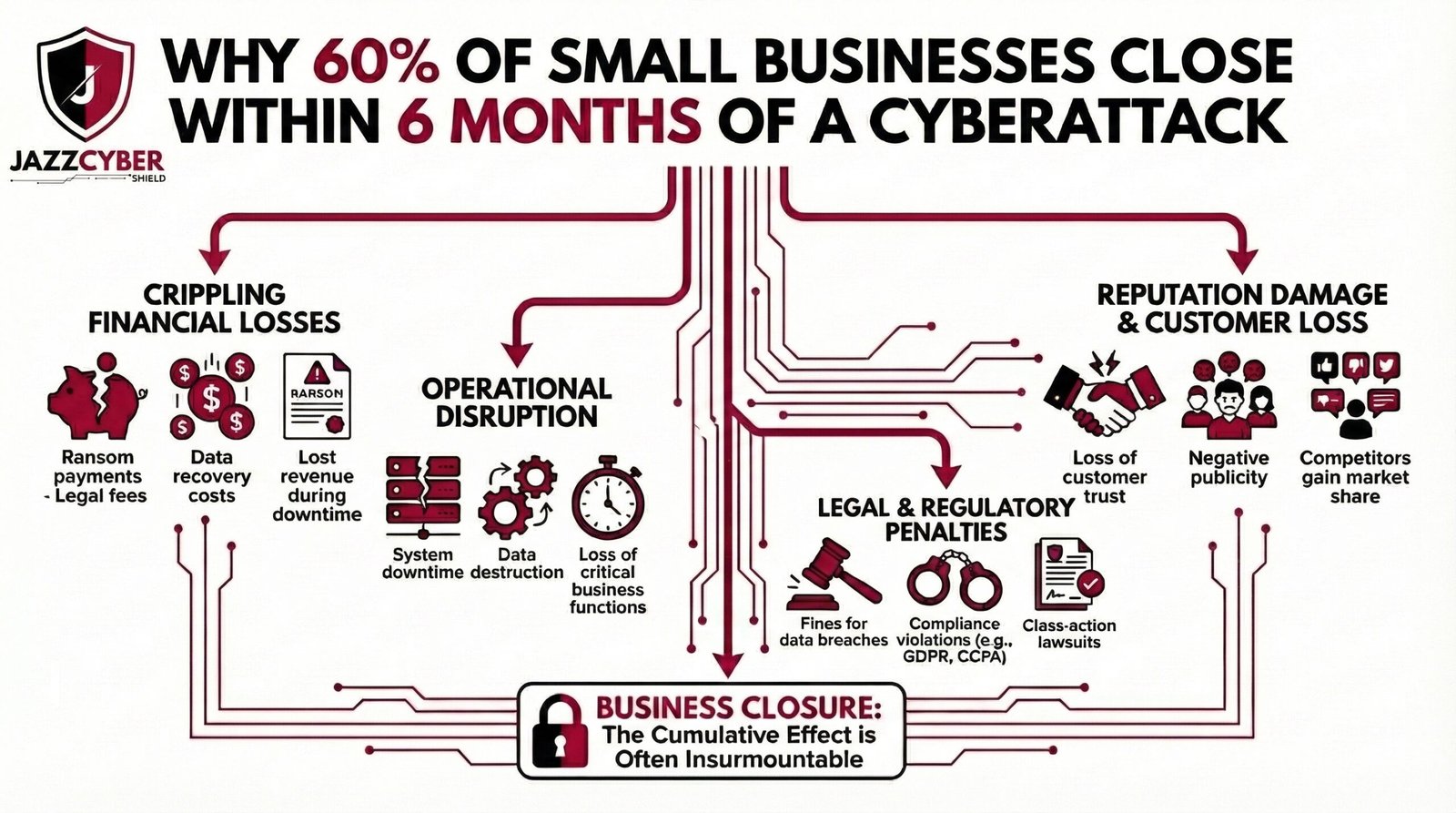
The Survival Gap Is Not About Budget — It’s About Preparation. Most small business owners ask why small businesses close after cyberattack — and the answer starts with a dangerous assumption: that attacks only target large corporations.
You’ve probably heard the statistic. Maybe you’ve seen it shared on LinkedIn, mentioned in a news segment, or referenced by your IT vendor trying to sell you something. Sixty percent of small businesses that suffer a significant cyberattack close their doors within six months.
The first reaction most people have is disbelief. Sixty percent? That sounds made up.
It’s not. The figure originates from research by the National Cyber Security Alliance and has been consistently supported by follow-up studies from IBM, Verizon, and the Ponemon Institute over the past decade. The number has barely moved — because the underlying problem has barely been addressed at the small business level.
The second reaction most small business owners have is: that won’t happen to me.
And that is precisely the mindset that puts them in the sixty percent.
This article breaks down exactly why cyberattacks are so financially fatal for small businesses, what the actual chain of damage looks like from attack to closure, and — most importantly — the specific defensive steps that keep businesses in the surviving forty percent.
Why Small Businesses Are the Primary Target, Not an Afterthought
There is a persistent myth that hackers spend their time targeting Fortune 500 companies, government agencies, and major financial institutions. The reality in 2026 is the opposite.
Large enterprises have full-time security teams, six-figure threat detection platforms, incident response retainers, and cyber insurance policies with dedicated claims adjusters. Attacking them is expensive, slow, and increasingly likely to end with the attacker being identified and prosecuted.
Small businesses — typically defined as under 500 employees — are a completely different story.
⚠️ THREAT INTELLIGENCE ALERT: According to Verizon’s Data Breach Investigations Report, over 43% of all cyberattacks target small businesses. Of those, fewer than 14% are adequately prepared to defend themselves.
Small businesses have real money flowing through them. They hold customer payment data, employee records, proprietary client information, and often serve as third-party vendors or contractors to larger organizations — making them an entry point into enterprise supply chains.
At the same time, most small businesses operate with:
- No dedicated IT security staff
- Consumer-grade or aging networking equipment
- No formal incident response plan
- Minimal or no employee security training
- Basic antivirus as their only active defense layer
To an attacker running automated scanning tools, a small business with an unpatched firewall and default router credentials is not a hard target. It’s an open door.
The Six-Month Death Spiral: How a Cyberattack Actually Destroys a Small Business
The closure rate is not just about the immediate cost of the attack. It’s about what the attack triggers — a compounding chain of financial, operational, and reputational damage that most small businesses simply cannot survive.
Stage 1: The Initial Breach (Hours to Days)
The attack itself can take many forms — ransomware encrypting your files, a data breach exposing customer records, a business email compromise diverting a wire transfer, or a credential theft giving attackers silent access to your systems for weeks before you notice.
SMALL BUSINESS ATTACK CHAIN — RANSOMWARE EXAMPLE:

[Phishing Email Opens] → [Malware Installed on Workstation]
         ↓
[Lateral Movement Across Network — Days to Weeks Undetected]
         ↓
[Ransomware Deployed — All Files Encrypted Simultaneously]
         ↓
[Business Operations: FULLY HALTED]
         ↓
[Ransom Demand Delivered — Average: $812,000 in 2025]
The immediate operational impact is total. Depending on how deeply the attacker has moved through your network, you may lose access to your accounting software, customer database, email, point-of-sale systems, inventory management — everything at once.
Stage 2: The Downtime Cost (Days to Weeks)
This is where most small business owners underestimate the damage. They focus on the ransom demand or the recovery cost, but the real killer is the revenue lost during downtime.
IBM’s Cost of a Data Breach report consistently shows that the average downtime for a small business following a ransomware attack is 21 days. For a business doing $500,000 annually, that is roughly $28,000 in lost revenue — before spending a single dollar on recovery.
For businesses in retail, hospitality, healthcare, or professional services where every day of downtime means lost clients who simply go elsewhere, the revenue gap never fully closes.
Stage 3: The Recovery Cost (Weeks to Months)
Recovery is expensive in ways that are not immediately obvious:
| Recovery Cost Category | Average Small Business Cost |
|---|---|
| IT forensics and incident response | $15,000 – $50,000 |
| Data recovery or system rebuild | $10,000 – $35,000 |
| Legal fees and regulatory compliance | $20,000 – $75,000 |
| Customer notification (if data breached) | $5,000 – $20,000 |
| Ransom payment (if paid) | $50,000 – $800,000+ |
| PR and reputation management | $5,000 – $25,000 |
| Total average SMB breach cost | $120,000 – $1.2M |
For context, the average small business in the US holds less than one month of operating expenses in cash reserves. A $120,000 recovery bill against a business with $40,000 in reserves is not a setback. It is a terminal event.
Stage 4: The Legal and Regulatory Exposure (Months)
If your breach exposed customer data — names, emails, payment information, health records — you are now in regulatory territory. Depending on your industry and the states your customers are in:
- HIPAA (healthcare): Fines from $100 to $50,000 per violation
- PCI DSS (payment cards): Fines, forced audits, potential loss of card processing rights
- CCPA (California customers): $100–$750 per consumer per incident in private lawsuits
- State breach notification laws: 50 states now have mandatory notification requirements with varying timelines and penalties
Many small businesses do not discover they are legally exposed until months after the breach, when the notification deadlines have already passed — triggering additional penalties on top of the original damage.
Stage 5: The Reputation Collapse (Permanent)
This is the stage that most post-mortems undercount. A business can survive a financial hit. It cannot easily survive the public knowledge that customer data was compromised because it failed to implement basic security measures.
In a 2024 survey by PwC, 87% of consumers said they would take their business elsewhere following a data breach at a company they used. For small businesses that depend on local reputation, word-of-mouth referrals, and long-term client relationships, a single publicized breach can permanently destroy the trust that took years to build.
The Industries Most Vulnerable in 2026
Not all small businesses face equal risk. These sectors are disproportionately targeted:
🔴 HIGH-RISK SECTORS — US SMALL BUSINESSES: — Healthcare practices and dental offices (patient record value on dark web) — Legal firms (confidential client data, wire transfer targets) — Accounting and financial services (tax data, banking credentials) — Real estate agencies (escrow wire fraud, transaction data) — Retail and e-commerce (payment card data, customer PII) — Construction and contractors (supply chain entry points to larger firms) — IT service providers and MSPs (access to multiple client networks simultaneously)
If your business falls into any of these categories and you are operating without enterprise-grade perimeter security, you are a statistic waiting to happen.
Why Cyber Insurance Is Not the Safety Net You Think It Is
When small business owners hear these numbers, the most common response is: “I have cyber insurance, so I’m covered.”
Cyber insurance has quietly transformed in the last three years. In response to catastrophic claim volumes, insurers have dramatically tightened their requirements and exclusions.
Today, many cyber insurance policies will deny or reduce claims if the insured business cannot demonstrate:
- Multi-factor authentication was enabled on all critical systems
- Regular, tested, and offsite data backups were maintained
- Endpoint detection and response (EDR) software was deployed
- Firewall policies were documented and regularly reviewed
- Employee security awareness training was conducted annually
If you suffered a breach and cannot document these controls, your insurer may pay a fraction of your claim — or nothing at all. The fine print in most SMB cyber insurance policies has become a minefield that many business owners do not read until after a breach.
Insurance is a recovery tool, not a security strategy. The businesses that survive are the ones that invest in prevention.
What the Surviving 40% Do Differently
The businesses that absorb a cyberattack and survive have three things in common that the ones that close do not.
They have layered perimeter security. A consumer router with default settings is not a firewall. The businesses that survive have actual next-generation firewall hardware — purpose-built devices from vendors like Fortinet, SonicWall, or WatchGuard — that perform deep packet inspection, block known malware signatures, and generate logs that make incident response faster and more accurate.
For small businesses serious about protection, a Fortinet or SonicWall next-generation firewall is the single most impactful hardware investment you can make. It is the difference between an attacker having a clear path into your network and hitting a wall.
They have network segmentation. Surviving businesses do not run everything on a flat network. Customer-facing systems, employee workstations, financial systems, and IoT devices are on separate network segments. When an attacker compromises one segment, they cannot pivot to the others.
Proper segmentation requires managed network switches that support VLAN configuration — hardware from Cisco or HPE Aruba that gives you granular control over which devices can talk to which. We covered exactly how this works in our VLAN guide for home and business networks.
They have an incident response plan. They know exactly what to do in the first 24 hours. Who gets called. What systems get isolated. Who notifies customers. What the backup restoration procedure looks like. This plan has been tested before the attack happens — not written in a panic during one.
The 8-Step Cyberattack Prevention Plan for Small Businesses
Step 1 — Deploy a Next-Generation Firewall
Replace any consumer-grade router acting as your perimeter device with a dedicated NGFW. Configure:
- Intrusion Prevention System (IPS) — blocks known attack signatures
- Application control — limits which applications can access the internet
- DNS filtering — blocks connections to known malicious domains
- Geo-blocking — restricts inbound traffic from high-risk countries
- Automatic threat intelligence updates — keeps defenses current
Browse Fortinet, SonicWall, and WatchGuard firewalls at Jazz Cyber Shield — all enterprise-grade, SMB-appropriate pricing.
Step 2 — Segment Your Network with Managed Switches
- Identify your device categories: workstations, servers, POS systems, IoT, guest devices
- Assign each category to a dedicated VLAN
- Configure inter-VLAN routing rules — most traffic should NOT cross VLAN boundaries
- Put any internet-facing devices (cameras, printers, smart TVs) on an isolated IoT VLAN
- Guest Wi-Fi should never touch your internal business network
Cisco and HPE Aruba managed switches support full VLAN configuration for businesses of any size.
Step 3 — Enable Multi-Factor Authentication Everywhere
- Business email (Microsoft 365 or Google Workspace) — MFA on every account
- Banking and financial platforms — MFA via authenticator app, not SMS
- Cloud storage and file sharing — MFA required
- VPN and remote access — MFA as a baseline requirement
- Any admin panel for business software — MFA enabled
This single step blocks over 99% of credential-based attacks according to Microsoft’s own security research.
Step 4 — Implement a 3-2-1 Backup Strategy
- 3 copies of all critical data
- 2 different storage media (local NAS + cloud)
- 1 offsite or air-gapped backup that ransomware cannot reach
Test your restoration process quarterly. A backup you have never tested is a backup you cannot count on.
Step 5 — Patch and Update Everything on a Schedule
PATCH MANAGEMENT SCHEDULE — SMALL BUSINESS:

Weekly:    Operating systems (Windows/macOS auto-updates ON)
Weekly:    Business software and SaaS platforms
Monthly:   Network equipment firmware (firewall, switches, AP)
Monthly:   Review and apply any critical CVE patches
Quarterly: Full inventory audit — identify EOL hardware/software
Unpatched systems are the number one entry point for ransomware attacks targeting small businesses.
Step 6 — Train Your Employees (The Human Firewall)
Over 90% of successful cyberattacks begin with a phishing email. Your firewall cannot stop an employee from clicking a malicious link if they don’t know what one looks like.
Conduct security awareness training at minimum twice a year. Cover:
- Phishing email identification
- Safe password hygiene and password manager use
- Reporting suspicious activity without fear of blame
- Social engineering red flags in phone calls and messages
Platforms like KnowBe4 and Proofpoint Security Awareness offer SMB-appropriate training programs with simulated phishing tests.
Step 7 — Write and Test an Incident Response Plan
Your plan needs to answer these questions before an attack happens:
- Who is your incident response contact? (Internal IT, MSP, or IR retainer)
- Which systems get isolated first?
- Who has authority to take systems offline?
- What is the customer notification process and timeline?
- Where are your backup restoration files and what is the procedure?
- Who is your legal counsel for breach notification compliance?
Keep a printed copy offsite. Digital-only plans are useless when your systems are encrypted.
Step 8 — Conduct a Quarterly Security Audit
Set a calendar reminder. Every 90 days:
- Review firewall logs for anomalous traffic patterns
- Check all user accounts — disable any accounts for former employees
- Verify backup restoration works as expected
- Review your cyber insurance policy requirements — are you still compliant?
- Check all network equipment for available firmware updates
- Run a vulnerability scan on internet-facing systems
The Real Cost Comparison: Prevention vs. Recovery
Let’s be direct about the numbers:
| Category | Prevention Investment | Post-Attack Recovery |
|---|---|---|
| Firewall hardware | $500 – $2,000/year | — |
| Managed switches | $300 – $1,500 one-time | — |
| Security training | $500 – $2,000/year | — |
| Backup solution | $100 – $500/year | — |
| Total annual prevention | $1,400 – $6,000 | — |
| Average SMB breach cost | — | $120,000 – $1.2M |
| Business closure rate | ~5% with full controls | 60% without |
The math is not complicated. The reason most small businesses skip prevention is not budget — it’s the assumption that it won’t happen to them. That assumption is what the sixty percent share.
FAQ: Small Business Cyberattack Survival
We’re a 5-person business. Do we really need enterprise firewall hardware?
Yes — because attackers do not filter their scans by company size. An unprotected small business is actually more attractive than a large one because it offers less resistance. Entry-level Fortinet and SonicWall units are specifically designed and priced for small teams with no dedicated IT staff.
We already pay for antivirus. Isn’t that enough?
Antivirus addresses endpoint threats — malicious software on individual devices. It does nothing to protect against network-level attacks, lateral movement across your infrastructure, phishing attacks that use legitimate links, or ransomware delivered through compromised remote access. It is one layer. You need at minimum five.
Should we pay the ransom if we get hit?
The FBI and CISA both recommend against paying ransoms. Payment does not guarantee data recovery — in 2025, fewer than 60% of businesses that paid a ransom received fully working decryption keys. Payment also marks you as a target willing to pay, increasing the probability of a follow-up attack. The correct response is isolation, incident response engagement, and restoration from verified backups.
How do we know if we’ve already been breached?
Many breaches involve an extended dwell period — attackers inside your network for weeks before deploying ransomware or exfiltrating data. Signs include: unusual login times, unknown devices on your network, unexpected outbound traffic, slow systems with high CPU/network usage, and account lockouts. A managed firewall with logging enabled makes these visible. Without one, you are flying blind.
Is this only a US problem?
No. Small businesses in the UK, Canada, and Australia face nearly identical threat profiles. The attack tools are automated and geographically indiscriminate. However, regulatory exposure varies by country — UK businesses face GDPR-aligned obligations under the UK Data Protection Act, Canadian businesses under PIPEDA, and Australian businesses under the Privacy Act.
Final Thought: The Bottom Line
The sixty percent statistic is not a scare tactic. It is a documented pattern with a documented cause: small businesses treating cybersecurity as a large-company problem, right up until the moment it becomes their problem.
The surviving forty percent are not necessarily bigger, richer, or luckier. They made a decision — before an attack happened — to take network security seriously. Deployed proper hardware segmented their networks. They trained their people. They made a plan.
That decision is available to every small business reading this right now.
If you’re ready to start with the most impactful layer — your network perimeter — browse our full range of enterprise-grade firewalls and managed network switches at Jazz Cyber Shield. Every product is selected for SMB deployability, not just enterprise spec sheets.

