Your Files Are Somewhere Right Now — Do You Know Who Else Can See Them?
If you’ve ever asked yourself whether NAS vs cloud storage truly matters for privacy, the answer in 2026 is a hard yes — and the stakes have never been higher.
You uploaded your tax returns. Your business contracts. Your family photos. Your medical records. They’re sitting on a server right now — somewhere. The question isn’t whether your data is stored. The question is who controls it.
Cloud storage feels frictionless. NAS feels old-school. But in 2026, “convenient” and “private” are rarely the same thing. This article cuts through the marketing noise and gives you a real-world breakdown so you can make a decision that protects what actually matters.
The NAS vs cloud storage debate has gotten louder as data breaches, government subpoenas, and corporate surveillance have exploded. Let’s break it all down.
Table of Contents
The Scale of Storage Privacy Risks in 2026
Data breaches hit record highs in 2025 — and 2026 is on track to surpass them. Billions of records were exposed last year from cloud platforms, SaaS services, and misconfigured storage buckets. This isn’t theoretical. It’s happening to real businesses, real families, and real individuals every single day.
The problem isn’t just hackers. It’s the architecture itself.
Most people never read the Terms of Service when they sign up for cloud storage. If they did, they’d find language that gives providers broad rights to scan, analyze, and share your data under certain conditions. That’s not a conspiracy theory. That’s written in legal documents most people click through in three seconds.
⚠️ ALERT: According to CISA (opens in new tab), misconfigured cloud storage is one of the top attack vectors in 2026 — responsible for a significant portion of enterprise data exposure incidents.
The NAS vs cloud storage conversation is no longer just about speed or cost. It’s about sovereignty. It’s about who holds the keys to your digital life.
NAS vs Cloud Storage: How They Actually Work
Before diving into privacy, let’s get the mechanics straight.
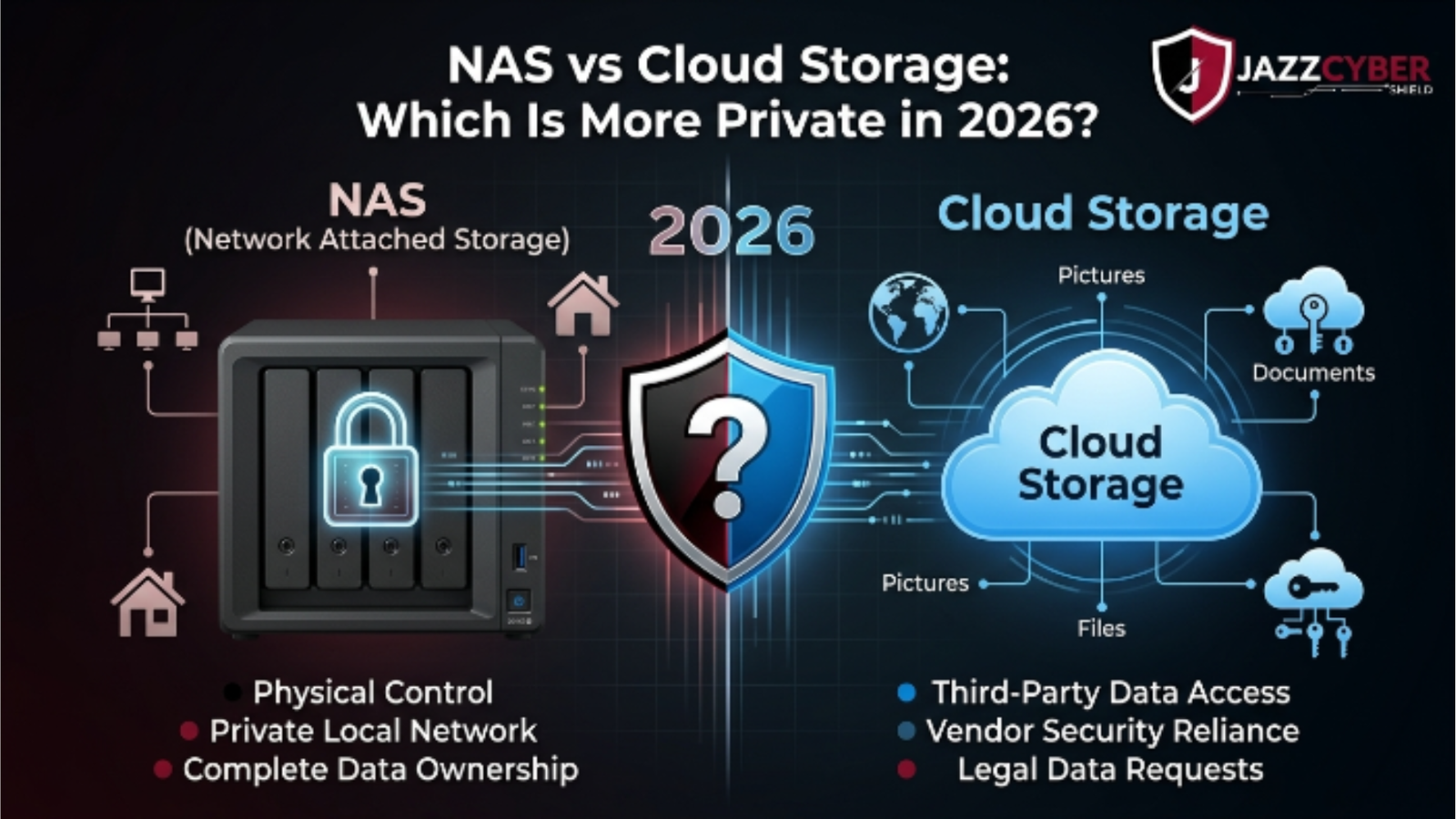
Network Attached Storage (NAS) is a physical device that lives on your local network — at your home, office, or data center. Brands like Western Digital, Synology, and QNAP dominate this space. You own the hardware. You manage the software. Your data never leaves unless you send it somewhere.
Cloud storage (Google Drive, Dropbox, OneDrive, iCloud, AWS S3) stores your files on servers owned by corporations. You access them via the internet. The company controls the infrastructure, the encryption keys, and — critically — who else can access your data under legal or policy frameworks.
Here’s a simple architecture breakdown:
NAS STORAGE MODEL
┌─────────────────────────────────────────┐
│  Your Device → Your Router → Your NAS  │
│  Data stays inside your network        │
│  You hold the encryption keys          │
│  No third-party server involved        │
└─────────────────────────────────────────┘

CLOUD STORAGE MODEL
┌──────────────────────────────────────────────┐
│  Your Device → Internet → Provider's Server │
│  Data lives on shared infrastructure        │
│  Provider holds encryption keys (usually)  │
│  Subject to provider's TOS + legal orders  │
└──────────────────────────────────────────────┘
The difference isn’t just physical. It’s a fundamentally different trust model.
🔴 WARNING: Most cloud storage providers use a model called “encryption at rest” — but they hold the decryption keys. That means they can decrypt your data if legally compelled or if their systems are breached.
If you’re running a business and handling sensitive client data, this architecture matters enormously. A misconfigured cloud bucket or a compromised provider account can expose everything you’ve built. Consider pairing your storage decision with a properly segmented network — setting up VLANs for your home or business network is a smart first step toward real data isolation.
Who Can Access Your Cloud Data (And When)?
This is the uncomfortable question most cloud providers don’t advertise clearly.
When you store data on Google Drive, Microsoft OneDrive, or Dropbox, you agree to their terms. Those terms include provisions for compliance with law enforcement requests, national security orders, and internal scanning for policy violations. This isn’t speculation — it’s documented in their transparency reports.
In the US, the Electronic Communications Privacy Act (ECPA) and CLOUD Act give domestic and foreign governments pathways to request your data from US-based providers. Your data doesn’t need to be “yours” under those frameworks — it needs to be in their system.
Here’s what can trigger access to your cloud files:
- A valid subpoena or court order
- A National Security Letter (NSL)
- An administrative request under the CLOUD Act
- A data breach that exposes your files to third parties
- Automated content scanning triggered by policy flags
- An insider threat at the provider
None of this means cloud storage is inherently evil. For casual users storing recipes and vacation photos, the risk calculus is different. But if you’re storing financial records, proprietary business data, legal documents, or anything with personal health information — you need to think hard about who’s holding the keys.
NAS Storage: Total Control or False Sense of Security?
NAS gives you control. But control comes with responsibility.
A NAS device sitting on your desk isn’t automatically private. An unpatched NAS with default credentials is a sitting duck. Ransomware has specifically targeted NAS devices — particularly internet-exposed ones — because attackers know they often contain valuable backups and files.
The NAS vs cloud storage privacy advantage only materializes if you actually secure your NAS properly. Here’s what that looks like in practice:
What makes NAS genuinely private:
- Data never leaves your physical premises
- You control the encryption — both at rest and in transit
- No third party can receive a legal order to hand over your files
- Air-gapping or VPN-only access removes internet exposure entirely
- You decide who has access credentials
What undermines NAS privacy:
- Default admin credentials left unchanged
- NAS exposed directly to the internet (no VPN)
- No encryption enabled on volumes
- Outdated firmware with unpatched CVEs
- Weak or reused passwords on admin accounts
- No network segmentation between NAS and untrusted devices
A properly secured NAS with encrypted volumes, VPN-only remote access, and regular firmware updates is genuinely one of the most private storage options available to individuals and businesses in 2026. But the keyword is “properly secured.”
If you’re already wondering whether your broader network is hardened enough to protect your NAS, start with the router settings you must change right now — default configurations are wide open.
NAS vs Cloud Storage: Side-by-Side Privacy Comparison
Here’s the breakdown you came for. No fluff, just facts.
| Privacy Factor | NAS Storage | Cloud Storage |
|---|---|---|
| Who holds encryption keys | You | Provider (usually) |
| Government data access | Requires physical access to your premises | Provider can comply with legal orders |
| Data scanning by provider | None | Possible per TOS |
| Breach exposure | Limited to your network | Shared infrastructure risk |
| ECPA / CLOUD Act exposure | Not applicable | Directly applicable |
| Ransomware risk | High if internet-exposed | Provider manages infrastructure security |
| Third-party sharing | None | Possible under TOS |
| Offline / air-gap option | Yes | No |
| Remote access privacy | VPN-controlled | Always through provider’s servers |
| Uptime responsibility | Yours | Provider’s |
| Setup complexity | Moderate to High | Very Low |
| Cost at scale | Lower long-term | Higher monthly recurring |
The verdict on NAS vs cloud storage isn’t “one is always better.” It depends on your threat model, technical ability, and what you’re actually storing.
For maximum privacy: NAS wins — if properly configured. For convenience and low maintenance: Cloud wins — but with real privacy trade-offs. For business-critical or regulated data: NAS or hybrid with encryption-first architecture wins every time.
Compliance, Regulations, and Legal Data Exposure
If you run a business in the US, Canada, UK, or Australia, this section is non-negotiable reading.
HIPAA (US Healthcare): Covered entities storing PHI in cloud environments must ensure Business Associate Agreements (BAAs) are in place. Many standard cloud tiers don’t qualify. A self-managed NAS with proper encryption can satisfy HIPAA requirements more cleanly in many scenarios.
GDPR (EU/UK): Data residency matters. Storing EU citizen data on US cloud servers creates cross-border transfer compliance obligations. A NAS located in your jurisdiction eliminates this complexity.
CCPA (California): Cloud providers with access to your data could be considered “service providers” under CCPA. Understanding what contracts you have in place is mandatory.
Australia’s Privacy Act: Similar frameworks apply — data stored with foreign cloud providers must meet adequacy standards.
If you’re handling regulated data and you haven’t assessed your cloud storage provider’s legal obligations, you’re flying blind.
What Setup Actually Protects Your Privacy in 2026?
Here’s how to actually get this right, whether you go NAS, cloud, or hybrid.
If you choose NAS:
- Buy a reputable NAS device — Synology, QNAP, or Western Digital are the top tier. Avoid no-name brands with poor firmware update histories.
- Enable full volume encryption immediately — before you store a single file. Encrypt with a strong passphrase only you know.
- Disable all direct internet exposure — do not port-forward your NAS to the internet. Period.
- Set up a VPN on your router — only allow NAS access through the VPN tunnel. WPA3 on your wireless network adds another layer of local protection.
- Create a dedicated VLAN for your NAS — isolate it from smart TVs, IoT devices, and guest networks.
- Update firmware on a regular schedule — set reminders, don’t skip this.
- Use strong, unique credentials — never leave admin as the username, never use default passwords.
- Enable two-factor authentication on the NAS admin console.
- Create offline backups — follow the 3-2-1 rule: 3 copies, 2 different media, 1 offsite.
- Audit access logs monthly — know who is accessing your NAS and when.
If you must use cloud storage:
- Use a provider that offers zero-knowledge encryption — meaning the provider genuinely cannot decrypt your files (e.g., Tresorit, Proton Drive).
- Use client-side encryption tools like Cryptomator before uploading anything sensitive to standard cloud providers.
- Read the Terms of Service — specifically the sections on law enforcement requests and data scanning.
- Enable MFA on your cloud account with a hardware key or authenticator app.
- Regularly audit what’s stored and delete what you no longer need.
If you want hardware-level security to protect the network your NAS sits on, explore business-grade firewall solutions built for exactly this kind of environment.
Frequently Asked Questions
Q: Is NAS storage completely private from government access? A: A properly secured NAS with no cloud sync and VPN-only access is significantly harder for third parties to reach than cloud storage. However, nothing is 100% immune. With physical access to your premises and a warrant, law enforcement can seize hardware. The key difference is that a cloud provider can receive a legal order and comply remotely — with a NAS, they’d have to come to you.
Q: Can cloud providers read my files even if they’re “encrypted”? A: It depends on who holds the keys. Most major cloud providers (Google, Microsoft, Dropbox) use encryption at rest — but they hold the keys. That means they can technically access your files and can be compelled to do so legally. Zero-knowledge providers like Proton Drive or Tresorit cannot read your files because only you hold the decryption keys.
Q: Is NAS vs cloud storage relevant for small businesses? A: Absolutely. Small businesses are actually more vulnerable because they often lack the legal and IT resources to assess cloud provider TOS or respond to breach events. A well-configured NAS gives a small business direct control over its most sensitive data without relying on a third-party infrastructure.
Q: What’s the biggest privacy mistake people make with NAS? A: Exposing the NAS admin interface directly to the internet. This is the #1 mistake. Attackers scan for exposed NAS ports constantly. If your NAS is on the open internet without a VPN layer, it’s only a matter of time before someone tries to get in. If you’re concerned about your network’s exposure, understand the real dangers of unsecured network access.
Q: Can I use both NAS and cloud storage together? A: Yes — a hybrid approach is smart for many users. Store your most sensitive data locally on NAS, with air-gapped backups. Use cloud storage for less sensitive data where the convenience trade-off makes sense. Use client-side encryption if you must sync sensitive files to the cloud. Just make sure your network and firewall protect the NAS side. If you’re setting this up for a business, explore network switches optimized for segmented environments to properly isolate your storage architecture.
Conclusion
The NAS vs cloud storage debate in 2026 isn’t a close call when privacy is your priority. Cloud storage is convenient, scalable, and well-supported — but it comes with a structural privacy compromise baked in. Someone else holds your keys. Someone else decides what legal obligations they comply with. Someone else’s breach is your problem.
NAS flips that equation. You own the hardware. You own the keys. You control the access. But that power comes with responsibility — a misconfigured NAS is worse than no NAS. The security is only as strong as the setup.
For most privacy-conscious individuals and businesses in 2026, the right answer is a properly hardened NAS as your primary sensitive data store, with cloud used selectively and encrypted client-side. Know your threat model. Act accordingly. Your data is worth protecting.
Related Reading
- How to Set Up VLANs for Your Home Network in 2026
- Router Settings You Must Change Right Now
- WPA2 vs WPA3: What’s the Real Difference?
- The Hidden Dangers of Public Wi-Fi in 2026