



A firewall is only as strong as the configuration behind it. Thousands of home users, small business owners, and even experienced IT professionals deploy firewalls and then unknowingly undermine their own security through common configuration mistakes that leave networks exposed to exactly the threats the firewall was installed to stop. Buying or deploying a firewall does not automatically make your network secure. The way you configure, manage, and maintain that firewall determines whether it actually protects you.
Leaving Default Credentials Unchanged
The single most common and most dangerous firewall mistake is leaving the default administrator username and password in place after installation. Every firewall platform ships with publicly documented default credentials. Attackers know these defaults, and automated scanning tools probe networks continuously looking for devices that still use them.
Change your firewall admin username and password immediately after installation, before you configure anything else. Use a password of at least sixteen characters combining uppercase and lowercase letters, numbers, and symbols. Store it in a dedicated password manager. Enable two-factor authentication on the admin interface if your firewall platform supports it — pfSense, OPNsense, and most enterprise platforms do.
Using an Allow-All Default Policy
Many users configure their firewall with a default allow policy — meaning all traffic passes through unless a specific rule blocks it. This approach feels convenient because it requires less upfront rule creation, but it inverts the fundamental principle of effective firewall security. A default allow policy means every new threat, every new attack vector, and every misconfigured application gets through automatically until you write a specific rule to stop it.
Configure your firewall with a default deny policy on all interfaces. Block everything by default and create explicit allow rules only for traffic your network genuinely requires. Start with the services you know your network needs — DNS, HTTP, HTTPS, and any specific application ports — and add rules incrementally as legitimate requirements arise. This approach requires more initial effort but produces a fundamentally more secure configuration that blocks unknown threats automatically.
Neglecting Outbound Traffic Rules
Most firewall configurations focus almost entirely on inbound traffic — blocking unauthorized connection attempts from the internet. This is correct but incomplete. Outbound traffic rules are equally important and most deployments ignore them entirely.
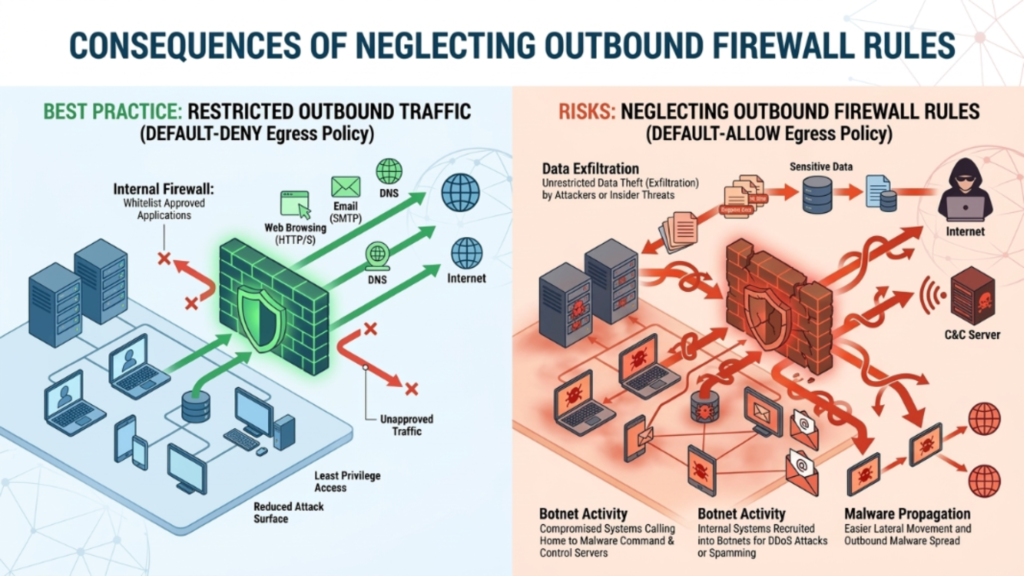
Apply outbound filtering rules that restrict which destinations and ports devices on your network can reach. Block outbound connections to known malicious IP ranges using threat intelligence feeds available in platforms like pfBlockerNG on pfSense. Restrict outbound DNS to your trusted DNS server only, preventing malware from using alternative DNS servers to bypass your filtering. Log all outbound connections and review unusual destinations regularly.
Failing to Update Firewall Firmware and Software
Your firewall is itself a piece of software running on hardware, and like all software it contains vulnerabilities. Security researchers discover and responsibly disclose firewall vulnerabilities regularly. Vendors release patches to address them. When you fail to apply these updates, you leave your firewall — the device protecting everything else on your network — exposed to attacks that already have public exploits available.
Enable automatic firmware updates on your firewall platform if the option exists. If automatic updates are not available, set a calendar reminder to check for and apply updates at least once per month. Subscribe to the security advisory mailing lists for your firewall vendor so you receive immediate notification when critical vulnerabilities are disclosed. Treat firewall firmware updates with the same urgency you apply to operating system security patches.
Overly Permissive Firewall Rules
Many firewall deployments accumulate overly broad rules over time. An administrator opens a wide port range to solve an immediate connectivity problem, plans to tighten the rule later, and never returns to do so. Another common pattern is allowing traffic from any source IP address when the rule should restrict access to a specific trusted IP range. These permissive rules create attack surface that attackers actively scan for and exploit.
Apply the principle of least privilege to every firewall rule. Every rule should allow the minimum traffic necessary for the legitimate requirement it serves — the most specific source IP range, the most specific destination, and the narrowest port range that still meets the need.
Not Segmenting Your Network With VLANs
Operating your entire network on a single flat network segment is a common mistake that dramatically amplifies the damage any single compromised device can cause. When every device shares the same network segment, a compromised smart home sensor, a malware-infected laptop, or an exploited IoT device can reach every other device on the network freely. Your firewall guards the perimeter but does nothing to limit lateral movement inside it.
Implement VLAN segmentation to divide your network into isolated zones based on device trust level and function. Create at minimum a trusted device VLAN for your personal computers and phones, an IoT VLAN for smart home devices and sensors, a guest network VLAN for visitor devices, and a server VLAN for any services you host locally. Configure inter-VLAN firewall rules that explicitly control which zones can communicate with each other and block all other cross-VLAN traffic by default.
Disabling Logging or Ignoring Logs
A firewall that does not log its activity — or whose logs nobody ever reviews — provides a false sense of security. Firewall logs are your primary source of evidence for attack attempts, unusual traffic patterns, misconfigured applications, and policy violations on your network. Many administrators enable logging but never review the logs, which means they gain none of the security intelligence the logs contain.
Enable comprehensive logging on your firewall for all blocked traffic, all allowed traffic on sensitive rules, and all administrative access events. Configure log retention so that at least thirty days of firewall logs remain available for review. Use a log aggregation tool — Graylog, Elasticsearch, or even a simple syslog server — to collect and organize your firewall logs in a searchable format. Set aside time weekly to review flagged or unusual log entries and investigate anything that does not match your expected traffic patterns.
Exposing the Firewall Admin Interface to the Internet
Many firewall deployments leave the admin management interface accessible from the public internet, either through a direct WAN IP address or through port forwarding. This exposes your firewall’s most sensitive interface — the one that controls all security policy — to every scanner, bot, and attacker on the internet.
Restrict admin interface access to your internal LAN network only. If you genuinely need remote management capability, access the admin interface exclusively through a VPN connection to your network rather than exposing the interface directly. Disable remote management on the WAN interface entirely. Configure firewall rules that explicitly block all external access to your admin management ports.
Relying on the Firewall as Your Only Security Layer
Treating your firewall as a complete security solution rather than one layer of a broader security architecture is a fundamental strategic mistake. Firewalls control network traffic, but they do not scan files for malware, detect compromised user credentials, prevent phishing attacks, or protect against threats introduced through USB devices and physical access.
Deploy your firewall as part of a layered security strategy that also includes endpoint antivirus and antimalware protection, DNS-based threat blocking, software firewalls on individual devices, regular software updates across all endpoints, and user security awareness. Defense in depth means an attacker who bypasses one layer still encounters multiple additional layers — each one adding friction and detection opportunity.
Conclusion
A firewall protects your network only when you configure and maintain it correctly. Leaving default credentials in place, using permissive default policies, ignoring outbound traffic, skipping firmware updates, and treating the firewall as your only security tool are all mistakes that create real, exploitable vulnerabilities regardless of how capable the underlying firewall platform is.

