



Your Security Footage Is Only as Good as the Drive Storing It
Most people obsess over security camera storage resolution and night vision. Almost nobody asks what happens to the footage after it’s recorded.
You install cameras. You feel safe. Then a break-in happens — and you discover your drive corrupted six weeks of footage. Or worse, it failed completely.
This isn’t a rare edge case. It happens constantly in homes and businesses across the US. The wrong storage choice doesn’t just cost you money. It costs you the evidence you paid hundreds of dollars to capture.
So let’s settle it once and for all: SSD vs HDD for security camera storage — which one actually holds up?
Table of Contents
The Scale of Security Camera Storage in 2026
Security cameras are everywhere. The US alone has an estimated 85 million surveillance cameras in active use as of 2026 — covering homes, businesses, parking lots, and public spaces.
Every single one of those cameras generates continuous footage. A single 1080p camera running 24/7 produces roughly 15–25 GB of footage per day. A 4K camera doubles that.
That data goes somewhere — usually a DVR, NVR, or network-attached storage box. And most people never think about what’s inside that box until the day it fails.
Storage failures don’t announce themselves. They happen silently — and by the time you notice, your footage is already gone.
SSD vs HDD for Security Camera Storage: Core Differences
Let’s start with the basics. SSD vs HDD for security camera storage comes down to fundamentally different technologies.
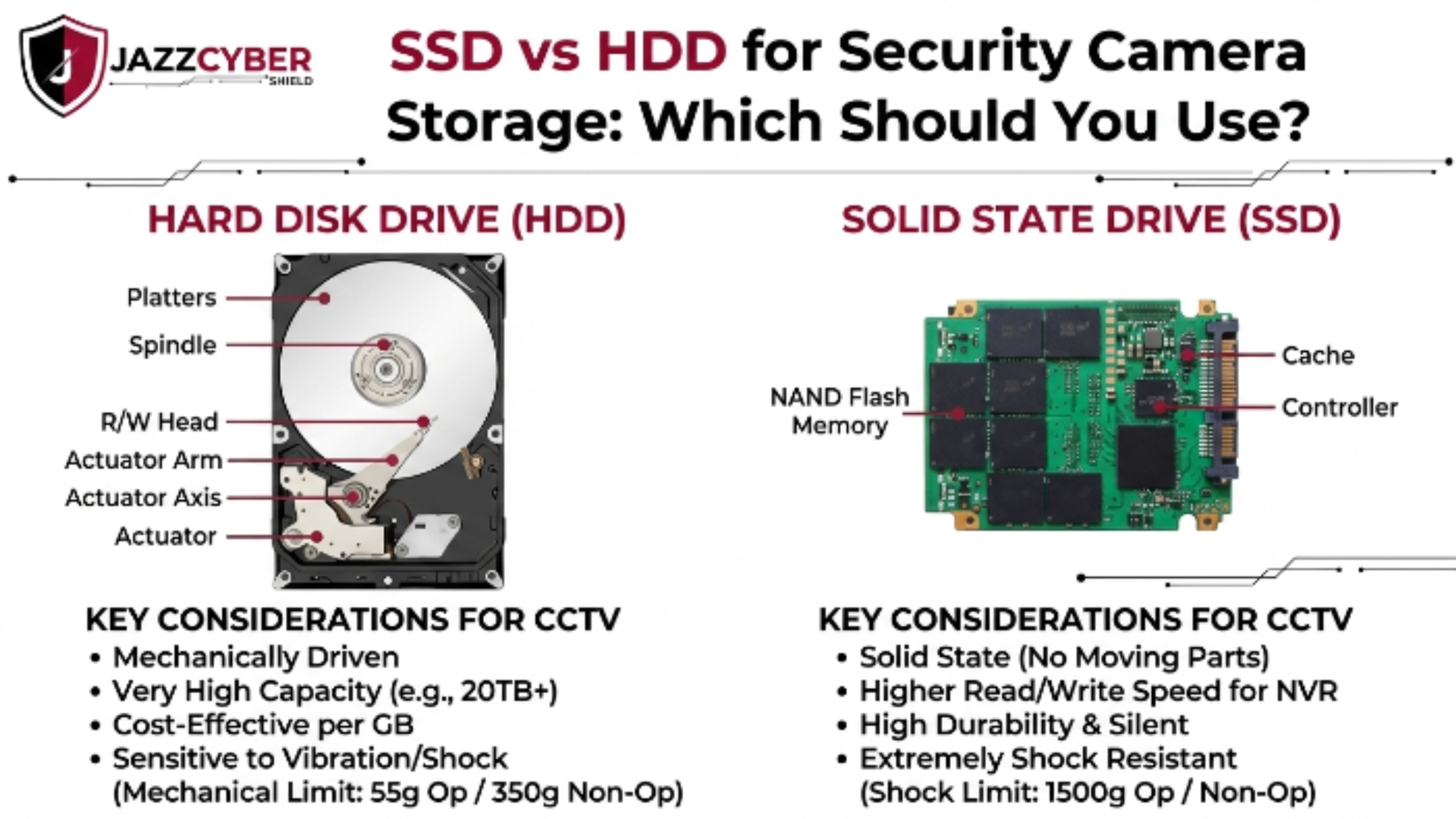
HDD (Hard Disk Drive) uses spinning magnetic platters to store data. A physical read/write head moves across the disk. It’s been the standard for decades.
SSD (Solid State Drive) has no moving parts. Data is stored on NAND flash memory chips — the same basic technology in your phone.
Here’s what that difference looks like in a surveillance context:
┌─────────────────────────────────────────────┐
│         STORAGE TECHNOLOGY OVERVIEW          │
├──────────────────┬──────────────────────────┤
│       HDD        │          SSD             │
├──────────────────┼──────────────────────────┤
│ Spinning platters│ NAND flash chips         │
│ Moving read head │ No moving parts          │
│ ~5ms seek time   │ ~0.1ms access time       │
│ Vibration-prone  │ Vibration-resistant      │
│ Lower cost/TB    │ Higher cost/TB           │
│ 3-5 year lifespan│ 5-10 year lifespan       │
│ Loud operation   │ Silent operation         │
└──────────────────┴──────────────────────────┘
For a standard home or small business setup, both can work. But the devil is in the details of how security cameras actually write data.
How Security Cameras Write Data (And Why It Matters)
Here’s what most people don’t understand about security camera storage.
Surveillance systems don’t write data the way a computer does. A PC writes files in bursts — you open a program, save a document, move on. Long idle periods in between.
Security cameras write continuously. Twenty-four hours a day. Seven days a week. Every second of every day, your NVR is hammering that drive with new data.
This is called continuous write workload — and it’s brutal on standard consumer drives.
For SSDs, this raises the question of TBW (Terabytes Written) — the total amount of data an SSD can write before NAND cells start to degrade. A cheap consumer SSD might have 150 TBW. A single 4-camera system running 4K can burn through that in under a year.
For HDDs, continuous writes cause heat buildup, head wear, and eventual mechanical failure. The question isn’t if — it’s when.
This is why both drive types have surveillance-specific models:
- WD Purple and Seagate SkyHawk for HDD surveillance use
- Samsung 870 EVO (with caution) or WD Purple SSD for solid-state surveillance
If you’re not using a drive designed for this workload, you’re rolling the dice.
SSD for Security Cameras: Pros and Cons
SSDs have come down in price dramatically. A 1TB SSD now costs under $80. That makes them tempting for security camera storage — but there are real trade-offs.
Advantages of SSD for Security Camera Storage:
- No moving parts — survives vibration from HVAC, vehicles, or physical tampering better than any HDD
- Silent operation — zero noise in sensitive environments
- Faster access — instant playback seeking, no spin-up delay
- Lower power draw — extends UPS runtime during outages
- Better for edge devices — ideal for compact cameras with onboard storage
Disadvantages of SSD for Security Camera Storage:
- Write endurance limits — continuous surveillance writes can exhaust cheap SSDs quickly
- Higher cost per terabyte — a 4TB surveillance SSD costs 3-4x more than a 4TB HDD
- Silent failure risk — when SSDs fail, they often fail completely without warning, unlike HDDs which typically degrade gradually
- Not cost-effective at scale — a 16-camera 4K system needs 8–12TB minimum; SSD cost at that scale is prohibitive
Bottom line on SSD: Best for 1–4 camera setups, edge storage (cameras with SD card or onboard SSD slots), or environments where vibration is a real concern. Use surveillance-rated SSDs only.
Browse our full lineup of security cameras including models with onboard SSD-compatible storage options.
HDD for Security Cameras: Pros and Cons
HDDs have powered surveillance systems for decades. They’re not going anywhere — and for good reason.
Advantages of HDD for Security Camera Storage:
- Cost per terabyte — a 4TB surveillance HDD runs $80–$120. An equivalent SSD runs $250–$350
- Massive capacity options — 10TB, 14TB, and 20TB surveillance HDDs exist. Comparable SSDs are rare or extremely expensive
- Gradual failure pattern — HDDs usually show warning signs (clicking, slow reads, S.M.A.R.T. errors) before complete failure, giving you time to act
- Proven in enterprise surveillance — every major NVR manufacturer — including Hikvision — designs their systems around surveillance-grade HDDs
- Replaceable and scalable — easy to swap out drives in NVR arrays as storage needs grow
Disadvantages of HDD for Security Camera Storage:
- Mechanical wear — moving parts mean eventual mechanical failure; vibration accelerates this
- Heat sensitivity — drives packed tightly in NVR enclosures can overheat
- Slower seek times — less critical for surveillance playback, but noticeable in high-channel systems
- Spin-up delay — 3–5 seconds from sleep mode; not ideal if instant playback is critical
Bottom line on HDD: The right call for most 4–32 camera surveillance setups, DVR/NVR systems, and any setup where storage capacity matters more than form factor.
SSD vs HDD: Head-to-Head Comparison Table
| Feature | SSD (Surveillance-Rated) | HDD (Surveillance-Rated) |
|---|---|---|
| Cost (4TB) | $250–$350 | $80–$120 |
| Max Capacity (consumer) | 4–8TB | Up to 20TB |
| Continuous Write Rating | Moderate (check TBW) | High (purpose-built) |
| Vibration Resistance | Excellent | Poor to Moderate |
| Failure Warning | Rare — often sudden | Usually gradual (S.M.A.R.T.) |
| Noise | Silent | Low hum |
| Power Consumption | Low | Medium |
| Best For | Edge / small setups | NVR / large systems |
| Typical Lifespan (24/7) | 3–7 years | 3–5 years |
| Recommended Brands | WD Purple SSD | WD Purple, Seagate SkyHawk |
What the Professionals Actually Use
Walk into a security operations center, a retail chain’s back office, or a hospital’s security room. Look at the NVR rack.
It’s HDDs. Almost always.
Not because IT professionals don’t know about SSDs — they do. It’s because the math doesn’t lie.
For a 16-camera 4K system with 30-day retention, you need roughly 40–50TB of storage. That’s five 10TB surveillance HDDs at around $600–$700 total. The same capacity in SSD? You’re looking at $3,000–$5,000+.
That said, hybrid setups are gaining traction. Some enterprise systems now use:
- SSD as cache/buffer — fast write layer that transfers to HDD for long-term storage
- SSD for active clips — incidents flagged for review stay on SSD for quick access; raw footage moves to HDD
- NVMe SSD for metadata — the index of what’s stored where lives on SSD; the actual video is on HDD
Microsoft’s security infrastructure documentation and enterprise NVR vendors increasingly recommend this tiered approach for large deployments.
For small businesses and homes, though? Pick one. Make it surveillance-rated. Size it correctly.
How to Choose the Right Storage for Your Setup
Follow this decision tree based on your actual situation:
1. Count your cameras.
- 1–4 cameras: SSD is viable if budget allows
- 5+ cameras: HDD is almost always the right call economically
2. Calculate your storage need.
- 1080p camera, motion-triggered: ~5 GB/day
- 1080p camera, continuous: ~15 GB/day
- 4K camera, continuous: ~30–50 GB/day
- Multiply by number of cameras × retention days (14, 30, 60)
3. Check your environment.
- High vibration (near HVAC, vehicles, machinery): SSD wins
- Normal indoor environment: HDD is fine
- Outdoor or industrial enclosure: SSD
4. Assess your failure tolerance.
- Need gradual failure warnings: HDD
- Silent, compact installation: SSD
- Hybrid approach for critical systems: both
5. Match your drive to your system.
- Using a Hikvision or similar NVR? Use WD Purple or Seagate SkyHawk HDD
- Using edge/onboard camera storage? Use WD Purple SSD or Samsung surveillance-rated SSD
Browse Hikvision security cameras — all compatible with surveillance-grade HDD and SSD storage options.
✅ Quick Reference Checklist
Use this before buying any drive for your surveillance system:
SECURITY CAMERA STORAGE CHECKLIST
━━━━━━━━━━━━━━━━━━━━━━━━━━━━━━━━━━
[ ] Using a SURVEILLANCE-RATED drive (not desktop/laptop)
[ ] Drive is rated for 24/7 continuous operation
[ ] Calculated total storage needed (cameras × GB/day × retention)
[ ] Matched drive capacity to NVR slot limits
[ ] Checked TBW rating if using SSD
[ ] Enabled S.M.A.R.T. monitoring in NVR settings
[ ] Planned for drive replacement every 3–5 years
[ ] Using RAID or backup if footage is business-critical
[ ] Drive installed in a secured, ventilated enclosure
[ ] NVR firmware updated before first use
━━━━━━━━━━━━━━━━━━━━━━━━━━━━━━━━━━
Frequently Asked Questions
Q: Can I use a regular laptop SSD in my NVR? A: Technically yes — but you shouldn’t. Consumer laptop SSDs aren’t rated for 24/7 continuous writes. You’ll hit write endurance limits much faster than expected. Use a surveillance-rated SSD like WD Purple SSD.
Q: How long does a surveillance HDD last? A: A quality surveillance HDD like WD Purple or Seagate SkyHawk typically lasts 3–5 years under continuous 24/7 use. Monitor S.M.A.R.T. data and replace proactively before failure.
Q: Do security cameras need fast storage speeds? A: Not really. Security cameras write sequentially at fixed bitrates — they don’t need the random-access speed that makes SSDs shine in computers. Speed matters more for playback than recording.
Q: What’s better for outdoor NVR enclosures — SSD or HDD? A: SSD. Outdoor and industrial environments bring vibration, temperature swings, and humidity. SSDs handle all of that better than mechanical HDDs.
Q: Is NVMe SSD worth it for security camera storage? A: For most setups, no. NVMe speed isn’t needed for surveillance recording. NVMe runs hotter, costs more, and many NVR enclosures don’t support the M.2 form factor. Stick with SATA SSD or HDD.
Conclusion
The security camera storage debate doesn’t have one universal answer. It has the right answer for your setup.
For most homes and small businesses with 4–16 cameras, a surveillance-rated HDD is the practical choice. Lower cost, higher capacity, gradual failure warnings. WD Purple and Seagate SkyHawk are the proven names.
For compact installs, edge devices, vibration-prone environments, or premium setups where silence and resilience matter — go SSD. Just confirm it’s surveillance-rated and calculate TBW against your expected write load.
Whatever you choose, stop using desktop drives. Stop ignoring drive health monitoring. And stop treating storage as an afterthought when it’s literally where all your security evidence lives.
Your cameras are only as good as the drives behind them.
Related Reading
- How Hackers Break Into Security Cameras — and How to Stop Them
- VLAN Setup for Home Networks in 2026
- Router Settings You Must Change Right Now
- Hidden Dangers of Public Wi-Fi in 2026

