



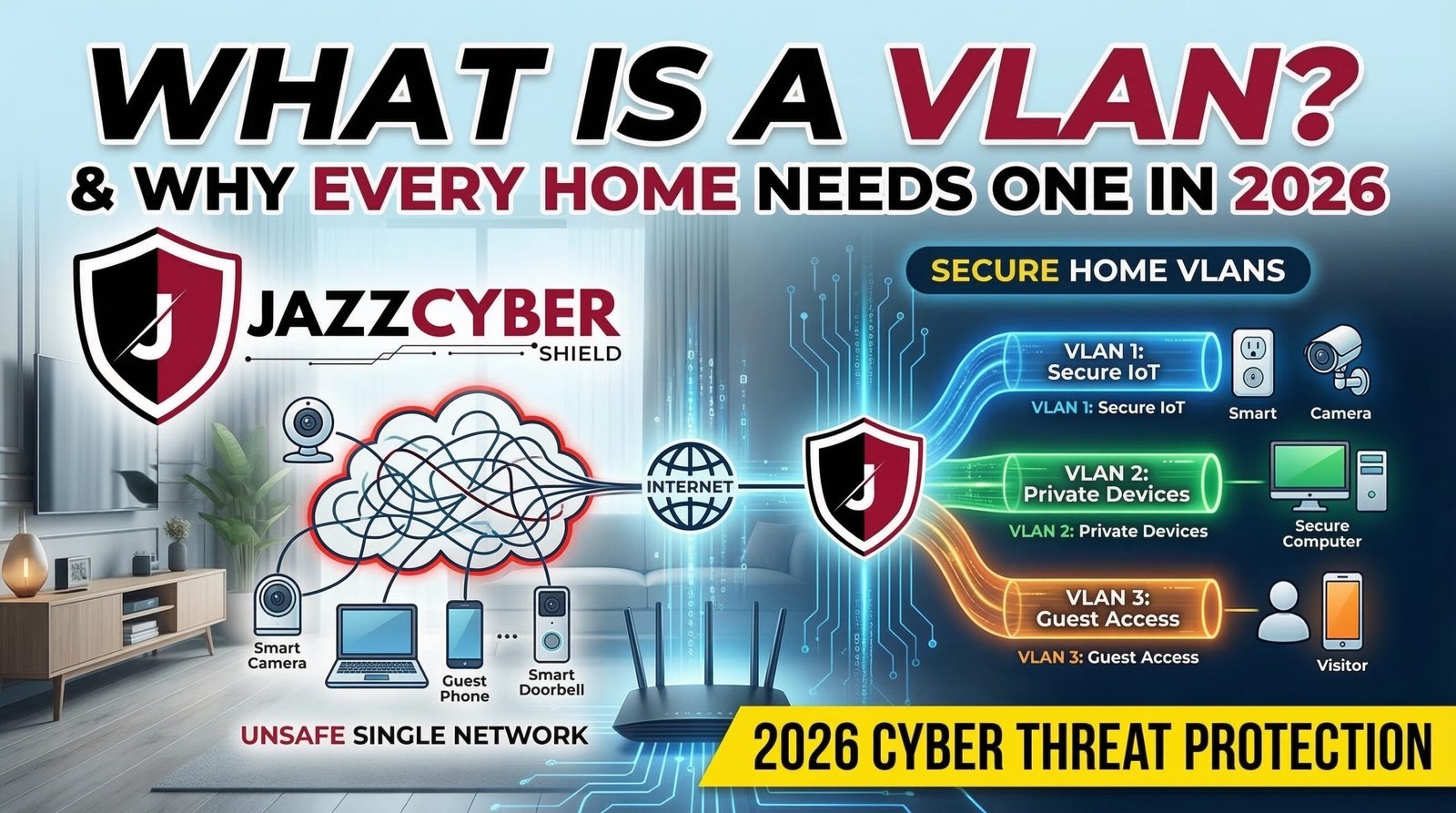
Your Home Network Is One Weak Device Away from a Full Breach
Most people never think about network segmentation — until a hacker exploits one unsecured smart device and reaches everything else. Setting up a VLAN for your home network is the single most effective way to prevent that.
Here is the core problem. Every device on a typical home Wi-Fi network lives on the same flat broadcast domain. Your work laptop, Your toddler’s tablet, Your smart fridge, Your IP camera. They are all neighbors. Furthermore, they share the same subnet, the same trust level, and the same attack surface.
Now consider the risk. Hackers are actively targeting IoT devices in homes right now. A single compromised smart bulb can hand an attacker a direct path to your work machine or banking session. In a flat network, there are no internal walls. Therefore, if one device falls, all devices are at risk.
The solution is not to remove your smart devices. Instead, it is to isolate them. That is exactly what a Virtual LAN — a VLAN — does. In 2026, implementing a VLAN for your home network is no longer optional. It is a baseline security requirement.
What Exactly Is a VLAN?
A VLAN (Virtual Local Area Network) is a logically segmented network that runs over your existing physical infrastructure. Specifically, instead of buying separate switches and running separate cables, a VLAN lets you create isolated network segments entirely in software.
Think of it as an apartment building. Everyone lives in the same building — the same physical switch — but every apartment has its own locked door. A resident in Apartment 3A cannot simply walk into 4B. VLANs apply that same principle to your network traffic.
How VLANs Work: 802.1Q Tagging Explained Simply
The technical standard behind VLANs is IEEE 802.1Q. Here is what it does in plain English.
When a data packet travels across your network, 802.1Q tagging inserts a small 4-byte header into that packet. This header contains a VLAN ID — a number between 1 and 4094. Your managed switch reads that tag and decides which port is allowed to receive the traffic.
Untagged traffic from regular devices — like a laptop or phone — enters the switch on an access port. The switch assigns it silently to its designated VLAN. Tagged traffic, however, travels between switches and your router on trunk ports, carrying its VLAN ID so every device in the chain knows where that packet belongs.
As a result, devices on VLAN 10 (your work machines) physically cannot communicate with devices on VLAN 20 (your IoT gadgets) unless you explicitly configure a rule to allow it. That separation is the entire point.
Why a VLAN for Home Network Security Is Critical in 2026
The IoT Explosion Has Broken the Flat Network Model
The number of connected devices in an average household has grown dramatically. Smart TVs, robot vacuums, video doorbells, HVAC controllers, and baby monitors — most ship with minimal firmware security, infrequent software updates, and hardcoded credentials. They are, in almost every case, the weakest link on any home network.
Without segmentation, your Ring doorbell and your remote work VPN client share the same network. That is an unacceptable risk for anyone handling sensitive company data from home. Additionally, many businesses now require remote workers to demonstrate a clean, isolated work environment. A properly configured VLAN for home network use satisfies that requirement.
Before building your VLAN, read our guide on the top 10 signs your network has already been compromised. It will help you assess your current exposure.
Remote Work Has Made Home Network Segmentation a Compliance Issue
Corporate IT teams have used VLANs for years to separate guest Wi-Fi from internal resources. In 2026, however, your home is your office. Compliance frameworks, endpoint detection tools, and zero-trust architectures all assume isolated, controlled environments. A VLAN for home network setup gives you exactly that structure.
Most people also overlook a related problem: router configuration. If you have not audited your router settings recently, our article on how your home router may be exposing your data right now is essential reading before you configure your first VLAN.
Home Labs Require Strict Traffic Isolation
If you run a home lab — Proxmox, pfSense, TrueNAS, or a basic Docker stack — mixing lab traffic with production devices creates serious risk. A misconfigured VM or an aggressive network scan should never reach your family’s devices. VLANs let you quarantine your lab environment completely.
Choosing Hardware for Your VLAN Home Network Setup
This section is where most guides are vague. Here is a specific breakdown.
Step 1: You Need a Managed Switch
A standard unmanaged switch has no concept of VLANs. It forwards all traffic to all ports without any filtering. To implement 802.1Q tagging, you specifically need a managed switch that supports per-port VLAN assignment and trunk configuration.
Jazz Cyber Shield stocks a curated range of managed network switches selected specifically for home lab and SOHO deployments. Two brands, in particular, stand out:
- Cisco managed switches — Industry-standard reliability, full 802.1Q support, and an extensive IOS CLI ecosystem. Ideal for users who want granular VLAN control and plan to scale their setup over time.
- HPE Aruba switches — Excellent for mixed wired and wireless VLAN segments. Their web interface makes VLAN assignment intuitive even for first-time home lab builders.
Both brands support full trunk and access port configuration, IGMP snooping, and QoS. Therefore, both cover everything a multi-VLAN home deployment requires.
Step 2: You Need a VLAN-Capable Router or Firewall
Your router must support inter-VLAN routing — the ability to enforce traffic rules between VLANs. Consumer ISP routers generally cannot do this. You need one of the following:
- A router running DD-WRT or OpenWRT firmware with VLAN support enabled
- A dedicated firewall appliance running pfSense or OPNsense on purpose-built hardware
The firewall path is strongly recommended for any serious setup. Jazz Cyber Shield carries a full range of enterprise firewall appliances suited for home and small office use:
- Fortinet FortiGate firewalls — Best-in-class NGFW performance with native VLAN interface support, SD-WAN integration, and one of the most mature policy engines at this price tier.
- SonicWall firewalls — A strong choice for remote workers who need Deep Packet Inspection, content filtering, and straightforward VLAN zone management.
- WatchGuard firewalls — Excellent for multi-VLAN labs that require layered security policies. Moreover, WatchGuard is known for approachable management interfaces that do not sacrifice enterprise-grade control.
Step 3: Your Access Point Must Support Multi-SSID VLAN Tagging
For wireless VLANs, your access point must support multiple SSIDs — each mapped to a separate VLAN. Consumer-grade APs typically cannot do this. Jazz Cyber Shield’s enterprise wireless access points support this natively.
Once configured, your IoT devices connect to one SSID (tagged to VLAN 30). Your work devices connect to another (tagged to VLAN 10). They never share a broadcast domain — regardless of sitting on the same physical AP. For an in-depth look at wireless hardening, see our Wi-Fi 6 router security settings guide for 2026.
A Practical VLAN Architecture for Home Networks in 2026
Below is a battle-tested segmentation model. Start here and adapt as your needs grow.
| VLAN ID | Network Name | Devices |
|---|---|---|
| VLAN 10 | Work / Corporate | Laptop, work phone, VPN endpoint |
| VLAN 20 | Personal | Personal computers, tablets, phones |
| VLAN 30 | IoT / Smart Home | Smart speakers, cameras, appliances |
| VLAN 40 | Guest Wi-Fi | Visitor devices, temporary access |
| VLAN 50 | Home Lab | VMs, servers, test environments |
Each VLAN gets its own subnet (for example, 192.168.10.0/24 for VLAN 10), its own DHCP scope, and its own firewall rule set. By default, block all inter-VLAN traffic. Then open only what you explicitly require. For instance, allow your NAS on VLAN 50 to be reached from VLAN 20 — but never from VLAN 30.
FAQ: Top Questions About a VLAN for Home Network Use
Does a VLAN hide my IP address?
No. A VLAN is a segmentation tool, not an anonymization tool. It isolates devices on your local network but does not mask your public IP when traffic leaves your router. For IP privacy, pair your VLAN with a trusted VPN service. We compare your options in free vs. paid VPNs — the truth in 2026.
Do I need a special router for a VLAN for home network use?
Yes, specifically. Standard ISP routers do not support VLAN tagging or inter-VLAN routing. You need either third-party router firmware (OpenWRT, DD-WRT) or a dedicated firewall appliance. Browse Fortinet, SonicWall, and WatchGuard options at Jazz Cyber Shield across every price point.
Can I set up a VLAN for home network Wi-Fi?
Yes — but only with an access point that supports multiple SSIDs mapped to separate VLANs. Jazz Cyber Shield’s enterprise wireless access points support this natively, tagging each SSID’s traffic to its designated VLAN before forwarding to your managed switch.
Will VLANs slow down my home network?
In practice, no. Modern managed switches handle 802.1Q tagging in hardware at line speed. The overhead is negligible on gigabit networks. Inter-VLAN routing through a firewall adds minimal latency. Importantly, that difference is imperceptible for everyday use.
How many VLANs should a home network have?
For most users, three to five VLANs is the right number for a VLAN for home network deployment. One for work devices, one for personal use, one for IoT, and optionally one each for guests and a home lab. Adding more increases management complexity without a proportional security gain. Start with three and expand as your setup matures.
Build Your Segmented Home Network Today
Network segmentation used to be an enterprise concept. In 2026, however, it is a home network fundamental. The rise of insecure IoT devices, the permanence of remote work, and the growth of home labs have made a flat, unsegmented home network a genuine liability — not just an inconvenience.
Fortunately, the right hardware is accessible, affordable, and well-supported. A properly configured VLAN for home network security is achievable in an afternoon with the right switch and firewall.
Ready to build your segmented network? Browse Jazz Cyber Shield’s complete catalog of managed switches, firewall appliances, and enterprise-grade access points — all selected for home lab enthusiasts, remote workers, and serious home network builders.
→ Shop All Networking Hardware at Jazz Cyber Shield

