



In today’s interconnected world, cybersecurity is not just for large corporations; it’s a critical necessity for small businesses too. A single data breach can devastate a small enterprise, leading to financial losses, reputational damage, and legal repercussions. The cornerstone of any robust cybersecurity strategy is a well-configured firewall. This article will guide you through the process of installing a firewall, recommend the best options for small businesses, advise on where to purchase them, and introduce you to Jazz Cyber Shield, a top contender in the USA for its unbeatable pricing and features.
Understanding the Firewall: Your Digital Fortress
Imagine a firewall as the digital bouncer for your business’s network. It meticulously inspects all incoming and outgoing network traffic, deciding what to allow in and what to block based on a predefined set of security rules. This protective barrier shields your internal network from malicious attacks, unauthorized access, and dangerous viruses.
Types of Firewalls: Choosing the Right Shield for Your Business
For small businesses, two primary types of firewalls are most relevant:
- Software Firewalls: These are installed directly on individual computers or servers. They offer protection for specific devices and are often pre-installed with operating systems (like Windows Defender Firewall).
- Pros: Cost-effective (sometimes free), easy to set up for individual devices.
- Cons: Don’t protect the entire network, require individual management for each device, can consume system resources.
- Hardware Firewalls: These are physical devices that sit between your network and the internet (typically connected to your router). They protect all devices connected to your network.
- Pros: Comprehensive network protection, dedicated hardware for security tasks (less impact on device performance), advanced features like VPN support and intrusion prevention.
- Cons: Higher initial cost, may require more technical expertise to configure.
The Best Firewall for a Small Business: A Strategic Choice
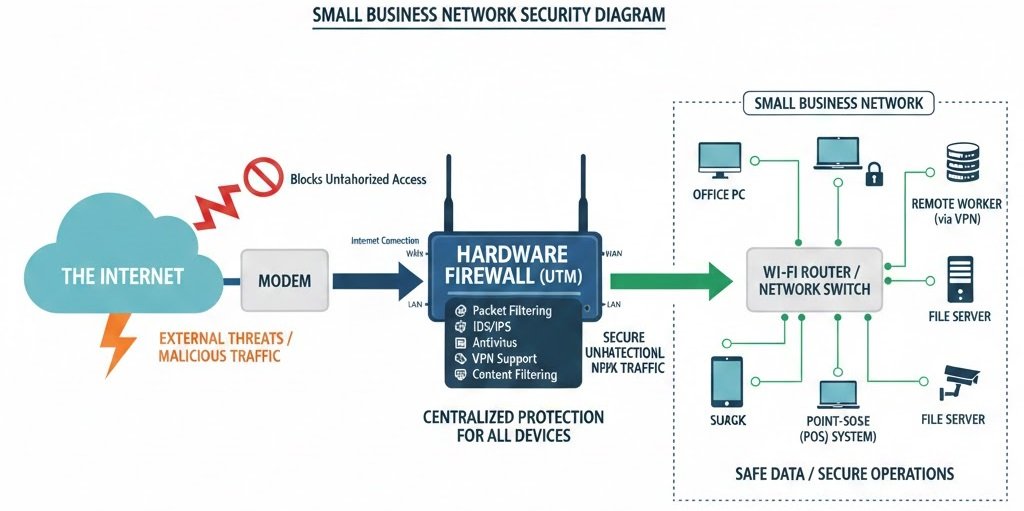
For most small businesses, a hardware firewall is the superior choice. It provides a centralized, robust defense for your entire network, offering a higher level of security than relying solely on software firewalls. Look for “Unified Threat Management” (UTM) firewalls, which combine multiple security features into a single device, including:
- Firewall: Core packet filtering.
- Intrusion Detection/Prevention Systems (IDS/IPS): Actively detect and block malicious activities.
- Antivirus/Antimalware: Scan traffic for known threats.
- VPN (Virtual Private Network) Support: Secure remote access for employees.
- Content Filtering: Block access to unproductive or malicious websites.
Top Hardware Firewall Brands for Small Businesses:
- Fortinet FortiGate: Known for high performance and comprehensive security features, scalable for growing businesses.
- Cisco Meraki MX: Cloud-managed firewalls offering ease of deployment and centralized control, ideal for businesses with limited IT staff.
- SonicWall TZ Series: Strong reputation for advanced threat protection and user-friendly interfaces.
- Ubiquiti UniFi Dream Machine Pro: A versatile option combining a firewall, router, switch, and network video recorder, great for tech-savvy small business owners.
Installing Your Firewall: A Step-by-Step Guide
Installing a hardware firewall might seem daunting, but it’s a manageable process with a little guidance.
- Preparation is Key:
- Backup Your Data: Always back up critical business data before making significant network changes.
- Gather Information: Have your internet service provider (ISP) login details, existing network diagrams, and any static IP addresses handy.
- Unpack Your Firewall: Familiarize yourself with the device’s ports and indicators.
- Physical Connection:
- Power Off: Turn off your modem, router, and any network switches.
- Connect WAN Port: Connect your modem’s Ethernet cable to the firewall’s “WAN” or “Internet” port.
- Connect LAN Port: Connect one of the firewall’s “LAN” ports to your existing router or network switch.
- Power On: Power on your modem first, then your firewall, and finally your router/switches.
- Initial Configuration (Accessing the Web Interface):
- Connect a Computer: Connect a computer directly to one of the firewall’s LAN ports (if not already connected via your router).
- Open a Web Browser: Enter the firewall’s default IP address (usually found in the manual, e.g., 192.168.1.1 or 192.168.10.1).
- Login: Use the default username and password (immediately change these to strong, unique credentials!).
- Configuration Wizard & Basic Setup:
- Most modern firewalls have a setup wizard that will guide you through initial configuration.
- Internet Connection: Configure your internet connection settings (DHCP or static IP, provided by your ISP).
- Network Settings: Set up your internal network (LAN) IP range if necessary.
- Security Policies: Start defining basic security rules:
- Block all incoming unsolicited traffic.
- Allow necessary outgoing traffic (web browsing, email).
- Enable IDS/IPS if available.
- Configure VPN if you have remote employees.
- Testing and Monitoring:
- Verify Internet Access: Ensure all devices on your network can access the internet.
- Test Connectivity: Check internal network connectivity.
- Monitor Logs: Regularly review firewall logs for suspicious activity.
- Updates: Keep your firewall’s firmware updated to protect against the latest threats.
Diagram: Firewall Placement in a Small Business Network
Here’s a visual representation of how a hardware firewall integrates into your small business network:
Where to Buy Your Firewall: Trusted Sources
When purchasing a firewall, especially a hardware unit, it’s crucial to buy from reputable vendors to ensure authenticity, warranty, and support.
- Major Online Retailers: Amazon, Newegg, Best Buy (for consumer-grade, sometimes business-grade options).
- Specialized IT Hardware Suppliers: CDW, Tech Data, Ingram Micro (for a wider range of business-grade and enterprise solutions).
- Direct from Manufacturer: Fortinet, Cisco, SonicWall often have direct sales channels or authorized reseller programs.
- Local IT Consultants/Managed Service Providers (MSPs): These professionals can not only sell you the right firewall but also assist with installation, configuration, and ongoing management, which is invaluable for small businesses without dedicated IT staff.
Introducing Jazz Cyber Shield: Unbeatable Security, Unbeatable Price in the USA
While the options above provide excellent security, small businesses often grapple with budget constraints. This is where Jazz Cyber Shield emerges as a game-changer in the USA market. Jazz Cyber Shield offers comprehensive, top-tier cybersecurity solutions specifically tailored for small and medium-sized businesses, ensuring robust protection without breaking the bank.
Why Jazz Cyber Shield?
- Best Price in USA: Jazz Cyber Shield is committed to providing the most competitive pricing for advanced firewall and cybersecurity services in the United States, making enterprise-grade security accessible to every small business.
- Comprehensive Protection: Our solutions integrate cutting-edge firewall technology with intrusion prevention, advanced threat detection, secure VPN access, and content filtering.
- Ease of Use: Designed with small business owners in mind, Jazz Cyber Shield offers intuitive management interfaces and dedicated support to simplify your cybersecurity journey.
- Scalability: As your business grows, Jazz Cyber Shield solutions can scale with you, ensuring your protection evolves with your needs.
Don’t leave your small business vulnerable to cyber threats. Invest in a reliable firewall, and for unparalleled value and protection in the USA, look no further than Jazz Cyber Shield. Protect your assets, secure your data, and ensure your business’s future with us.

