



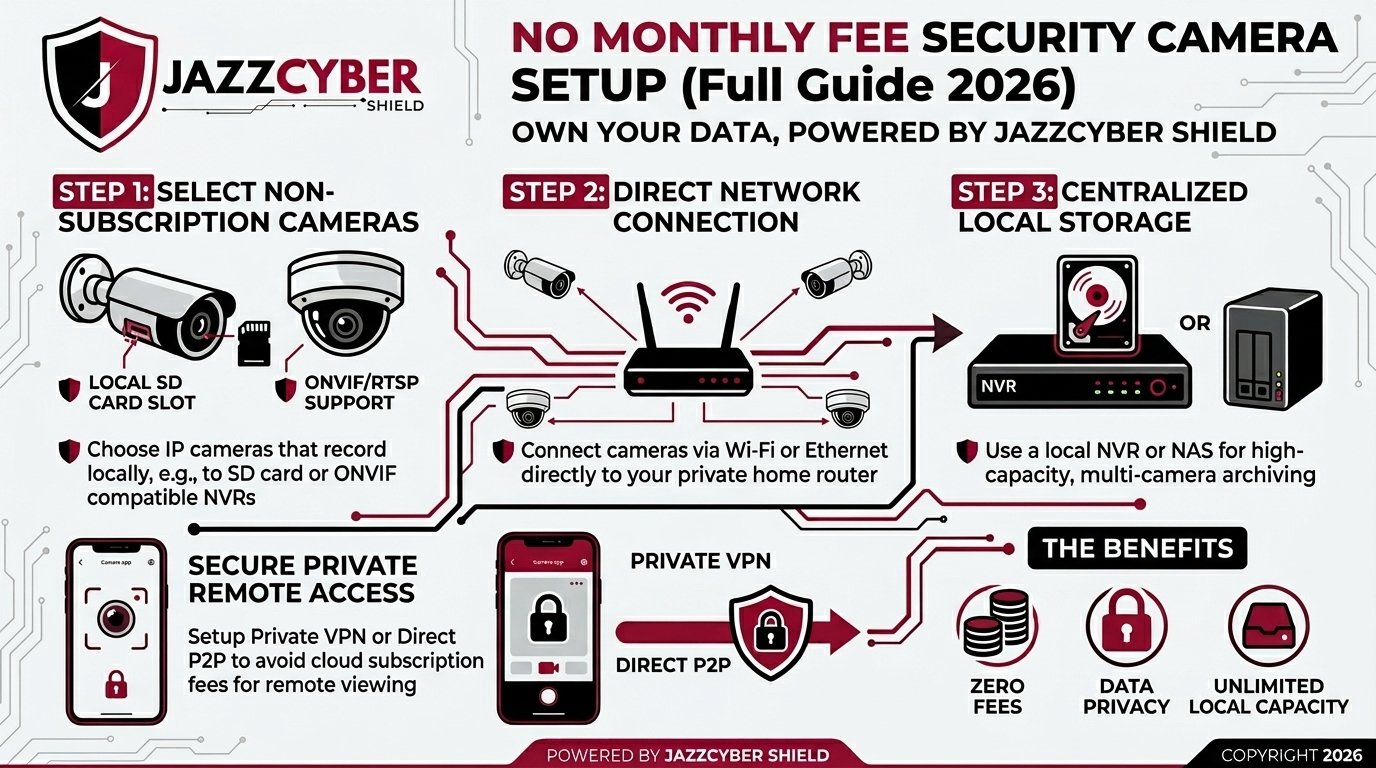
Are you tired of paying $10–$50 every month just to watch your own security footage? You are not alone. Millions of homeowners and business owners are ditching cloud-based subscriptions and switching to security cameras without a monthly fee — saving hundreds of dollars a year without sacrificing an ounce of security.
In this complete 2026 guide, we will walk you through everything you need to know: what hardware to buy, how to set it up, what software to use, and how to store your footage 100% locally — for free, forever. Whether you are a complete beginner or a tech-savvy user, this guide has you covered.
At Jazz Cyber Shield, we specialize in professional-grade surveillance and networking hardware. Everything we recommend here is available in our store at competitive prices.
What Does “No Monthly Fee” Actually Mean?
When companies like Ring, Nest (Google Home), or Arlo sell you a camera, they often bundle it with a cloud storage subscription. Without paying that monthly fee, your footage either doesn’t get saved or is only stored for 24–48 hours. This means you are essentially renting access to your own security footage.
No monthly fee security cameras store footage locally — on a hard drive, NAS device, SD card, or Network Video Recorder (NVR) — so no third-party company holds your data, and you pay nothing beyond the initial hardware cost.
This approach is also far more secure. As we discuss in our blog post Hacked Security Camera Websites: What They Are and How to Stop Them, cloud-connected cameras are one of the most common targets for hackers. Local storage removes that attack surface entirely.
Why Choose Security Cameras Without a Subscription?
Before diving into the setup guide, here’s why more people are choosing subscription-free surveillance in 2026:
- Complete data privacy — your footage never leaves your property.
- Lower long-term cost — pay once for hardware, nothing more.
- No internet dependency — cameras record even during outages.
- More storage options — terabytes of storage vs. cloud limitations.
- Faster access — local footage loads instantly with no bandwidth throttling.
- Better cybersecurity posture — fewer attack vectors as explained in our guide on How Hackers Break Into Security Cameras (And How to Protect Yours).
Step 1: Choose the Right Type of Security Camera System
The first step in setting up no subscription security cameras is picking the right system type. There are three main options:
Option A: Wired PoE (Power over Ethernet) Camera System
This is the most professional and reliable setup. PoE cameras receive both power and data through a single Ethernet cable — no separate power adapter needed. These are ideal for permanent home and business installations.
You will need a PoE network switch to power the cameras. Jazz Cyber Shield carries enterprise-grade Cisco PoE switches such as the Cisco Meraki MS120 8-Port PoE+ Switch and the Cisco 9300 series — perfect for powering multiple cameras across a property without monthly cloud costs.
Best for: Permanent installations, businesses, large properties.
Option B: Wireless (Wi-Fi) Cameras with Local Storage
Wireless security cameras connect over your home Wi-Fi network and save footage to a local SD card or NAS device. No subscription, no cloud. Just ensure your router is secure — read our article on 7 Router Settings You Must Change Right Now to lock down your network before adding cameras.
Best for: Renters, small apartments, temporary setups.
Option C: Analog CCTV with DVR
Traditional CCTV cameras connect to a Digital Video Recorder (DVR) via coaxial cable. While older technology, these systems are extremely affordable, reliable, and 100% offline — making them ideal for those who want zero internet exposure.
Best for: Budget setups, offline environments, older buildings.
Step 2: Select the Best Security Cameras for Local Storage
Not all cameras support local recording without a subscription. Here are the best categories to look at in 2026, all available at Jazz Cyber Shield’s Security Cameras store:
Axis Communications Cameras (Enterprise Grade)
Axis Communications cameras are renowned worldwide for their image quality, cybersecurity hardening, and local storage support. Every Axis camera supports onboard SD card recording, ONVIF compatibility, and integration with free NVR software.
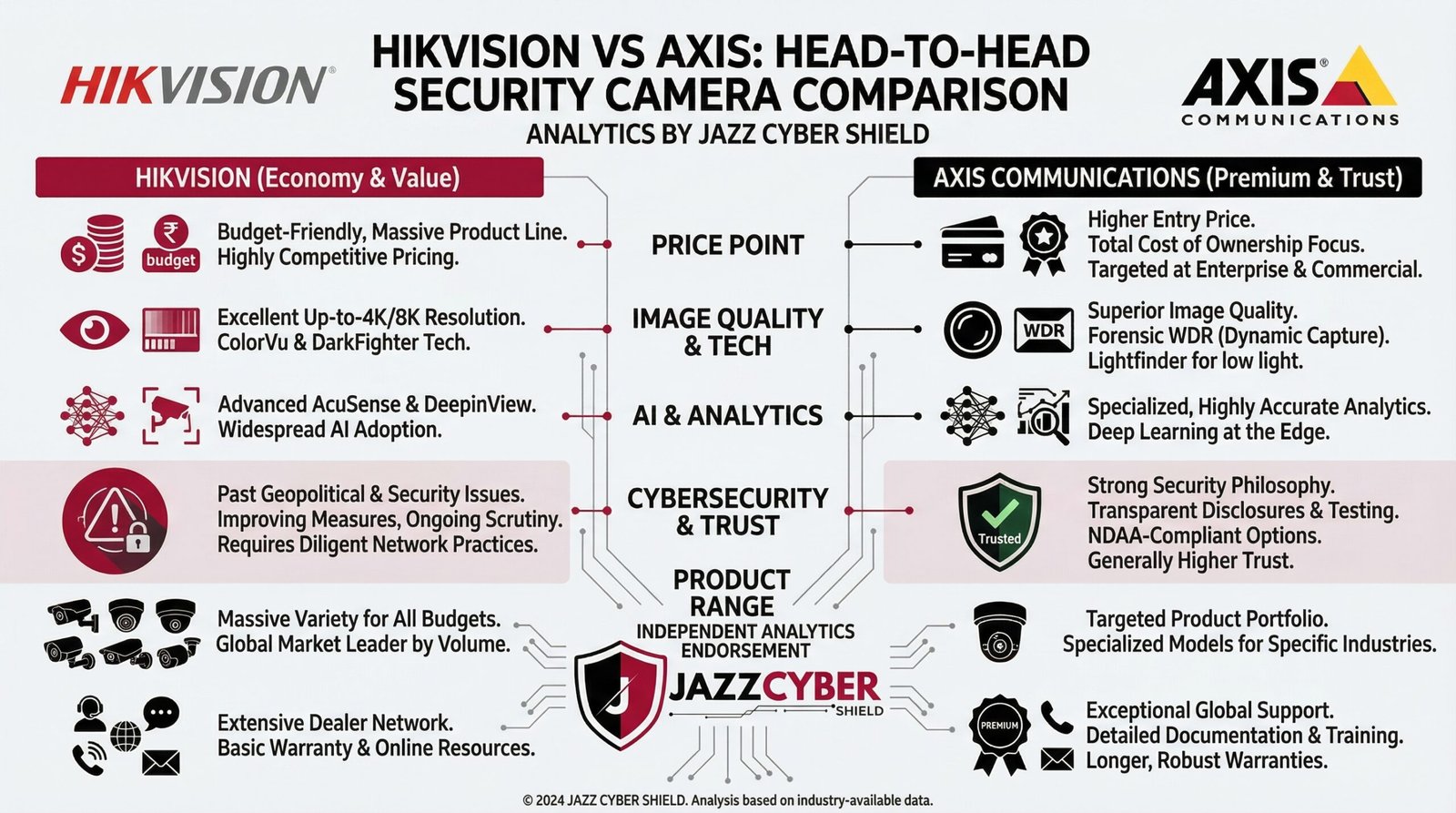
Top Axis cameras available at Jazz Cyber Shield include the AXIS M3065-V 2MP Compact Dome Camera (from $229), the AXIS M2036-LE Network Camera (from $518), the AXIS M3057-PLVE 6MP Dome Network Camera, and the AXIS M3066-V 4MP Indoor Mini Dome Camera. Compare Axis vs. competitors in our blog post Hikvision vs Axis Security Cameras: Which Is Safer in 2026?
Hikvision Cameras (Best Value)
Hikvision security cameras offer outstanding image quality at an affordable price point. They natively support local NVR recording, SD card storage, and ONVIF — making them a top choice for free security camera setups worldwide.
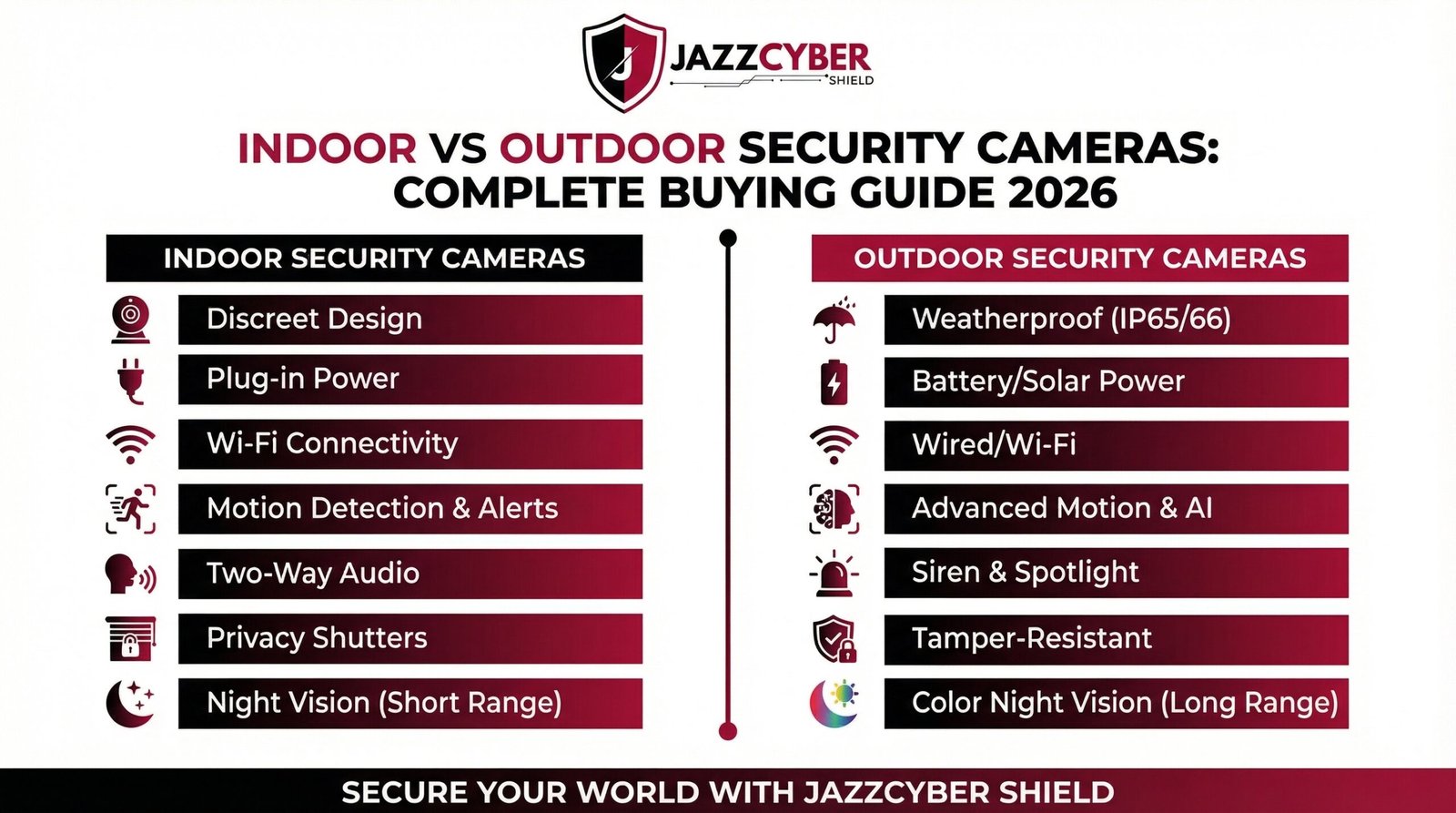
Available Hikvision models at Jazz Cyber Shield include the DS-2CD1143G0-I (from $96), the DS-2CD2083G0-I (from $203), the DS-2CD2143G2-IU (from $126), and the DS-2CD2085G1-I (from $145). Before purchasing, check out our complete review: Indoor vs Outdoor Security Cameras: Complete Buying Guide 2026.
Security Warning: Always buy cameras from reputable dealers. As reported in our article Cheap Security Cameras Are Sending Your Footage Overseas — Here’s Why, counterfeit or grey-market cameras can transmit your footage to overseas servers without your knowledge.
Step 3: Choose Your Local Storage Method
This is the heart of the no monthly fee security camera system. Here are your main local storage options:
Method 1: NVR (Network Video Recorder)
An NVR is a dedicated device that receives footage from IP cameras over your network and stores it on an internal hard drive. It is the most common solution for PoE IP camera setups and requires zero recurring costs.
Free NVR software options include Shinobi (open-source), Blue Iris (one-time license), iSpy (open-source), and Milestone XProtect Essential (free tier). For hardware NVRs, Hikvision and Axis both manufacture their own NVR units that are compatible with their cameras.
For storage drives inside your NVR, Jazz Cyber Shield carries surveillance-grade hard drives including the 10TB Seagate IronWolf HDD (supports 24/7 NAS use with RAID-optimized CMR) and the ST20000VE002 surveillance drive — built for continuous recording workloads. Browse our full range of storage devices at Jazz Cyber Shield.
Method 2: NAS (Network Attached Storage)
A NAS device is a centralized file server on your home network. Paired with free software like Surveillance Station (Synology) or Shinobi, a NAS can replace a dedicated NVR. Jazz Cyber Shield carries a wide range of Storage Devices including Seagate and Western Digital NAS drives for exactly this purpose.
Method 3: SD Card (Onboard Camera Storage)
Many cameras — especially Axis and Hikvision models — feature a built-in microSD card slot. This allows each camera to record footage independently without any central recorder. While convenient, SD cards have limited storage (typically 32GB–512GB) and can be physically removed by intruders.
Method 4: Dedicated PC or Raspberry Pi NVR
Running free NVR software on an old PC or even a Raspberry Pi is a surprisingly powerful solution. Blue Iris (Windows) and Shinobi (Linux/Raspberry Pi) can turn any computer into a full-featured security recording station.
Step 4: Set Up Your Network for Maximum Security Camera Performance
A secure, well-configured network is essential for your local security camera system. Here is what you need to do:
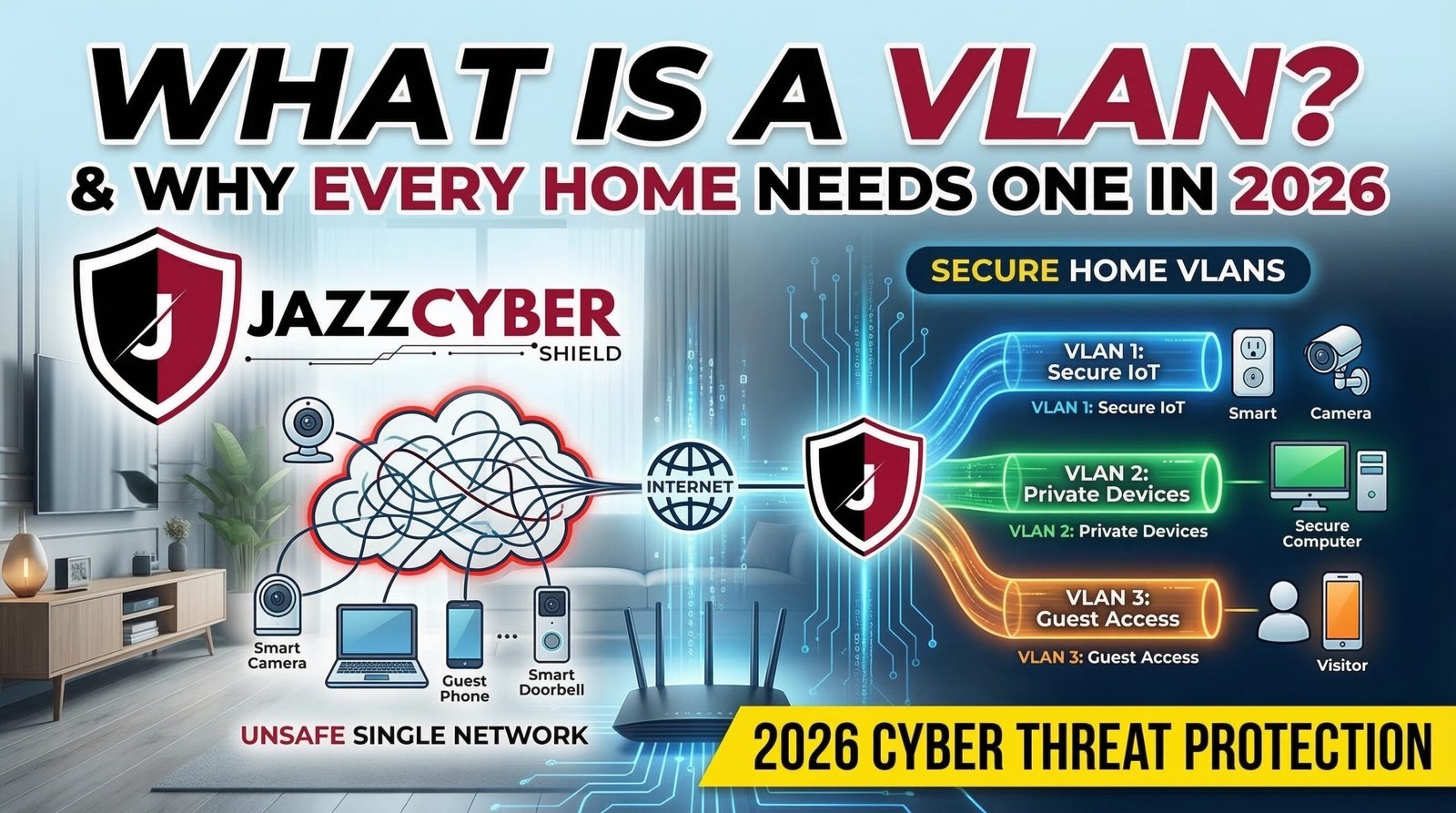
- Segment your cameras onto a dedicated VLAN. Security cameras should never share a network with your computers or phones. Read our guide What Is a VLAN and Why Every Home Network Needs One in 2026 to understand how to do this properly.
- Use a secure router. Jazz Cyber Shield offers enterprise-grade routers including the TP-Link Archer GE650 Wi-Fi 7 Gaming Router and the TP-Link Archer BE230 Wi-Fi 7 Router, both available in our shop.
- Enable WPA3 encryption on your Wi-Fi network. Older WPA2 can be cracked. Learn why at WPA2 vs WPA3: Is Your Home Wi-Fi Secure? (2026 Guide).
- Install a firewall. A hardware firewall between your cameras and the internet ensures your footage never accidentally leaks online. Jazz Cyber Shield offers professional firewalls from SonicWall, Fortinet, and WatchGuard — all available in our store.
- Change default credentials immediately. Every camera ships with a default username and password. Hackers know these defaults and scan for them constantly.
Step 5: Install and Configure Your NVR Software (Step-by-Step)
Let’s walk through setting up Blue Iris — one of the most popular local NVR solutions — as an example:
- Download and install Blue Iris on a Windows PC (one-time license, no subscription).
- Add each camera by entering its IP address, username, and password. Most Axis and Hikvision cameras support RTSP streams for easy integration.
- Configure recording schedules — choose between continuous recording, motion-triggered recording, or scheduled time slots.
- Set up local storage by pointing Blue Iris to a designated folder on your hard drive or NAS.
- Enable motion alerts to receive push notifications on your phone without any cloud subscription using Blue Iris’s built-in notification system or the free Pushover app.
- Set up remote access using a VPN (not port forwarding) to view your cameras securely from anywhere. Jazz Cyber Shield’s guide on How to Setup a Completely Secure Home Network From Scratch covers VPN setup in detail.
Step 6: Configure Remote Access Without a Cloud Subscription
One concern many people have is: “If I don’t use the cloud, how do I view my cameras remotely?” The answer is simple: use a VPN.
A VPN creates an encrypted tunnel from your phone or laptop back to your home network, giving you secure access to your camera feeds anywhere in the world — for free, with no monthly subscription. You can run a VPN server on your router, a Raspberry Pi, or a dedicated device.
This approach is far more secure than port-forwarding or cloud relay services. For more on securing your network access, read our guide on Mesh WiFi vs Traditional Router: Which Is More Secure in 2026?
Step 7: Best Practices for Maintaining Your No-Fee Camera System
Setting up your system is only half the battle. Here is how to keep it running reliably:
- Check storage regularly — make sure drives are not full and recordings are being saved correctly.
- Update camera firmware — manufacturers like Axis and Hikvision regularly release security patches. Always apply them.
- Review footage periodically — test that cameras are recording at the expected quality and frame rate.
- Back up critical footage — copy important clips to an external drive or encrypted cloud backup (different from live streaming subscriptions).
- Monitor your network — use a firewall to detect unusual traffic from your cameras. Our article Top 5 Cybersecurity Threats Businesses Must Watch in 2026 covers what to watch for.
Recommended No-Subscription Security Camera Setup (By Budget)
Budget Setup (Under $300)
2x Hikvision DS-2CD1143G0-I cameras at $96 each + 32GB SD cards per camera + free Shinobi NVR software on a Raspberry Pi. Total: approximately $250 with zero monthly fees.
Mid-Range Setup ($500–$1,000)
4x Hikvision DS-2CD2143G0-I cameras + a dedicated NVR or 8-port PoE switch + 4TB Seagate IronWolf HDD from Jazz Cyber Shield. Total: approximately $750 with zero monthly fees.
Professional Setup ($1,500+)
6–8x Axis Communications cameras (AXIS M3065-V or AXIS M3086-V) + Cisco PoE switch + Blue Iris Pro license + 10TB Seagate surveillance drive. Total: approximately $2,000–$3,000 with zero monthly fees forever. Get enterprise-grade equipment from Jazz Cyber Shield’s shop.
Recent Topics You Should Read
Stay informed with the latest security camera and cybersecurity news from the Jazz Cyber Shield blog:
- Hikvision vs Axis Security Cameras: Which Is Safer in 2026? — A detailed side-by-side comparison of the two biggest names in surveillance.
- Indoor vs Outdoor Security Cameras: Complete Buying Guide 2026 — Everything you need to know before buying your next camera.
- How Hackers Break Into Security Cameras (And How to Protect Yours) — The exact methods attackers use and how to defend against them.
- Cheap Security Cameras Are Sending Your Footage Overseas — Here’s Why — Why you should never buy no-name cameras from online marketplaces.
- Hacked Security Camera Websites: What They Are and How to Stop Them — A deep dive into the websites broadcasting stolen live camera feeds.
- How to Setup a Completely Secure Home Network From Scratch (2026 Guide) — The foundation every home security system needs.
- WPA2 vs WPA3: Is Your Home Wi-Fi Secure? (2026 Guide) — Is your encryption keeping up with modern threats?
Frequently Asked Questions (FAQ)
Q1: Can I use security cameras without a monthly fee?
Yes, absolutely. Security cameras with local storage — using SD cards, NVR systems, or NAS devices — record and store footage without any cloud subscription. Brands like Axis Communications and Hikvision, both available at Jazz Cyber Shield, fully support local recording with no recurring fees.
Q2: What is the best free NVR software for local camera recording?
The best free NVR software options in 2026 are Shinobi (open-source, cross-platform), iSpy/Agent DVR (Windows/Linux), and Milestone XProtect Essential (free tier for up to 8 cameras). Blue Iris is a premium one-time-purchase option that many professionals prefer. All of these work perfectly with Axis and Hikvision IP cameras.
Q3: Do I need internet for security cameras without a subscription?
No. Local storage security cameras work entirely offline. Footage is saved directly to your NVR, NAS, or SD card — no internet connection required for recording. You will only need internet if you want remote viewing access, which can be done securely via VPN as described in our secure home network guide.
Q4: What is the difference between NVR and DVR for security cameras?
An NVR (Network Video Recorder) works with IP cameras and receives digital video over a network cable (Ethernet/Wi-Fi). A DVR (Digital Video Recorder) works with analog CCTV cameras using coaxial cables. For a modern no monthly fee security camera system, NVR with IP cameras is the recommended choice for better image quality and smart features.
Q5: How many cameras can I run without a subscription?
With free software like Shinobi, you can run an unlimited number of cameras. Milestone XProtect Essential’s free tier supports up to 8 cameras. Blue Iris Pro supports up to 64 cameras. The only limitation is your hardware — storage capacity and processing power of your NVR machine.
Q6: Are Hikvision cameras good for no-subscription setups?
Yes. Hikvision cameras are among the most popular choices for subscription-free security systems globally. They natively support SD card recording, ONVIF, and RTSP streaming — all the features needed for local NVR integration. Jazz Cyber Shield carries a full range of Hikvision models starting from $96.
Q7: Are Axis cameras better than Hikvision for local recording?
Both are excellent. Axis cameras lead in cybersecurity hardening, firmware transparency, and NDAA compliance, making them ideal for sensitive environments. Hikvision cameras offer better value for money for general home and small business use. Read our full comparison: Hikvision vs Axis Security Cameras: Which Is Safer in 2026?
Q8: Can I view my local security cameras on my smartphone?
Yes. Most NVR software (Blue Iris, Shinobi, Milestone) has free companion smartphone apps. You can also view camera RTSP streams directly using apps like IP Cam Viewer or tinyCam Monitor. For secure remote access without a subscription, set up a VPN as covered in our network security guide.
Q9: Do PoE cameras need a monthly subscription?
No. PoE (Power over Ethernet) cameras are simply a method of delivering power and data through a single cable. They record to a local NVR with zero ongoing fees. Jazz Cyber Shield offers the full range of PoE networking hardware including Cisco PoE switches available in our shop.
Q10: What storage drive should I use for my security camera NVR?
Always use surveillance-rated hard drives designed for 24/7 continuous write operations. Jazz Cyber Shield recommends the 10TB Seagate IronWolf HDD — built specifically for NAS and NVR use with RAID optimization and vibration resistance. Avoid desktop drives as they are not rated for continuous recording.
Final Thoughts
Setting up security cameras without a monthly fee is not just possible in 2026 — it is the smarter, more secure, and more cost-effective choice for most homes and businesses. By investing in quality hardware like Axis Communications cameras or Hikvision cameras, a reliable storage solution, and free NVR software, you can build a professional-grade surveillance system that you own completely.
Jazz Cyber Shield is your one-stop destination for all the hardware you need — from security cameras and PoE switches to storage drives and firewalls. Browse our complete catalog at jazzcybershield.com and take control of your security today — without ever paying a monthly fee again.
Have questions about which cameras or storage setup is right for you? Drop a comment below or contact our team — we are here to help.
Published by Jazz Cyber Shield | Cybersecurity & IT Hardware Experts | Updated: March 2026

