



One Ransomware Email. 72 Hours. Gone.
*Cyber insurance for small business has gone from a “nice-to-have” to a survival tool — and in 2026, getting it wrong is as bad as not having it at all.*
A dental office in Ohio clicked one link. Their patient records were encrypted within minutes. The ransom demand: $95,000. The recovery cost without insurance: over $200,000. They closed six months later.
That’s not a rare horror story. That’s Tuesday in 2026. Small businesses are now the primary targets for cybercriminals — not because you’re interesting, but because you’re reachable. You have real money, real data, and real gaps in your defenses.
Cyber insurance for small business can cover ransomware payments, breach notification costs, legal fees, and lost income. But only if you get the right policy — and qualify for it in the first place.
This guide walks you through exactly how to get covered, what it costs, what insurers actually check, and how to make your business look less risky before you apply.
Table of Contents
The Scale of Cyber Attacks on Small Businesses in 2026
The numbers are ugly. And they keep getting worse.
According to the Verizon Data Breach Investigations Report (opens in new tab), small businesses (under 1,000 employees) account for over 46% of all reported data breaches globally. That’s nearly half — and they lack the recovery resources of a Fortune 500 company.
The average cost of a data breach for a small business now exceeds $120,000. Most small businesses carry less than $10,000 in liquid reserves. The math doesn’t work in your favor.
⚠️ ALERT: 60% of small businesses that suffer a significant cyberattack shut down within six months, according to the National Cyber Security Alliance. Cyber insurance for small business is now the financial safety net that keeps the doors open.
Ransomware attacks targeting small businesses increased 82% in 2025 alone. Healthcare, legal, retail, and professional services are the top four sectors hit. If you run any kind of business that touches customer data — you’re a target.
What Cyber Insurance for Small Business Actually Covers
Most people assume cyber insurance is just “hacker insurance.” It’s far more than that. A good policy has two layers: first-party coverage and third-party coverage.
┌─────────────────────────────────────────────────────────────┐
│              CYBER INSURANCE COVERAGE MAP                   │
├─────────────────────────┬───────────────────────────────────┤
│  FIRST-PARTY (Your Loss)│  THIRD-PARTY (Others' Claims)    │
├─────────────────────────┼───────────────────────────────────┤
│ • Ransomware payments   │ • Customer data breach lawsuits  │
│ • Data recovery costs   │ • Regulatory fines (HIPAA/PCI)   │
│ • Business interruption │ • Media liability                │
│ • Extortion response    │ • Credit monitoring for victims  │
│ • PR / crisis comms     │ • Defense legal costs            │
│ • Forensic investigation│ • Settlement payments            │
└─────────────────────────┴───────────────────────────────────┘
The biggest payout category in 2025 was business interruption — the income you lose while your systems are down. For a business that does $50K/month in revenue, even three days of downtime is a $5,000 hit. A week is catastrophic.
🔴 WARNING: Many basic cyber policies exclude social engineering fraud, wire transfer fraud, and nation-state attacks. Read the exclusions before you sign — not after you file a claim.
| Coverage Type | Typically Included? | Watch For |
|---|---|---|
| Ransomware payment | ✅ Yes (most policies) | Sub-limits may apply |
| Data breach notification | ✅ Yes | Per-record costs add up fast |
| Business interruption | ✅ Yes | Waiting period (often 8-12 hrs) |
| Social engineering / BEC fraud | ⚠️ Sometimes | Often requires separate rider |
| Physical hardware damage | ❌ Rarely | Covered by property insurance |
| Nation-state attacks | ❌ Almost never | War exclusion clause |
| Regulatory fines (HIPAA/PCI) | ⚠️ Varies by state | Check your specific jurisdiction |
How Insurers Decide If You Qualify
Getting cyber insurance for small business isn’t like buying a car insurance policy in 10 minutes. Underwriters actually look at your security posture now. After the ransomware epidemic of 2021–2023, insurance companies got burned badly. They tightened the screws hard.
Here’s what every major carrier will ask you during the application process:
The Security Controls Questionnaire
You’ll fill out a detailed form — sometimes 5 pages, sometimes 30. The critical questions:
- Do you use multi-factor authentication (MFA) for all remote access?
- Do you have endpoint detection and response (EDR) software deployed?
- Are privileged accounts (admin) separated from standard user accounts?
- Do you perform regular, tested, offline backups?
- Do you use email filtering to block phishing and malicious attachments?
- Do you have a firewall with active threat prevention?
- Do you conduct annual security awareness training for employees?
If you answer “No” to MFA for remote access, most carriers will decline your application outright. That’s not a negotiating point — it’s a hard stop.
⚠️ ALERT: The CISA Cyber Insurance Resources page (opens in new tab) publishes free guidance on exactly what security controls insurers now require. Read it before you apply — it’s the cheat sheet the insurance industry doesn’t advertise.
Insurers are also starting to run external scans of your network perimeter. They’ll check for open RDP ports, unpatched software, and misconfigured DNS before offering you a policy. You might not even know they ran the scan.
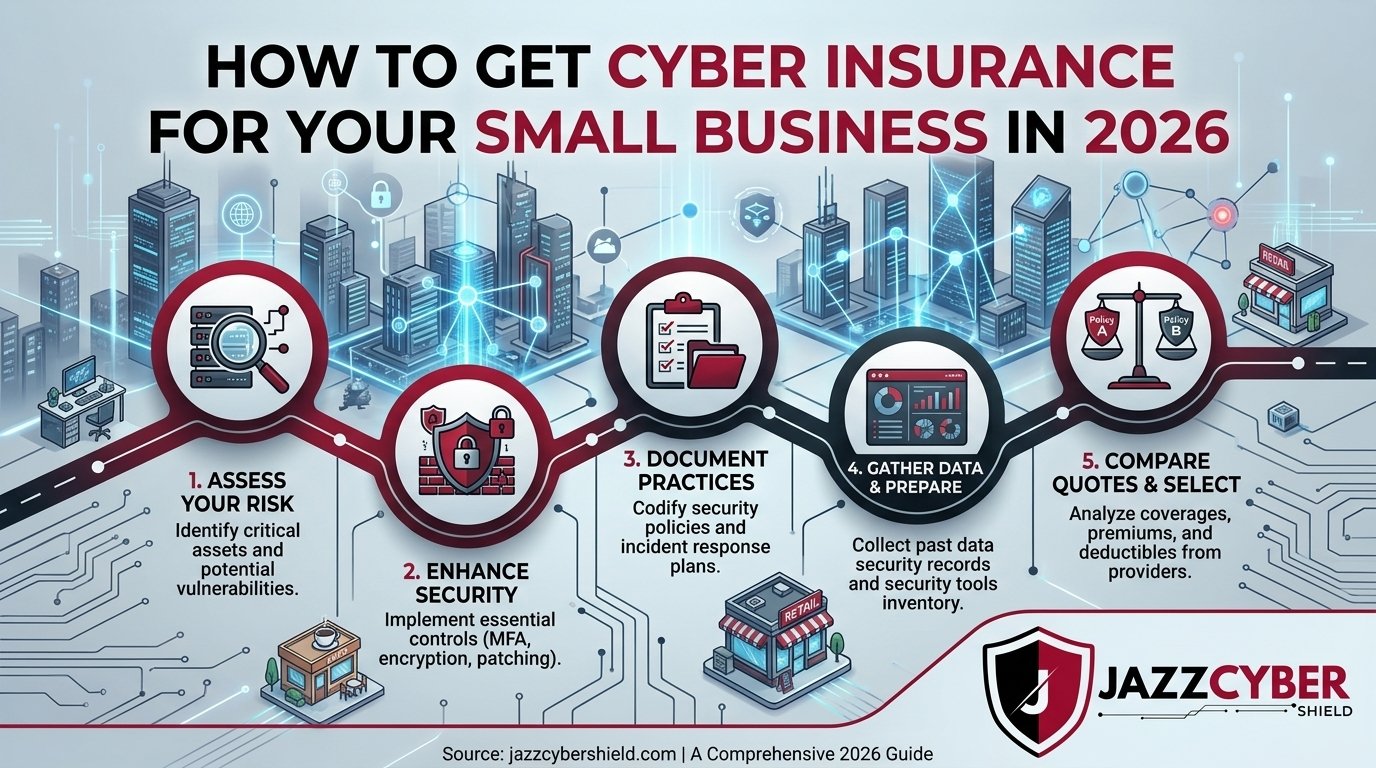
How to Get Cyber Insurance for Small Business: Step-by-Step
Here’s the exact process. Follow it in order and you’ll move faster, get better rates, and avoid surprises at claim time.
Step 1: Inventory Your Risk Exposure
Before you talk to a single broker, know what you’re protecting. List every system that stores customer data, every remote access point, every third-party vendor with access to your network. This is your risk map.
Step 2: Shore Up Your Security Controls
Don’t apply until you have MFA enabled everywhere, backups tested and stored offline, and a basic firewall with intrusion prevention active. Applying before fixing these gaps means you’ll either get declined or pay 3x the standard rate.
The NIST Cybersecurity Framework (opens in new tab) is the gold standard for small business security planning. Work through the Identify, Protect, and Detect functions before applying.
Step 3: Choose a Specialized Cyber Broker
Don’t use your general business insurance agent unless they have a dedicated cyber practice. Use a broker who places cyber policies daily. They know which carriers accept what industries and can get you real quotes — not ballpark guesses.
Step 4: Complete the Application Honestly
This is not the place to stretch the truth. If you misrepresent your security controls on the application and then file a claim, the insurer will investigate. Misrepresentation voids the policy. You’ll pay the breach costs out of pocket and potentially face fraud charges.
Step 5: Compare at Least 3 Carriers
Cyber insurance pricing swings wildly between carriers for the same risk profile. Get quotes from at least three. Compare coverage limits, sub-limits (especially for ransomware and business interruption), deductibles, and exclusions side-by-side.
Step 6: Review Annually
Your business changes. Your coverage should too. Review your policy every year and update it when you add employees, move to cloud platforms, or expand into new services. A policy written for a 5-person shop won’t adequately cover a 25-person operation.
What It Costs — and How to Cut Your Premium
Pricing varies significantly based on industry, revenue, and security posture. Here’s a realistic range for 2026:
| Business Size / Revenue | Industry | Annual Premium (Est.) |
|---|---|---|
| Under $1M revenue | Retail, services | $500 – $1,500 |
| $1M – $5M revenue | Professional services | $1,500 – $5,000 |
| $5M – $20M revenue | Healthcare, legal | $5,000 – $20,000 |
| $20M+ revenue | Any high-risk sector | $20,000+ |
Want to lower that number? Here are the three fastest premium reducers:
- Enable MFA everywhere. This single control can drop your premium 15–25%.
- Show documented, tested backups. Insurers love verifiable offline backups. It proves you can recover without paying a ransom.
- Complete employee security training. Annual phishing training with documented completion records signals a mature security culture.
“The difference between a $2,000 premium and a $6,000 premium for the same business is almost always the security controls they have in place — not the size of the business.”
The Hardware Insurers Actually Want to See
Here’s what nobody tells small business owners about cyber insurance: the physical security hardware on your network directly affects your insurability and your rates.
Underwriters increasingly ask whether you run a business-grade firewall with active subscription services (threat intelligence, intrusion prevention, SSL inspection). A home router from the electronics store won’t cut it. It doesn’t log traffic, doesn’t detect lateral movement, and can’t prove to an insurer that you’re monitoring your perimeter.
Carriers are particularly interested in:
- Next-generation firewall (NGFW) with active threat protection subscriptions
- Managed switches with VLAN segmentation separating guest Wi-Fi from business systems
- Endpoint Detection & Response (EDR) deployed on all workstations
- Email security gateway to block phishing and malware attachments
- Encrypted, air-gapped backups stored off-site or in isolated cloud storage
🛡️ Upgrading your network security before applying? Browse enterprise-grade firewalls from Fortinet, SonicWall, and WatchGuard at Jazz Cyber Shield — the same hardware that meets insurance underwriter standards.
Running a solid NGFW from a vendor like Fortinet or SonicWall also gives you audit logs — documented evidence that you monitor your network. That documentation matters enormously when you’re dealing with a breach and need to prove to the insurer you had reasonable controls in place.
Need to segment your network properly? Read our guide on VLAN setup for network segmentation — the same principles apply to small business environments.
5 Mistakes That Get Your Claim Denied
Getting the policy is step one. Keeping your claim valid when disaster strikes is step two. These are the mistakes that void claims — after you’ve already paid years of premiums.
Mistake 1: Misrepresenting Security Controls on the Application
Said you had MFA on your application but didn’t? Said you did annual backups but last tested them 3 years ago? Insurers conduct forensic investigations after a breach. Lies on the application are grounds to void the entire policy. Be accurate.
Mistake 2: Not Reporting the Breach Fast Enough
Most policies have a reporting window — often 72 hours from discovery. Miss that window and you risk your claim. The moment you suspect an incident, call your insurer’s breach response hotline. Don’t wait until you’re certain.
Mistake 3: Paying a Ransom Without Insurer Approval
Your policy likely requires insurer involvement in ransomware negotiations. If you wire $80,000 to attackers without notifying your carrier first, they may refuse to reimburse you. Call them first. Every time.
Mistake 4: Using Personal Devices on Business Networks Without Disclosure
BYOD (Bring Your Own Device) creates coverage ambiguity. If the breach originated from a personal phone or laptop not covered under the policy’s scope, the insurer may dispute the claim. Disclose your BYOD situation upfront.
Mistake 5: Letting Coverage Lapse During a Vendor Transition
Switching insurers? Make sure the new policy starts the same day the old one ends. A 24-hour gap is still a gap. Retroactive coverage doesn’t exist in cyber insurance the way it does in some other lines.
🔴 WARNING: The IBM Cost of a Data Breach Report (opens in new tab) found that breaches at organizations with immature security programs cost 2.5x more than those with mature controls — and those organizations were far more likely to face claim disputes. Don’t let that be you.
🔐 Want to close the gaps before your next policy renewal? Explore business-grade Fortinet security appliances — trusted by insurers, MSPs, and enterprise IT teams across the US.
Also make sure you understand why small businesses are uniquely vulnerable — our piece on why small businesses close after a cyberattack covers the full picture of post-breach collapse.
Quick Reference Checklist — Cyber Insurance for Small Business
- ✅ Inventory all systems that store or process customer data
- ✅ Enable MFA on all remote access, email, and admin accounts
- ✅ Deploy a business-grade firewall with active threat prevention
- ✅ Segment your network — isolate guest Wi-Fi from business systems
- ✅ Set up automated, encrypted, offline or air-gapped backups
- ✅ Test your backups — verify you can actually restore from them
- ✅ Install EDR/antivirus on all business workstations and servers
- ✅ Enable email filtering and anti-phishing protection
- ✅ Complete (and document) annual security awareness training
- ✅ Review the NIST Cybersecurity Framework and map your controls
- ✅ Use a specialized cyber insurance broker — not a generalist agent
- ✅ Get quotes from at least 3 carriers before choosing
- ✅ Read the exclusions — especially for ransomware sub-limits
- ✅ Document your security controls for the underwriter questionnaire
- ✅ Set a policy review reminder 90 days before annual renewal
- ✅ Keep the insurer’s breach hotline number saved and accessible
Frequently Asked Questions
Q: Is cyber insurance mandatory for small businesses in the US?
A: No federal law mandates cyber insurance, but certain industries and contracts do. If you handle healthcare data, HIPAA compliance is required — and many business partners now require proof of cyber coverage before signing vendor agreements. In regulated industries, having no policy is a serious liability.
Q: Can I get cyber insurance if I’ve already had a breach?
A: Yes, but it’s harder and more expensive. Most carriers will ask about prior incidents on the application. Disclose honestly — concealing a past breach is grounds for later denial. Some specialty carriers and excess/surplus lines markets do cover higher-risk applicants after a prior incident.
Q: What’s the minimum coverage limit a small business should carry?
A: Most advisors recommend a minimum of $1 million in coverage. If you store large volumes of customer records or operate in healthcare, legal, or financial services, $2–5 million is more appropriate. The average breach cost for a small business in 2025 hit $120,000 — and that’s the average, not the worst case.
Q: Does my general liability or BOP policy cover cyber incidents?
A: Rarely, and almost never fully. Some Business Owner Policies (BOPs) include a very small cyber endorsement — often $10,000–$25,000 in coverage. That won’t cover a real ransomware event. You need a standalone cyber policy with adequate limits for meaningful protection.
Q: How long does it take to get a cyber insurance policy?
A: Simple applications for small businesses (under $5M revenue, low-risk industry) can be quoted and bound in 24–72 hours. Complex applications for larger or higher-risk businesses may take 2–4 weeks, especially if the underwriter orders an external security scan of your network.
Conclusion
Cyber insurance for small business isn’t about fear — it’s about arithmetic. The average small business can’t absorb a six-figure breach on its own. Insurance transfers that risk to a carrier that can. But only if you qualify, only if your controls are real, and only if you don’t make the claim-killing mistakes outlined above.
Start with your security controls. Fix the obvious gaps — MFA, backups, firewall, training. Then apply. A stronger security posture means a lower premium and a cleaner path to approval. The two go hand in hand.
The dental office in Ohio didn’t have insurance. Don’t be the dental office in Ohio. Get covered — and get covered right.
Related Reading
- 🔗 Why Small Businesses Close After a Cyberattack
- 🔗 The Hidden Danger of Public Wi-Fi in 2026
- 🔗 VLAN Setup: Segment Your Network the Right Way
- 🔗 Router Settings You Must Change to Protect Your Business
- 🔗 How Hackers Break Into Security Cameras

