




Your Security Camera Could Be Watching the Wrong Person Right Now: Default passwords, unencrypted streams, and outdated firmware — these three weaknesses are why thousands of security cameras get hacked every single day across the US and worldwide.
You installed a security camera to feel safer. To watch your front door at 2 AM. To check on your kids, your business, your parents or grandparents. You paid good money for it, you mounted it yourself, and it’s been sitting there quietly doing its job.
Or so you think.
Right now, thousands of home and business security cameras across the United States — and millions more worldwide — are being actively watched by people who were never supposed to see anything. Not just watched. Recorded. Indexed. Shared on public websites where strangers browse live feeds like they’re flipping through Netflix.
Security camera hacking is not a Hollywood trope. It is happening today, it is getting easier every year, and the cameras most vulnerable to it are the exact brands sitting on shelves at Best Buy, Amazon, and Walmart right now.
This guide breaks down exactly how attackers get in, which vulnerabilities they exploit, and — most importantly — the specific steps you can take today to lock down every camera on your network.
The Scale of the Problem Nobody Wants to Admit
Before we get into the “how,” you need to understand the “how widespread.”
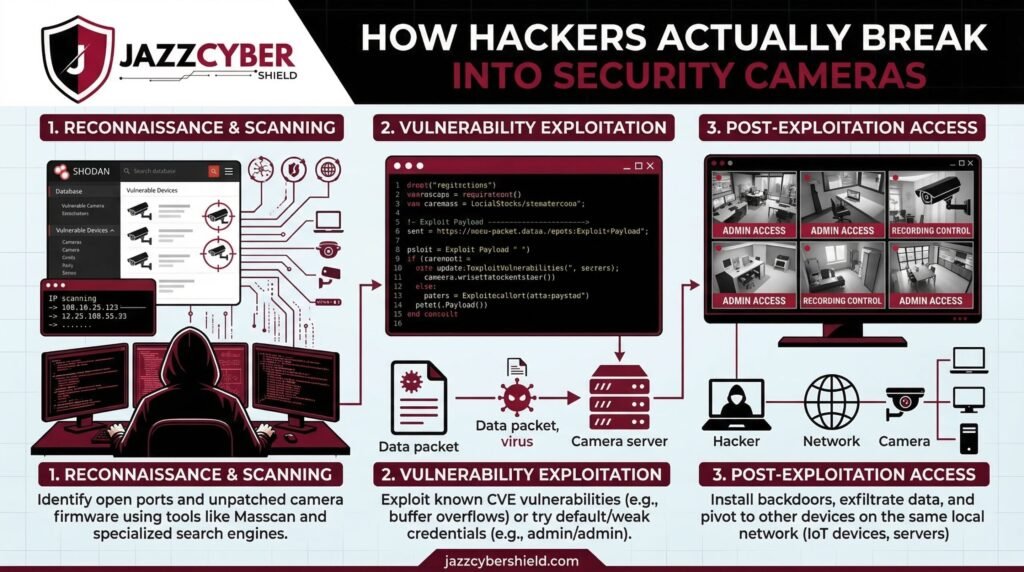
Websites like Shodan — often called “the search engine for hackers” — allow anyone to search for internet-connected devices, including security cameras, that are broadcasting without proper authentication. In 2026, Shodan alone indexes hundreds of thousands of camera feeds from private homes, small businesses, clinics, and schools.
There are also dedicated streaming sites — some hidden in dark corners of the web, others surprisingly easy to find — that aggregate live feeds from vulnerable cameras all over the world. Bedroom cameras. Baby monitors. Shop floors. Hotel lobbies. All streaming live, all accessible because of one reason: the owners never changed their default settings.
⚠️ SECURITY ALERT: According to Bitdefender’s IoT threat research, IP cameras consistently rank as the number one most compromised category of smart home device globally. Over 34% of scanned IP cameras had at least one critical vulnerability accessible from the internet.
This is not a problem you can ignore because you “live in a safe neighborhood.” Hackers targeting cameras are not in your city. They’re in different countries, running automated tools that scan millions of IP addresses a day looking for open ports and default credentials. Your zip code is completely irrelevant to them.
How Hackers Actually Break Into Security Cameras
There are six primary methods attackers use to compromise security cameras. Understanding each one is the first step to defending against them.
Method 1: Default Credentials (The Easiest Attack of All)
This is by far the most common attack vector — and the most embarrassing one, because it requires almost zero skill.
Every security camera ships with factory-set login credentials. Admin credentials like admin/admin, admin/12345, or even blank password fields are factory defaults for dozens of camera brands including some well-known budget models. Manufacturers do this for convenience during setup. The problem is that most users never change them.
ATTACKER WORKFLOW — DEFAULT CREDENTIAL ATTACK:

[Step 1] Shodan/Censys scan → finds open RTSP ports (554) on IP range
[Step 2] Automated tool pulls list of known default creds per brand/model
[Step 3] Credential stuffing tool → tries all combos in seconds
[Step 4] SUCCESS → Full admin access to live feed + camera controls
[Step 5] Camera added to botnet OR feed streamed/sold
Tools like RouterSploit and Mirai-based botnets have automated this process to the point where one person can compromise thousands of cameras in a single evening without any advanced technical knowledge.
Method 2: Unpatched Firmware Vulnerabilities
Camera manufacturers release firmware updates to patch security holes. Most users never apply them. Some cameras don’t even have auto-update features, and the manufacturers of budget models sometimes abandon firmware support within 18–24 months of release.
Publicly known CVEs (Common Vulnerabilities and Exposures) for popular camera brands sit in databases like the National Vulnerability Database (NVD) for months — sometimes years — before affected devices get patched in the field.
A hacker who knows the make and model of your camera can look up its known CVEs in minutes and use a matching exploit. If you’ve never updated your camera’s firmware, you may be vulnerable to exploits that were publicly documented years ago.
Method 3: Man-in-the-Middle (MitM) on the Same Network
If an attacker gains access to your local network — through a compromised router, a weak Wi-Fi password, or a guest network attack — they don’t need to break into the camera directly. They can intercept the video stream between the camera and your NVR or router.
Many older and budget cameras transmit video over unencrypted RTSP (Real-Time Streaming Protocol). This means that on the same local network, the footage streams in plain text. Anyone with Wireshark or similar packet capture tools can pull the raw stream without ever touching the camera’s admin panel.
NETWORK TOPOLOGY — UNENCRYPTED CAMERA STREAM:

[IP Camera] ──── RTSP (plain text) ──── [Home Router]
                                              |
                               [Attacker on same WiFi]
                                     captures stream
                               [No encryption = full video]
This is why securing your home network with proper VLAN segmentation is not optional if you run security cameras — it is essential.
Method 4: Cloud Platform and App Vulnerabilities
Most modern cameras use a companion app and cloud backend. You set up the camera, it connects to the manufacturer’s cloud servers, and you view footage remotely through the app. This architecture introduces a completely different attack surface: the cloud itself.
In 2021, a breach in Verkada’s cloud platform exposed over 150,000 live camera feeds including those inside Tesla factories, Cloudflare offices, and women’s health clinics. The entry point was a single set of compromised super-admin credentials — not the cameras themselves.
Budget camera brands with weaker cloud infrastructure are even more exposed. API misconfigurations, weak token authentication, and insecure direct object references (IDOR) vulnerabilities can allow attackers to access any account on the platform with minimal effort.
Method 5: Phishing and Social Engineering for App Credentials
You can have a perfectly secured camera with updated firmware and a strong password — and still get compromised if an attacker steals your app login credentials.
Phishing attacks targeting smart home users are increasingly common. A fake “firmware update required” email mimicking your camera brand’s design, a spoofed notification from the companion app, or a credential stuffing attack using passwords leaked in previous data breaches can hand over your account in seconds.
If you’re using the same email and password for your camera app that you use for other accounts — and that combination has appeared in any past data breach — you are already a high-probability target.
Method 6: Physical Proximity Attacks (Targeted, But Devastating)
For high-value targets — business locations, upscale homes, sensitive facilities — attackers sometimes don’t need the internet at all. Wi-Fi cameras broadcasting on 2.4GHz bands can be targeted by someone with a directional antenna in a parked car. Deauthentication attacks can force cameras offline. Signal replay attacks can potentially disrupt recording windows.
For businesses storing high-value inventory or sensitive data, physical proximity attacks represent a serious threat that purely software-based security cannot fully address.
Warning Signs Your Camera Has Already Been Compromised
Don’t wait until you find your footage on a streaming site. These are the red flags to watch for:
🔴 INTRUSION INDICATORS — CHECK THESE NOW: — Camera pan/tilt moves on its own without your input — LED indicator blinks erratically or stays on when it shouldn’t — Unusual spikes in your internet bandwidth (especially at night) — Login notifications from unknown IP addresses or countries — App shows “last accessed” timestamps you don’t recognize — Camera firmware version doesn’t match the latest release — Router logs show outbound connections from camera IP to unknown servers
If you spot even one of these, treat your camera as compromised and follow the hardening steps below immediately.
How to Completely Secure Your Security Cameras (Step-by-Step)
Step 1 — Change Default Credentials Immediately
The moment you unbox a new camera, before you mount it, before you point it at anything:
- Log into the admin panel (usually via the companion app or browser at the camera’s IP address)
- Navigate to Account Settings or Security Settings
- Set a strong, unique password — minimum 16 characters, mix of uppercase, lowercase, numbers, and symbols
- Change the default admin username if the camera allows it
- Disable any secondary “guest” admin accounts that may come pre-enabled
- Never reuse this password on any other service or account
Use a password manager. There is no good reason to memorize camera credentials manually.
Step 2 — Update Firmware Before You Do Anything Else
- Find the camera’s exact model number (usually on the back label)
- Visit the manufacturer’s official support page and download the latest firmware
- Apply it through the admin panel before connecting the camera to your main network
- Enable auto-updates if the option exists
- Set a calendar reminder to check for manual updates every 90 days
If your camera model has not received a firmware update in over 24 months and the manufacturer no longer lists it on their support page, treat it as end-of-life hardware and replace it. Running EOL cameras on your network is a security liability that no amount of configuration can fully compensate for.
Step 3 — Isolate Cameras on a Dedicated VLAN
This is the single most impactful network-level change you can make. Put every camera on its own VLAN, completely separated from your main network where your computers, phones, and sensitive devices live.
Even if an attacker compromises a camera on its own VLAN, they cannot pivot to your laptops, NAS drives, or work devices. The damage is contained.
We covered exactly how to set this up in detail in our VLAN guide for home networks. If you haven’t read it yet, do that after this article.
For businesses running multiple camera zones, managed switches from brands like HPE Aruba and Cisco give you granular VLAN control without complex enterprise-level configuration.
Step 4 — Disable UPnP and Port Forwarding on Your Router
Universal Plug and Play (UPnP) lets devices on your network automatically open ports on your router to allow external access. Sounds convenient. Is actually a nightmare from a security standpoint.
Many cameras automatically request UPnP rules to make remote viewing easier. This punches a direct hole from the public internet to your camera — bypassing your router’s firewall entirely.
- Log into your router admin panel
- Find the UPnP setting (usually under Advanced or NAT settings)
- Disable it completely
- Check your port forwarding rules and delete any entries created by cameras or NVR systems
- Use your camera’s secure cloud relay or a proper VPN instead of port forwarding for remote access
Our router hardening guide covers this in full detail including exactly where to find these settings across common router models.
Step 5 — Enable Two-Factor Authentication on Every Camera App
Every major camera platform — Arlo, Ring, Hikvision iVMS, Axis Camera Station, Reolink — offers two-factor authentication. Most users never enable it.
- Open your camera companion app
- Go to Account Settings → Security
- Enable 2FA via authenticator app (preferred) or SMS
- Generate and store backup codes in a safe place
This single step stops credential stuffing and phishing attacks cold, even if an attacker has your exact username and password.
Step 6 — Disable Features You’re Not Using
Every enabled feature on your camera is a potential attack surface. If you’re not using it, turn it off:
| Feature | Why Disable It |
|---|---|
| Telnet access | Unencrypted, legacy protocol — high risk |
| SSH (if unused) | Attack surface if not needed |
| ONVIF protocol | Useful for integration, risky if exposed publicly |
| P2P cloud relay | Use only if needed for remote access |
| Anonymous RTSP access | Should always be disabled |
| Remote web interface | Use app instead; disable public web login |
Step 7 — Use Cameras That Support HTTPS and Encrypted Streams
This is a purchasing decision as much as a configuration one. When buying cameras, verify:
- HTTPS admin panel (not HTTP)
- TLS-encrypted RTSP or SRTP for video streams
- Certificate-based authentication support
- End-to-end encrypted cloud storage option
Enterprise-grade cameras from Hikvision, Axis, and Hanwha support all of these. Many sub-$30 cameras from unknown brands on Amazon do not — and no amount of configuration will add encryption to hardware that doesn’t support it.
Browse Hikvision and Axis security cameras from Jazz Cyber Shield — all verified for encryption support and enterprise-grade security compliance.
Step 8 — Audit Your Network Regularly
Set a monthly reminder to do a quick network audit:
- Log into your router and check the list of connected devices
- Verify every camera’s IP address and MAC address matches your records
- Check router logs for unusual outbound traffic from camera IP addresses
- Run a quick scan with a tool like Fing (mobile) or Nmap to confirm no unexpected open ports
- Review camera access logs for unknown logins
A 15-minute monthly audit catches issues before they become breaches.
Choosing Secure Cameras: What to Look For in 2026
Not all cameras are created equal from a security standpoint. Here’s a quick decision framework:
| Factor | What to Look For | Red Flag |
|---|---|---|
| Firmware support | Active updates in last 6 months | No updates in 2+ years |
| Encryption | HTTPS + encrypted stream | HTTP-only admin panel |
| Authentication | 2FA supported on app | Single password only |
| Cloud infrastructure | Major brand, transparent privacy policy | Unknown brand, no privacy policy |
| VLAN compatibility | Works with managed switch configs | Requires UPnP to function |
| Password policy | Forced change on first setup | Ships with blank or admin/admin |
For US businesses specifically, cameras certified for use in regulated environments (healthcare, retail, finance) go through additional security vetting that consumer-grade devices skip entirely.
The Bigger Picture: Cameras Are Part of Your Network
Here’s the thing most camera security guides miss: a camera is not a standalone device. It’s a network endpoint. It has an IP address, it’s connected to your Wi-Fi or Ethernet, it talks to the internet, and it has an operating system that can be compromised just like your laptop or smartphone.
Everything you know about general network security applies to your cameras. Weak passwords are dangerous. Unpatched software is dangerous. Open ports are dangerous. Unencrypted traffic on your local network is dangerous.
That’s why fixing your cameras means fixing your network. That means upgrading to WPA3 on your Wi-Fi router. It means using proper router security settings. It means understanding public Wi-Fi risks if you’re accessing your camera feeds remotely from coffee shops or airports.
Security is a system, not a product.
Quick Reference: Security Camera Hardening Checklist
SECURITY CAMERA HARDENING CHECKLIST — 2026

[  ] Changed default admin username and password
[  ] Firmware updated to latest version
[  ] Cameras isolated on dedicated VLAN
[  ] UPnP disabled on router
[  ] No unnecessary port forwarding rules active
[  ] 2FA enabled on companion app/cloud account
[  ] Unused features (Telnet, anonymous RTSP) disabled
[  ] HTTPS admin access confirmed (not HTTP)
[  ] Encrypted video stream verified (TLS/SRTP)
[  ] Monthly network audit scheduled
Print this out. Go through it camera by camera. Every box you check is one fewer entry point for an attacker.
FAQ: Security Camera Hacking — Your Questions Answered
Can someone hack my camera even if I have a strong Wi-Fi password?
Yes. If your camera itself has a default or weak admin password, or runs unpatched firmware with known vulnerabilities, a strong Wi-Fi password alone does not protect it. An attacker on your network — or exploiting cloud platform weaknesses — can still gain access.
Do expensive cameras get hacked less often than budget ones?
Generally, yes — but not because of price. Premium brands like Axis and Hikvision invest significantly in security engineering, regular firmware updates, and third-party vulnerability audits. Budget cameras from unknown manufacturers often have none of this. That said, even premium cameras are vulnerable if they’re misconfigured.
Is it safe to use my camera’s built-in cloud/P2P feature?
It depends on the brand. For major, reputable manufacturers with transparent privacy policies and encryption, cloud relay is reasonably safe when 2FA is enabled and you use a strong unique password. For unknown brands with no published privacy policy or security documentation, we recommend avoiding cloud relay entirely and using a local VPN for remote access instead.
How do I know if my specific camera model has known vulnerabilities?
Search for your camera’s make and model on the National Vulnerability Database at nvd.nist.gov. If you find CVEs listed, check whether a patching firmware update exists. If not, and the vulnerability is critical, consider replacing the camera.
My Hikvision camera keeps connecting to Chinese IP addresses. Is that normal?
This is a documented concern and an active area of discussion in the security community. Hikvision offers a “private cloud” deployment option that routes data through US servers and avoids Chinese infrastructure. For US government facilities, NDAA-compliant camera alternatives are now mandated. For private use, review Hikvision’s current data routing documentation and configure accordingly.
Final Thought: Your Camera System Is Only as Secure as You Make It
The attack methods covered in this guide range from embarrassingly simple — default credentials — to genuinely sophisticated — cloud platform API exploitation. But the defenses are consistent across all of them: strong unique credentials, updated firmware, network segmentation, encrypted communications, and regular audits.
None of these steps require a cybersecurity degree. They require about two hours of focused setup and 15 minutes of monthly maintenance. That’s the entire cost of keeping your camera system from becoming someone else’s live entertainment.
If you’re ready to upgrade to properly secured hardware that supports all the protection layers covered in this guide, browse our verified selection of enterprise-grade security cameras and networking equipment at Jazz Cyber Shield — built for homes and businesses that take security seriously.
Related reading: — What Is a VLAN and Why Every Home Network Needs One — 7 Router Settings You Must Change Right Now — WPA2 vs WPA3: Is Your Home Wi-Fi Secure? — The Hidden Danger of Public WiFi in 2026

