




Smart TV spying is happening in your home right now — and most people have no idea. Your television is not just showing you content. It is actively watching you back. It tracks what you watch, when you pause, what you search, and in many cases, what you say out loud near it.
This is not a conspiracy theory. It is documented, proven, and backed by federal investigations. In this guide, you will get the real proof behind Smart TV surveillance. You will also get a clear, step-by-step fix to stop it today.
If you have already read our guide on how your home router spies on you, then you know surveillance starts at the network level. However, your Smart TV takes the problem much further.
What Is Smart TV Spying — And Why Does It Matter?
Smart TV spying refers to the automatic collection of user data by internet-connected televisions. Unlike traditional TVs, modern Smart TVs run full operating systems. These include Samsung’s Tizen, LG’s webOS, Roku OS, and Amazon’s Fire OS.
Each of these platforms is built with data collection at its core. Moreover, your Smart TV sits inside your home network. It shares that network with your laptop, phone, and work computer. Therefore, it does not just threaten your privacy — it can threaten your entire digital life.
The Proof: How Smart TV Spying Actually Works
Let’s look at the real, documented technology behind Smart TV spying. These are not theories. These are verified, publicly confirmed systems running on your device right now.
1. ACR Technology — The Core Engine Behind Smart TV Spying
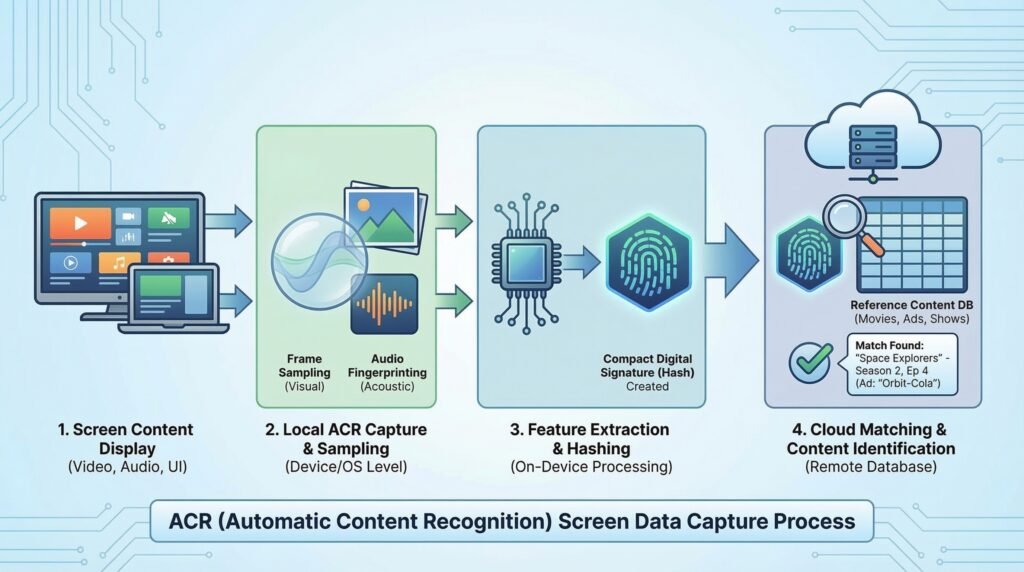
Automatic Content Recognition, or ACR, is the most invasive tracking technology in your TV. It works by taking screenshots of everything on your screen. Then it matches those screenshots against a database to identify what you are watching.
Importantly, ACR captures everything — including content from external devices like gaming consoles, Blu-ray players, and cable boxes. The data is then sent to the TV manufacturer and their advertising partners.
Samsung, LG, Vizio, Roku, and Amazon Fire TV all use ACR. Furthermore, Vizio was fined $2.2 million by the FTC for collecting ACR data without proper disclosure. You can read the official FTC action against Vizio here.
In 2026, ACR has grown even more powerful. It can now cross-reference your viewing habits with your purchase history and social media activity to build a detailed behavioral profile.
2. Microphone Surveillance — Your TV Is Always Listening
Many Smart TVs come with built-in microphones for voice commands. This creates a serious Smart TV spying risk. Voice commands are not processed locally. They are sent to remote servers — meaning your words physically leave your home.
In 2015, Samsung’s privacy policy stated that voice commands spoken near the TV could be transmitted to a third party. Additionally, security researchers at NCC Group discovered in 2019 that multiple Smart TV models could have their microphones activated remotely with no on-screen warning.
This is exactly the type of threat covered in Top 5 Cybersecurity Threats Businesses Must Watch in 2026. IoT devices like Smart TVs are being used as silent listening posts.
3. Your Viewing Data Is Sold to Third Parties
Smart TV manufacturers earn serious money — not from hardware sales, but from your data. Vizio admitted in FTC filings that it collected and sold the viewing history of approximately 11 million TVs to data brokers.
The data was not meaningfully anonymized either. Buyers could cross-reference device identifiers with other data to reconstruct individual profiles. Your viewing data flows to advertising networks, data brokers, retail analytics companies, and political campaign organizations.
Therefore, what you watch at night can directly influence the ads you see the next morning.
4. Smart TVs Are Open Doors for Hackers
Beyond corporate Smart TV spying, cybercriminals are also a real threat. Smart TVs are IoT devices. They share the same security weaknesses — outdated firmware, weak default passwords, and unencrypted communications.
The FBI officially warned consumers that hackers can gain access to unsecured Smart TVs to spy through cameras and microphones. Read the FBI’s official Smart TV security warning here.
A compromised Smart TV on your home network becomes a gateway to every other device you own. This is why understanding the real limitations of firewalls in 2026 is so important. Traditional defenses were never designed for IoT threats.
Which Smart TV Brands Are Worst for Smart TV Spying?
Not all Smart TVs spy equally. Here is a quick breakdown of the major platforms in 2026:
Samsung (Tizen OS) uses ACR through SyncPlus. It also collects app usage, search queries, and voice data through Bixby.
LG (webOS) uses ACR through LivePlus. It has faced regulatory scrutiny in multiple countries over data collection.
Vizio has the most documented history of aggressive data collection — including the 2017 FTC settlement.
Roku shares data with Google, Facebook, and dozens of other companies. Its privacy terms are among the broadest in the industry.
Amazon Fire TV links viewing data directly to your Amazon account, combining it with purchase history and Alexa voice commands.
Apple TV is the most privacy-respecting option. Apple’s business model is not based on advertising. However, apps on the platform still collect data individually.
The Fix: 8 Steps to Stop Smart TV Spying Today
Now let’s get to the solution. These steps are practical, proven, and take fewer than 30 minutes to complete in total.
Step 1: Disable ACR on Your Smart TV
This single step will stop the biggest data stream immediately. Here is how to do it on each major platform:
Samsung: Settings → Support → Terms & Policies → Viewing Information Services → Toggle OFF. Also disable Interest-Based Advertising in the same menu.
LG: Settings → All Settings → General → LivePlus → Toggle OFF.
Vizio: Settings → System → Reset & Admin → Viewing Data → Toggle OFF.
Roku: Settings → Privacy → Smart TV Experience → Uncheck “Use Information from TV Inputs.”
Amazon Fire TV: Settings → Preferences → Privacy Settings → Disable Device Usage Data.
Step 2: Turn Off the Microphone and Cover the Camera
First, disable voice recognition in your TV’s privacy settings. Then, revoke microphone access from every app that does not specifically require it. Additionally, physically cover any built-in camera with a piece of tape.
This sounds extreme. However, security professionals — including intelligence agency staff — do exactly this. It costs nothing and provides complete physical protection.
Step 3: Audit and Limit All App Permissions
Every app on your Smart TV requests permissions to your microphone, location, and usage data. Go into your app settings and revoke any permission that is not strictly necessary.
Also, delete apps you no longer use. Unused apps continue to run background processes and collect data even when you are not using them.
Step 4: Segment Your Network — Put Your Smart TV on Its Own Wi-Fi
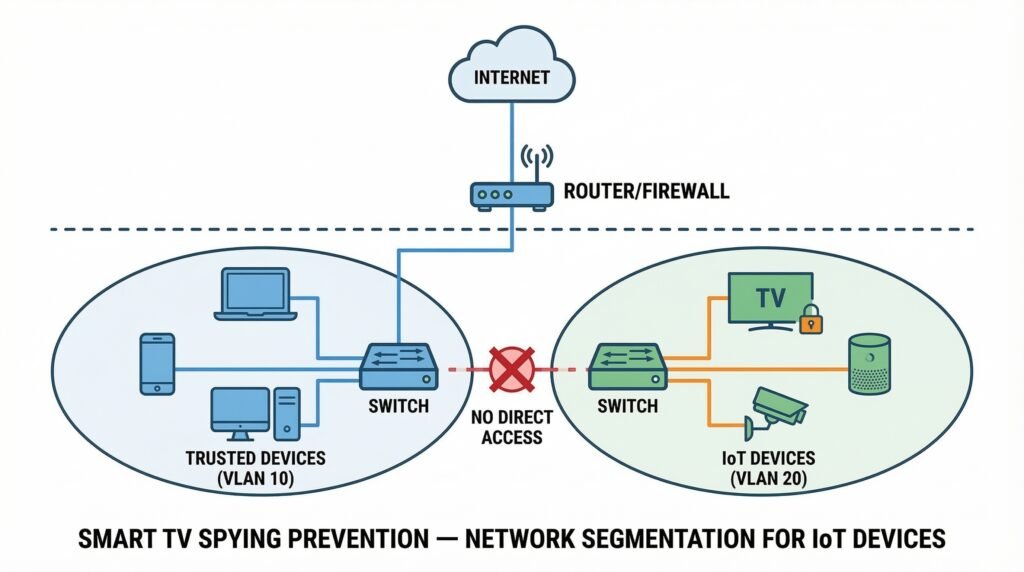
This is one of the most powerful steps you can take. Set up a separate guest network or IoT VLAN specifically for your Smart TV and smart home devices. This isolates those devices from your main network.
As a result, even if your Smart TV is actively collecting data or is compromised by a hacker, it cannot reach your laptop, phone, or work computer. For a full walkthrough of this strategy, our article on stopping router-level surveillance covers IoT segmentation in detail.
Step 5: Update Your Firmware Regularly
Firmware updates patch known security vulnerabilities. In 2026, unpatched Smart TV firmware is one of the primary ways hackers access home networks. Enable automatic updates if possible. Otherwise, set a monthly reminder to check manually.
Step 6: Use a VPN at the Router Level
A VPN encrypts all traffic leaving your network — including data your Smart TV tries to send. When installed at the router level, it protects every device automatically.
This makes collected data significantly harder to use after it leaves your network. For a full comparison of privacy tools, read our guide on VPN vs DPN — which one truly protects your network in 2026.
Step 7: Deploy a Next-Gen Firewall or Pi-hole
A next-generation firewall adds deep packet inspection to your home network. It can identify and block outbound connections from your TV to known data-collection servers.
Products like Firewalla, Pi-hole, and pfSense work well for home use. They give you granular control over exactly what traffic your Smart TV is allowed to send. Read our full guide on how next-gen firewalls stop data exfiltration in 2026 for setup guidance.
Step 8: Opt Out of Every Data Program You Can Find
Most Smart TV platforms bury privacy settings across multiple menus. Search for terms like “data collection,” “advertising,” “analytics,” and “interest-based ads” inside your TV settings. Opt out of everything that is not essential.
Furthermore, visit your TV manufacturer’s website. Under GDPR and CCPA regulations, many now offer a web-based opt-out tool that applies globally to your account.
Why Smart TV Spying Is Getting Worse in 2026
You might hope the industry is improving. Unfortunately, it is moving in the opposite direction. Smart TV advertising revenue is growing faster than almost any other digital category. Manufacturers have every financial incentive to expand data collection — not reduce it.
Moreover, the average Smart TV is replaced every six to seven years. TVs sold today will still be in homes until 2032 or 2033. Their data collection practices are unlikely to change meaningfully over that period.
Regulatory pressure is growing in Europe under GDPR and in U.S. states modeled on CCPA. However, enforcement remains inconsistent. As we covered in 10 Cybersecurity Myths You Need to Stop Believing, waiting for corporations or regulators to protect your privacy is one of the most dangerous assumptions you can make in 2026.
Should You Just Disconnect Your Smart TV from the Internet?
Honestly — yes, if you do not actively use its built-in apps. Disconnecting your TV from the internet is the most complete solution to Smart TV spying. A TV with no internet connection cannot send data anywhere.
You can still stream by using an external device — Apple TV, Chromecast, or a laptop via HDMI — while keeping the TV’s built-in OS completely offline. This approach gives you everything you need while removing the manufacturer’s data collection entirely.
However, if you prefer to stay connected, following all eight steps above will reduce your exposure dramatically.
How Jazz Cyber Shield Helps You Fight Back Against Smart TV Spying
At Jazz Cyber Shield, we help homes and businesses build networks that are truly secure — not just on paper. From next-generation firewalls and IoT segmentation to professional-grade routers and security cameras, we provide both the hardware and the expertise to keep your data where it belongs.
If Smart TV spying concerns you — and it should — we can help you architect a complete home network defense strategy. Visit Jazz Cyber Shield to explore our solutions, or follow the Jazz Cyber Shield Blog for regular threat intelligence, privacy guides, and cybersecurity updates in 2026.
Related Topics Worth Reading Next
These articles will help you build a complete privacy and security strategy beyond just your Smart TV:
Your Home Router Is Spying on You — Here’s How to Stop It — https://blog.jazzcybershield.com/home-router-spying-how-to-stop-it-2026/
10 Cybersecurity Myths You Need to Stop Believing in 2026 — https://blog.jazzcybershield.com/10-cybersecurity-myths-you-need-to-stop-believing/
Top 5 Cybersecurity Threats Businesses Must Watch in 2026 — https://blog.jazzcybershield.com/top-5-cybersecurity-threats-2026/
How Next-Gen Firewalls Stop Ransomware in 2026 — https://blog.jazzcybershield.com/next-gen-firewalls-stop-ransomware-2026/
Hardware Firewalls vs Software Firewalls 2026: Which One Wins? — https://blog.jazzcybershield.com/hardware-firewalls-vs-software-firewalls-2026/
Microsoft OAuth Phishing Attack 2026 — How to Protect Yourself — https://blog.jazzcybershield.com/microsoft-oauth-phishing-attack-2026/
How to Audit Your Network Firewall — Step-by-Step Checklist — https://blog.jazzcybershield.com/audit-your-network-firewall-step-by-step-checklist/
Frequently Asked Questions About Smart TV Spying
Q1: Is my Smart TV really spying on me right now?
Yes — almost certainly. Every major Smart TV platform uses ACR, usage tracking, and third-party data sharing. Unless you have manually disabled every privacy option in your TV’s settings — which most users have never done — your TV is transmitting data about your behavior right now.
Q2: What data does my Smart TV collect exactly?
Smart TVs collect what you watch via ACR, how long you watch it, which apps you use, what you search for, which ads you see, your device identifiers, your IP address, and in many cases, audio captured by the built-in microphone. This data is combined with other sources to build detailed consumer profiles.
Q3: Can hackers actually access my Smart TV?
Yes. The FBI has officially confirmed this risk. Smart TVs are IoT devices with the same fundamental vulnerabilities as any connected device — outdated firmware, weak default credentials, and unencrypted communications. A compromised Smart TV can access other devices on your home network.
Q4: What is ACR and how do I disable it?
ACR (Automatic Content Recognition) continuously captures screenshots of your screen and identifies what you are watching. To disable it: on Samsung, go to Settings → Support → Terms & Policies → Viewing Information Services. On LG, go to Settings → General → LivePlus. On Roku, go to Settings → Privacy → Smart TV Experience. Full per-brand steps are in Step 1 of this guide.
Q5: Does a VPN stop Smart TV spying completely?
A VPN encrypts your traffic and makes collected data harder to attribute to your household. However, it does not prevent your TV from collecting data in the first place. For complete protection, combine a VPN with all eight steps in this guide.
Q6: Which Smart TV is the most privacy-friendly?
Apple TV is the most privacy-respecting streaming platform available in 2026. Its business model is not dependent on advertising revenue. However, the physical TV you attach it to may still collect data through its own operating system. The safest setup is Apple TV connected to a TV whose smart OS is fully offline.
Q7: How often should I recheck my Smart TV’s privacy settings?
At minimum every six months — and always immediately after a firmware update. Updates frequently reset privacy settings back to their data-collection defaults. Building this into a regular privacy routine is one of the most effective long-term habits you can develop.
Q8: Is disconnecting from the internet the only surefire fix for Smart TV spying?
It is the most complete fix, yes. However, applying all eight steps in this guide creates a very strong privacy barrier without requiring you to go offline. The combination of disabling ACR, network segmentation, a VPN, and a next-gen firewall significantly limits what your TV can collect and transmit.
Final Thoughts on Smart TV Spying
Smart TV spying is one of the most overlooked privacy threats inside the modern home. It is quiet, invisible, and enormously profitable for the companies behind it. Most people never realize it is happening — and that is completely by design.
But now you know the proof. You understand the technology. And you have a clear, eight-step fix you can start applying today. None of these steps require technical expertise. Most of them take under ten minutes to complete.
Your living room should be your private space. Make sure it is.
To protect your entire home network — not just your Smart TV — visit Jazz Cyber Shield for cybersecurity hardware and professional solutions. Stay ahead of every new threat by following the Jazz Cyber Shield Blog.


Such a big knowledge got from this blog and definitely will do the same procedure as you guide us
A moving company provides comprehensive help from planning to completion of the move.
movers for local move movers for local move.